Search packages, repositories and app categories

colored_json cover
Package detailsv1.1.2

colored_json

A package that converts JSON string into a customizable flutter widget.

AndroidiOSWebmacOSWindowsLinux
30-day downloads
3.5K
Likes
27
Pub points
160

Install package

flutter pub add colored_json

Package Overview

Package selection guidance compiled from public package information, community data, and project usage.

A Flutter package that transforms JSON strings into visually enhanced, customizable widgets with syntax highlighting. It enables developers to display structured JSON data in a readable and aesthetically pleasing format within their apps. The widget supports color customization for different JSON elements like keys, values, and brackets, improving readability during debugging or data presentation. Ideal for development tools, dashboards, or any UI requiring formatted JSON output.

Use cases

  • Debugging JSON responses
  • Displaying API data in apps
  • Enhancing developer tool interfaces
  • Visualizing configuration files
  • Real-time data inspection
  • Educational app content display

Key features

  • Syntax highlighting for JSON
  • Customizable colors and styles
  • Easy integration with Flutter widgets
  • Supports all major platforms
  • Lightweight and fast rendering
  • Configurable indentation and spacing

Suitable for

  • Flutter developers
  • Debugging tools
  • API testing interfaces
  • Learning applications
  • UI designers working with structured data

Considerations

  • May impact performance with very large JSON
  • Limited to static JSON display
  • Requires manual string input or parsing
  • Not intended for dynamic JSON editing
  • Color themes need explicit setup
  • Best used in non-production debug views

Original README

Original README snapshot from the linked source repository. Visit the repository for the latest content.

Colored JSON

Convert JSON string into customizable widget.

Getting Started

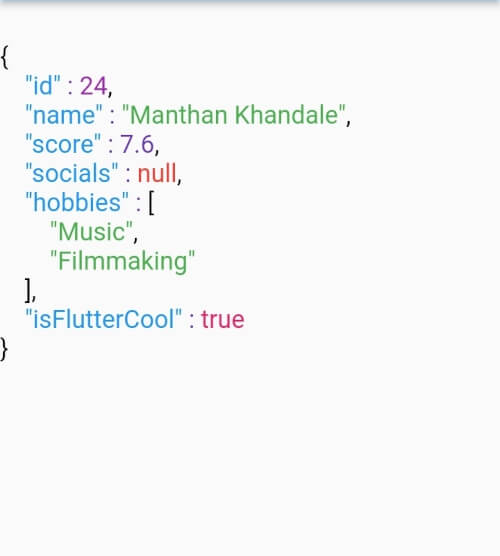
ColoredJson is a stateless widget that produces a structured view of JSON string provided. It can be used like any other flutter widget. It's fully customizable where you can set different colors to different datatypes including colon, comma and brackets. Set indent length. Use text style of your choice. You can also change the background color.

Defaut View Customised View 1 Customised View 2
Default View Customized View 1 Customized View 2

Usage

  • Pass a JSON string to the data parameter of ColoredJson Widget
Simple Usage
const String responseBody = '''
{
  'id' : 1,
  'name' : 'Colored Json',
  'isFlutterAwesome' : true,
}
''';

ColoredJson(
 data: responseBody,
)

Full Usage
final dartMap = {
  "id": 24,
  "name": "Manthan Khandale",
  "score": 7.6,
  "socials": null,
  "hobbies": [
    "Music",
    "Filmmaking",
  ],
  "isFlutterCool": true,
};

ColoredJson(
 data: jsonEncode(dartMap),
 indentLength: 5,
 keyColor: Colors.green,
 backgroundColor: Colors.black,
 boolColor: Colors.white,
 nullColor: Colors.redAccent,
 stringColor: Colors.cyan,
 curlyBracketColor: Colors.yellow,
 doubleColor: Colors.deepOrange,
 squareBracketColor: Colors.amber,
 commaColor: Colors.yellow,
 colonColor: Colors.purple,
 intColor: Colors.lime,
 textStyle: const TextStyle(
  fontSize: 20,
  letterSpacing: 2,
  ),
 )
Parameter Info
data (required) A JSON string to be formatted
keyColor Color of Json Key
intColor Color of integer type value
doubleColor Color of decimal type value
stringColor Color of string type value
boolColor Color of boolean type value
nullColor Color of null type value
curlyBracketColor Color of curly brackets {}
squareBracketColor Color of square brackets []
commaColor Color of comma ( , )
colonColor Color of colon ( : )
backgroundColor Background color of widget
textStyle Textstyle of texts in the widget
indentLength Indent length

Upcoming Tasks

  • Code shrink feature
  • Add Inner Spacing parameter
  • Add tests

Categories

Source repository

Projects using this package

No data available yet.