Search packages, repositories and app categories

colorize cover
Package detailsv3.0.0

colorize

Colorize console output

AndroidiOSWebmacOSWindowsLinux
30-day downloads
190K
Likes
29
Pub points
90

Install package

flutter pub add colorize

Package Overview

Package selection guidance compiled from public package information, community data, and project usage.

Colorize is a Flutter/Dart package that enables developers to add color and styling to console output in command-line applications. It provides a simple API to print text in various colors, backgrounds, and styles (like bold or underline) directly in the terminal. Ideal for debugging, logging, or enhancing CLI tool readability, it works across all major platforms including Android, iOS, Web, macOS, Windows, and Linux. The package is lightweight and integrates seamlessly with Dart's standard output.

Use cases

  • Debugging CLI applications
  • Enhancing log messages
  • Creating interactive command-line tools
  • Improving terminal output readability
  • Developing developer-facing scripts

Key features

  • Supports ANSI color codes
  • Simple and intuitive API
  • Cross-platform compatibility
  • Customizable text styles
  • Works with stdout and stderr

Suitable for

  • CLI tool developers
  • Dart developers working on console apps
  • Teams improving debug output visibility
  • Educational projects involving terminal interaction

Considerations

  • Not intended for UI rendering
  • Color output may vary by terminal emulator
  • Limited to console environments
  • Does not support non-ANSI terminals
  • Requires manual handling of escape sequences in some cases

Original README

Original README snapshot from the linked source repository. Visit the repository for the latest content.

Colorize

Colorize console output in dart console apps!

Install

Add dependency to your pubspec.yaml:

colorize: any

Run

pub get

Usage

Import package:

import 'package:colorize/colorize.dart';

You have two way to colorize your string:

  • use class Colorize
  • use top-level function color()
Use Colorize

For colorize string with Colorize class you should create object of type Colorize:

Colorize string = new Colorize("This is my string!");

Then you can call methods of Colorize.

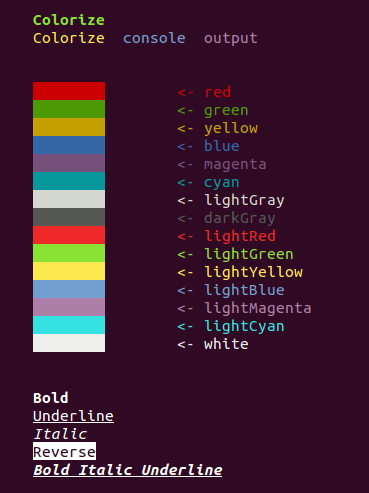
Text color

  • default()
  • black()
  • red()
  • green()
  • yellow()
  • blue()
  • magenta()
  • cyan()
  • lightGray()
  • darkGray()
  • lightRed()
  • lightGreen()
  • lightYellow()
  • lightBlue()
  • lightMagenta()
  • lightCyan()
  • white()

Background color

  • bgDefault()
  • bgBlack()
  • bgRed()
  • bgGreen()
  • bgYellow()
  • bgBlue()
  • bgMagenta()
  • bgCyan()
  • bgLightGray()
  • bgDarkGray()
  • bgLightRed()
  • bgLightGreen()
  • bgLightYellow()
  • bgLightBlue()
  • bgLightMagenta()
  • bgLightCyan()
  • bgWhite()

Formatting

  • reset()
  • bold()
  • dark()
  • italic()
  • underline()
  • blink()
  • reverse()
  • concealed()

After apply styles to string you can print it to console:

print(string);
Use top-level function color()

Top-level function color apply one required parameter - String text. It is text, that would be print on console.

Also top-level function color has seven named parameters:

  • Styles front - name of front color (you can also use the constants of class Styles). Default value is ''.
  • Styles back: name of background color (you can also use the constants of class Styles). Default value is ''.
  • bool isUnderline - default value is false.
  • bool isBold - default value is false.
  • bool isDark - default value is false.
  • bool isItalic - default value is false.
  • bool isReverse - default value is false.

Example of usage

color("Bold Italic Underline", front: Styles.RED, isBold: true, isItalic: true, isUnderline: true);
Enum Styles

Enum Styles contains all styles which you can pass to Colorize.applyState method;

Categories

Source repository

Projects using this package