Search packages, repositories and app categories

connectivity_widget cover
Package detailsv3.0.0

connectivity_widget

A widget that shows the user if the phone is connected to the internet or not

AndroidiOSWebmacOSWindowsLinux
30-day downloads
324
Likes
88
Pub points
140

Install package

flutter pub add connectivity_widget

Package Overview

Package selection guidance compiled from public package information, community data, and project usage.

The connectivity_widget package provides a simple, reactive widget that displays the current internet connection status of the device. It monitors network availability across Android, iOS, Web, macOS, Windows, and Linux platforms, updating the UI in real time when connectivity changes occur. Designed for ease of integration, it allows developers to show visual indicators—such as icons or text—to inform users whether they are online or offline. Ideal for apps requiring immediate feedback on network state, such as messaging, media streaming, or data synchronization services.

Use cases

  • Real-time network status display
  • Offline mode indicators
  • User experience enhancement during connectivity changes
  • App functionality adaptation based on network state
  • Loading state management during poor connectivity

Key features

  • Cross-platform support
  • Reactive UI updates
  • Simple integration with minimal setup
  • Customizable appearance
  • Automatic detection of connection changes

Suitable for

  • Apps needing real-time network awareness
  • Developers seeking lightweight connectivity monitoring
  • UI components requiring dynamic network feedback
  • Projects targeting multiple platforms
  • Users wanting instant online/offline status indicators

Considerations

  • Requires proper permissions on mobile platforms
  • May need additional logic for handling transient network states
  • Does not handle specific network types (e.g., Wi-Fi vs cellular)
  • Limited to connectivity status, not bandwidth or quality
  • Depends on underlying platform APIs for accuracy
Original README

Original README snapshot from the linked source repository. Visit the repository for the latest content.

connectivity_widget

A widget that shows the user if the phone is connected to the internet or not

This is accomplished not only by verifying the status of the mobile network and/or wifi, but also by pinging a remote server and verifying its response.

Example

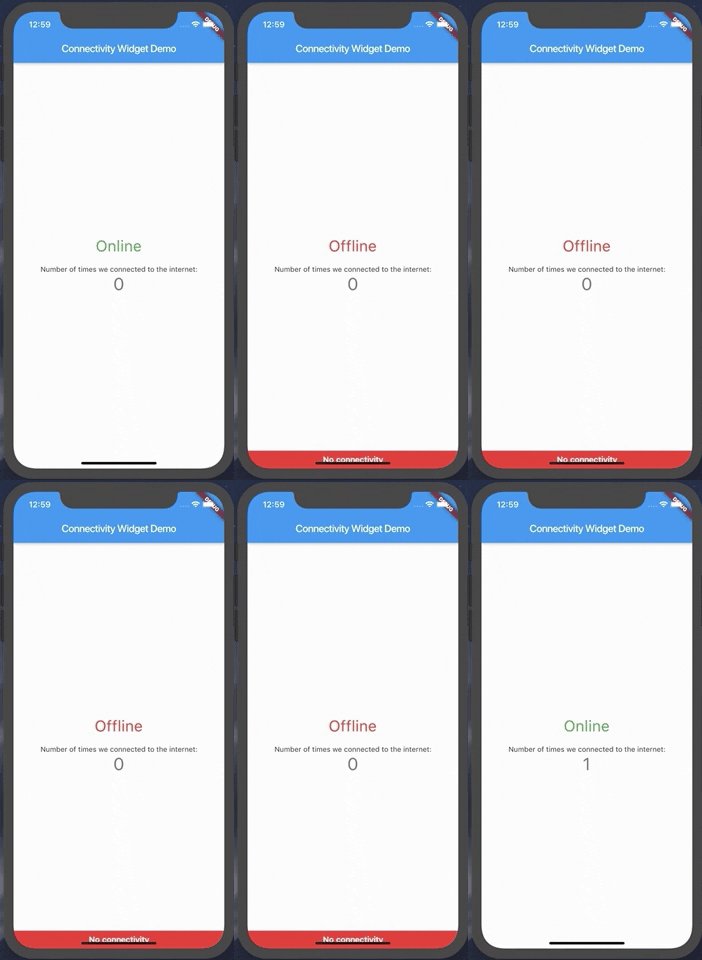
Using the ConnectivityWidget

The ConnectivityWidget uses a builder function that provides you a isOnline flag to build different screens for offline or online mode.

 ConnectivityWidget(
        builder: (context, isOnline) => Center(
          child: Column(
            mainAxisAlignment: MainAxisAlignment.center,
            children: <Widget>[
              Text("${isOnline ? 'Online' : 'Offline'}", style: TextStyle(fontSize: 30, color: isOnline ? Colors.green : Colors.red),),
              SizedBox(height: 20,),
              Text(
                'Number of times we connected to the internet:',
              ),
              Text(
                '$_counter',
                style: Theme.of(context).textTheme.display1,
              ),
            ],
          ),
        )

It also provides both a onlineCallback and a offlineCallback that are called when the phone changes the connection state to online and offline, respectively.

 ConnectivityWidget(
        onlineCallback: _incrementCounter,
        builder: //...,
        )

If there is a need to change the default offline banner, a Widget can be provided to the offlineBanner parameter. Additionally, its visibility can be enabled or disabled by using the showOfflineBanner parameter.

Configurable Parameters:

  • serverToPing;
  • timeoutDuration;
  • debounceDuration;
  • verifyResponseCallback;

Changing the server to ping and the response verification

By default, the Connectivity Widget checks if there is a connection to http://www.google.com. If you want to check the availability of a custom endpoint, you can set a new endpoint to ping and a callback to verify the response.

ConnectivityUtils.instance.setCallback((response) => response.contains("This is a test!"));
ConnectivityUtils.instance.setServerToPing("https://gist.githubusercontent.com/Vanethos/dccc4b4605fc5c5aa4b9153dacc7391c/raw/355ccc0e06d0f84fdbdc83f5b8106065539d9781/gistfile1.txt");
Using ConnectivityUtils to Listen to Network Changes

This library also provides access to the ConnectivityUtils class in which you can verify the status of the network.

Stream<bool> ConnectivityUtils.instance.isPhoneConnectedStream // gets the current status of the network
Future<bool> ConnectivityUtils.instance.isPhoneConnected() // future that determines network status
Note on Web:

Although we can verify the status of the connection in web, what happens is that browsers will cache a request to a specific endpoint, so we cannot verify for certain if the connection is down or if we are using cache, using the methods presented in this package.

Categories

Dependencies

Dependency list 5 items

Source repository

Projects using this package

No data available yet.