Search packages, repositories and app categories

country_currency_pickers cover
Package detailsv3.0.0

country_currency_pickers

Countries, codes, flags, currency and several way of picking them at your service...one widget away...

AndroidiOSWebmacOSWindowsLinux
30-day downloads
2.4K
Likes
39
Pub points
150

Install package

flutter pub add country_currency_pickers

Package Overview

Package selection guidance compiled from public package information, community data, and project usage.

A Flutter package that provides comprehensive country and currency selection functionality, including country names, codes, flags, and currency details. It offers a single widget to pick countries and currencies with customizable UI options. Ideal for apps requiring internationalization, payment forms, or user location setup. The package supports all major platforms: Android, iOS, Web, macOS, Windows, and Linux.

Use cases

  • International form inputs
  • Currency selection in payments
  • User profile localization
  • Multi-language app setups
  • Travel and logistics apps
  • User onboarding with country choice

Key features

  • Built-in country and currency data
  • Flag icons support
  • Customizable picker widget
  • Supports multiple platforms
  • Easy integration with Flutter forms
  • Searchable and filterable list

Suitable for

  • E-commerce apps
  • Global travel applications
  • Finance and banking tools
  • Multilingual mobile apps
  • User registration flows

Considerations

  • Requires internet for latest data updates
  • Large initial bundle size due to embedded data
  • Limited customization of internal UI components
  • May need additional styling for dark mode compatibility
  • Not optimized for very large datasets

Original README

Original README snapshot from the linked source repository. Visit the repository for the latest content.

country_currency_pickers

Countries, codes, flags, currency and several way of picking them at your service...one widget away...

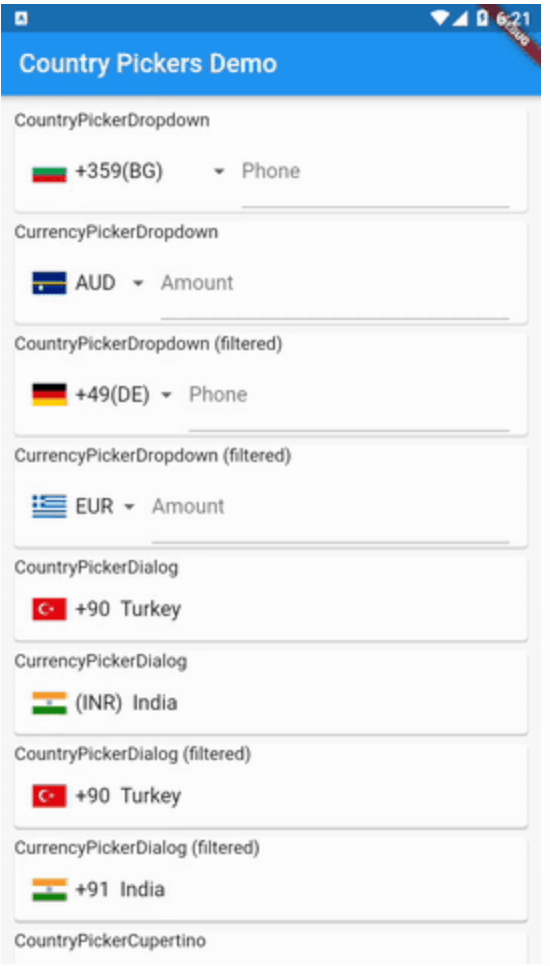
CountryPickerDropdown example
 CountryPickerDropdown(
            initialValue: 'tr',
            itemBuilder: _buildDropdownItem,
            onValuePicked: (Country country) {
              print("${country.name}");
            },
          ),
 Widget _buildDropdownItem(Country country) => Container(
        child: Row(
          children: <Widget>[
            CountryPickerUtils.getDefaultFlagImage(country),
            SizedBox(
              width: 8.0,
            ),
            Text("+${country.phoneCode}(${country.isoCode})"),
          ],
        ),
      );
CurrencyPickerDropdown example
 CurrencyPickerDropdown(
            initialValue: 'INR',
            itemBuilder: _buildCurrencyDropdownItem,
            onValuePicked: (Country country) {
              print("${country.name}");
            },
          ),
 Widget _buildCurrencyDropdownItem(Country country) => Container(
        child: Row(
          children: <Widget>[
            CountryPickerUtils.getDefaultFlagImage(country),
            SizedBox(
              width: 8.0,
            ),
            Text("${country.currencyCode}"),
          ],
        ),
      );
CountryPickerDialog example
void _openCountryPickerDialog() => showDialog(
        context: context,
        builder: (context) => Theme(
            data: Theme.of(context).copyWith(primaryColor: Colors.pink),
            child: CountryPickerDialog(
                titlePadding: EdgeInsets.all(8.0),
                searchCursorColor: Colors.pinkAccent,
                searchInputDecoration: InputDecoration(hintText: 'Search...'),
                isSearchable: true,
                title: Text('Select your phone code'),
                onValuePicked: (Country country) =>
                    setState(() => _selectedDialogCountry = country),
                itemBuilder: _buildDialogItem)),
      );
CurrencyPickerDialog example
void _openCurrencyPickerDialog() => showDialog(
        context: context,
        builder: (context) => Theme(
            data: Theme.of(context).copyWith(primaryColor: Colors.pink),
            child: CurrencyPickerDialog(
                titlePadding: EdgeInsets.all(8.0),
                searchCursorColor: Colors.pinkAccent,
                searchInputDecoration: InputDecoration(hintText: 'Search...'),
                isSearchable: true,
                title: Text('Select your Currency'),
                onValuePicked: (Country country) =>
                    setState(() => _selectedDialogCountry = country),
                itemBuilder: _buildCurrencyDialogItem)),
      );
CountryPickerCupertino example
 void _openCupertinoCountryPicker() => showCupertinoModalPopup<void>(
      context: context,
      builder: (BuildContext context) {
        return CountryPickerCupertino(
          pickerSheetHeight: 300.0,
          onValuePicked: (Country country) =>
              setState(() => _selectedCupertinoCountry = country),
        );
      });
CurrencyPickerCupertino example
 void _openCupertinoCurrencyPicker() => showCupertinoModalPopup<void>(
      context: context,
      builder: (BuildContext context) {
        return CurrencyPickerCupertino(
          pickerSheetHeight: 300.0,
          onValuePicked: (Country country) =>
              setState(() => _selectedCupertinoCountry = country),
        );
      });

Credits

Forked from country_pickers repo. Thanks goes to country-flags repo for the flag image assets. Learn Pain Less | Code Academy (learn to code)

Categories

Source repository

Projects using this package

No data available yet.