Original README snapshot from the linked source repository. Visit the repository for the latest content.
CSS Filter for Flutter
English | 简体中文
Use CSS filter effects on Flutter.


IFstruct parser supports generating flutter code from iofod visually edited projects. We have separated its filter module code and added many preset effects to form the current CSS Filter for Flutter, which facilitates all flutter projects to use the excellent design of the Web: CSS filter.
Features
- Simple and efficient
- Support multiple filter effects overlay
- Rich preset effects.
- Full platform support
- Customize your own effect
- Null-safety
Getting started
After importing the dependent, you can use the basic filters through CSSFilter.
import 'package:css_filter/css_filter.dart';

CSSFilter.contrast(child: const Text('foo'), value: 1.2);
Support filters:
- contrast()
- grayscale()
- sepia()
- hueRotate()
- brightness()
- saturate()
- invert()
- blur()
- opacity()
You can combine and overlay these filters in flutter just as you would with a CSS filter. Use CSSFilter.apply in conjunction with CSSFilterMatrix(). Such as:
CSSFilter.apply(
  child: const Text('bar'),
  value: CSSFilterMatrix().contrast(1.2).sepia(0.8).hueRotate(90.0).invert(0.9).opacity(0.9)
);
Note: the order of the chain calls represents the order in which the filters are applied, and the order in which the filter effects are applied affects the final result.
Use presets
The CSSgram project does an excellent job of providing the CSS world with Instagram-like filters, and instagram.css complements it with more types of filters. We've combined these two libraries to encapsulate several presets that can call through CSSFilterPresets.
import 'package:css_filter/css_filter.dart';

CSSFilterPresets.insXpro2(child: const Text('Your widget'));
Support effects:
| Effect name |
Preview effect |
Sample code |
| origin |
 |
CSSFilterPresets.origin(child: Image(...)) |
| ins1977 |
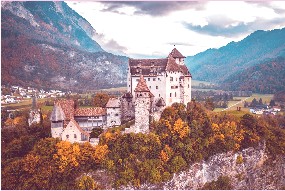 |
CSSFilterPresets.ins1977(child: Image(...)) |
| ins1977V2 |
 |
CSSFilterPresets.ins1977V2(child: Image(...)) |
| insAden |
 |
CSSFilterPresets.insAden(child: Image(...)) |
| insAmaro |
 |
CSSFilterPresets.insAmaro(child: Image(...)) |
| insAshby |
 |
CSSFilterPresets.insAshby(child: Image(...)) |
| insBrannan |
 |
CSSFilterPresets.insBrannan(child: Image(...)) |
| insBrooklyn |
 |
CSSFilterPresets.insBrooklyn(child: Image(...)) |
| insClarendon |
 |
CSSFilterPresets.insClarendon(child: Image(...)) |
| insDogpatch |
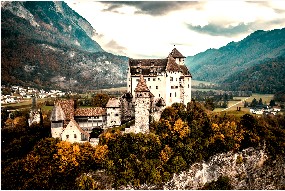 |
CSSFilterPresets.insDogpatch(child: Image(...)) |
| insEarlybird |
 |
CSSFilterPresets.insEarlybird(child: Image(...)) |
| insGingham |
 |
CSSFilterPresets.insGingham(child: Image(...)) |
| insHelena |
 |
CSSFilterPresets.insHelena(child: Image(...)) |
| insHudson |
 |
CSSFilterPresets.insHudson(child: Image(...)) |
| insInkwell |
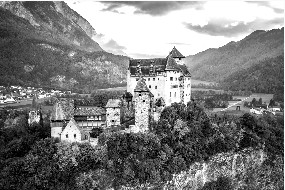 |
CSSFilterPresets.insInkwell(child: Image(...)) |
| insInkwellV2 |
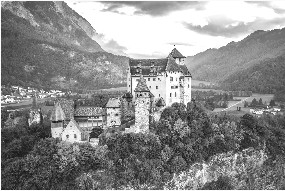 |
CSSFilterPresets.insInkwellV2(child: Image(...)) |
| insJuno |
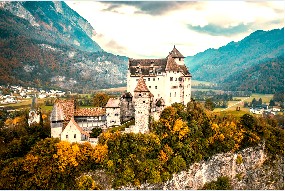 |
CSSFilterPresets.insJuno(child: Image(...)) |
| insKelvin |
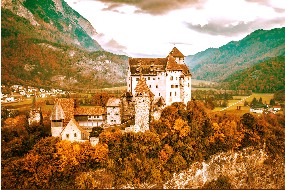 |
CSSFilterPresets.insKelvin(child: Image(...)) |
| insLark |
 |
CSSFilterPresets.insLark(child: Image(...)) |
| insLofi |
 |
CSSFilterPresets.insLofi(child: Image(...)) |
| insLudwig |
 |
CSSFilterPresets.insLudwig(child: Image(...)) |
| insMaven |
 |
CSSFilterPresets.insMaven(child: Image(...)) |
| insMayfair |
 |
CSSFilterPresets.insMayfair(child: Image(...)) |
| insMoon |
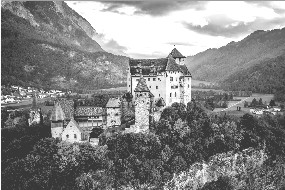 |
CSSFilterPresets.insMoon(child: Image(...)) |
| insMoonV2 |
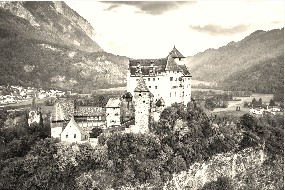 |
CSSFilterPresets.insMoonV2(child: Image(...)) |
| insNashville |
 |
CSSFilterPresets.insNashville(child: Image(...)) |
| insNashvilleV2 |
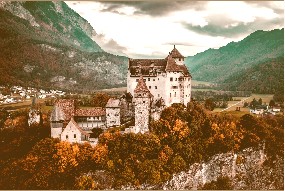 |
CSSFilterPresets.insNashvilleV2(child: Image(...)) |
| insPerpetua |
 |
CSSFilterPresets.insPerpetua(child: Image(...)) |
| insPoprocket |
 |
CSSFilterPresets.insPoprocket(child: Image(...)) |
| insReyes |
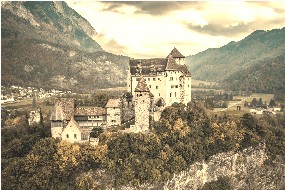 |
CSSFilterPresets.insReyes(child: Image(...)) |
| insRise |
 |
CSSFilterPresets.insRise(child: Image(...)) |
| insSierra |
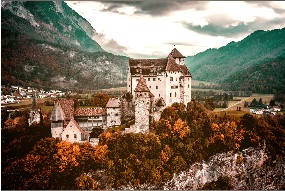 |
CSSFilterPresets.insSierra(child: Image(...)) |
| insSkyline |
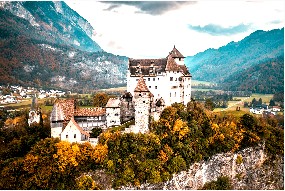 |
CSSFilterPresets.insSkyline(child: Image(...)) |
| insSlumber |
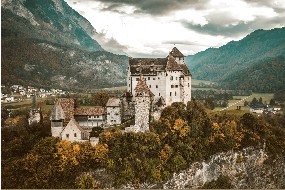 |
CSSFilterPresets.insSlumber(child: Image(...)) |
| insStinson |
 |
CSSFilterPresets.insStinson(child: Image(...)) |
| insSutro |
 |
CSSFilterPresets.insSutro(child: Image(...)) |
| insToaster |
 |
CSSFilterPresets.insToaster(child: Image(...)) |
| insToasterV2 |
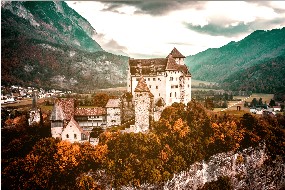 |
CSSFilterPresets.insToasterV2(child: Image(...)) |
| insValencia |
 |
CSSFilterPresets.insValencia(child: Image(...)) |
| insVesper |
 |
CSSFilterPresets.insVesper(child: Image(...)) |
| insWalden |
 |
CSSFilterPresets.insWalden(child: Image(...)) |
| insWaldenV2 |
 |
CSSFilterPresets.insWaldenV2(child: Image(...)) |
| insWillow |
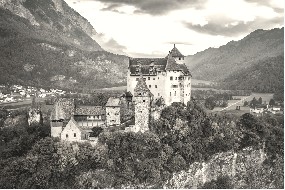 |
CSSFilterPresets.insWillow(child: Image(...)) |
| insXpro2 |
 |
CSSFilterPresets.insXpro2(child: Image(...)) |
Similar to CSSFilter, we provide the apply method for CSSFilterPresets to invoke presets consistently, and apply additionally supports setting the intensity of the filter effect used. To do so:
CSSFilterPresets.apply(
child: YourWidget,
value: CSSFilterPresets.insNashville,
strength: 0.7
);
Customize your own filter preset
CSSFilter provides the most basic filters, CSSFilterPresets collects the commonly used combinations of basic filters as presets, meaning you can also customize your own filter presets based on the basic filters.
customPreset({ required Widget child }) {
return CSSFilter.apply(
child: child,
value: CSSFilterMatrix().sepia(0.2).saturate(1.4)
);
}
CSSFilterPresets.apply(
child: YourWidget,
value: customPreset,
strength: 0.9
);
customPreset(child: YourWidget);
More examples
For more usage examples, please check out the example project.
