Search packages, repositories and app categories

Package detailsv1.0.2

cube_transition

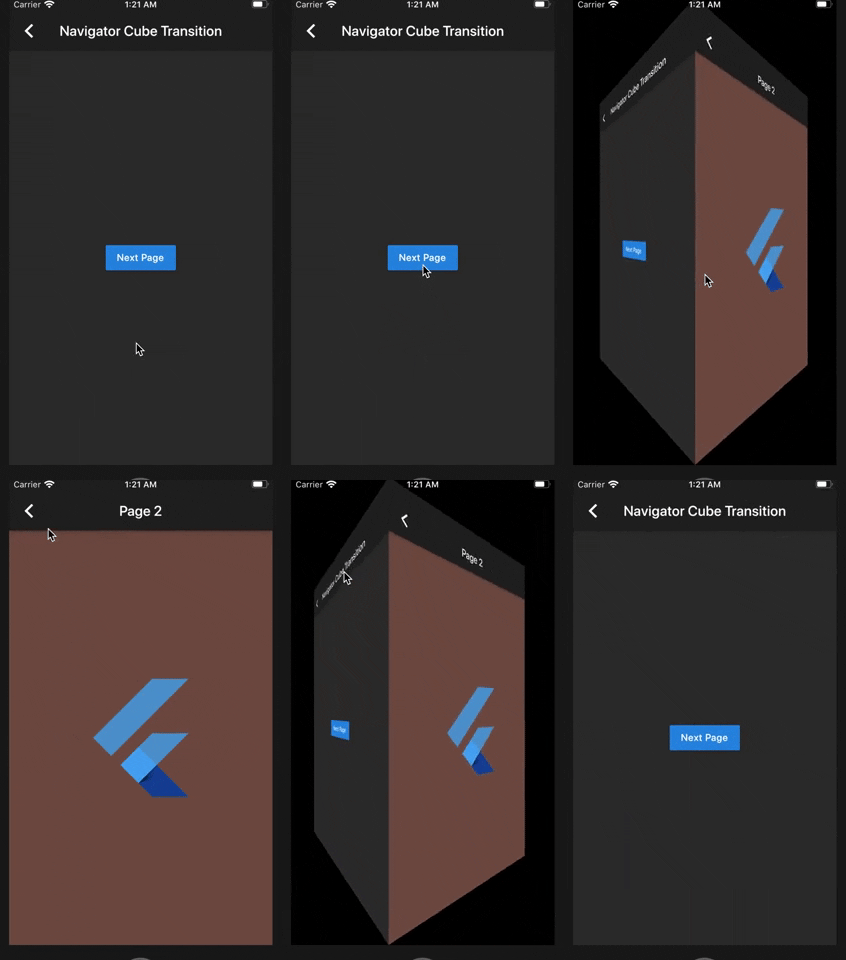
A nice 3D Cube effect for your PageView and PageRoute transitions.

30-day downloads
47
Likes
70
Pub points
40

Install package

flutter pub add cube_transition

Package Overview

Package selection guidance compiled from public package information, community data, and project usage.

CubeTransition is a Flutter package that provides a smooth 3D cube animation effect for PageView and PageRoute transitions. It enhances user experience by adding depth and visual appeal to navigation between screens or pages. The package leverages Flutter's rendering capabilities to create immersive, card-like flipping animations that simulate a real cube rotating in 3D space. Ideal for apps seeking modern, engaging transitions without complex implementation. It integrates seamlessly with existing Flutter navigation patterns.

Use cases

  • PageView page transitions
  • PageRoute navigation effects
  • Interactive app onboarding
  • Visual feedback in tab switches
  • Enhancing UI polish in mobile apps

Key features

  • 3D cube rotation animation
  • Smooth and customizable transitions
  • Works with PageView and PageRoute
  • Lightweight and easy to integrate
  • Supports directional flipping

Suitable for

  • Developers seeking modern UI animations
  • Apps with interactive navigation
  • Design-focused Flutter projects
  • Mobile apps emphasizing user engagement

Considerations

  • Limited to 3D cube style only
  • May impact performance on low-end devices
  • No built-in customization for cube size or texture
  • Requires manual handling of transition states
  • Not suitable for non-interactive or minimal UI designs

Original README

Original README snapshot from the linked source repository. Visit the repository for the latest content.

Cube Transition

pub package

A 3D Cube transition for your PageView and PageRoute.

Aeyrium Inc. is a provider of innovative software solutions for the business and commercial aviation

Features

  • Use the cube transition between the navigation of your pages.
  • Add cube transitions to your PageView.
  • Add custom transformation in your items of your PageView.

Getting started

You should ensure that you add the dependency in your flutter project.

dependencies:
  cube_transition: "^1.0.0"

You should then run flutter packages upgrade or update your packages in IntelliJ.

Import the package:

import 'package:cube_transition/cube_transition.dart';

Example Project

There is a example project in the example folder. Check it out. Otherwise, keep reading to get up and running.

Usage

Navigator Cube Transition

class Sample1 extends StatelessWidget {
  @override
  Widget build(BuildContext context) {
    return Scaffold(
      appBar: AppBar(
        title: Text('Navigator Cube Transition'),
      ),
      body: Center(
        child: RaisedButton(
          child: Text('Next Page'),
          onPressed: () {
            Navigator.of(context).push(
              CubePageRoute(
                enterPage: Sample1NextPage(),
                exitPage: this,
                duration: const Duration(milliseconds: 900),
              ),
            );
          },
        ),
      ),
    );
  }
}

PageView Cube Transition (default)

class Sample2 extends StatelessWidget {
  @override
  Widget build(BuildContext context) {
    final height = MediaQuery.of(context).size.height / 2;
    return Scaffold(
      appBar: AppBar(
        title: Text('PageView Cube Transition'),
      ),
      body: Center(
        child: SizedBox(
          height: height,
          child: CubePageView(
            children: places
                .map(
                  (item) =>  Image.network(
                        item.url,
                        height: height,
                        fit: BoxFit.cover,
                      ),
                )
                .toList(),
          ),
        ),
      ),
    );
  }
}

PageView Cube Transition Custom (If you want more control over the items inside the CubePageView)

class Sample3 extends StatelessWidget {
  @override
  Widget build(BuildContext context) {
    final height = MediaQuery.of(context).size.height / 2;
    return Scaffold(
      appBar: AppBar(
        title: Text('Custom Cube Transition'),
      ),
      body: Center(
        child: SizedBox(
          height: height,
          child: CubePageView.builder(
            itemCount: places.length,
            itemBuilder: (context, index, notifier) {
              final item = places[index];
              final transform = Matrix4.identity();
              final t = (index - notifier).abs();
              final scale = lerpDouble(1.5, 0, t);
              transform.scale(scale, scale);
              return CubeWidget(
                index: index,
                pageNotifier: notifier,
                child: Stack(
                  children: [
                    Image.network(
                      item.url,
                      height: height,
                      fit: BoxFit.cover,
                    ),
                    Transform(
                      alignment: Alignment.center,
                      transform: transform,
                      child: Center(
                        child: Padding(
                          padding: const EdgeInsets.all(12.0),
                          child: Container(
                            decoration: BoxDecoration(boxShadow: [
                              BoxShadow(
                                color: Colors.black45,
                                spreadRadius: 5,
                                blurRadius: 5,
                              ),
                            ]),
                            child: Text(
                              item.name.split('-').join('\n'),
                              textAlign: TextAlign.center,
                              style: Theme.of(context).textTheme.title,
                            ),
                          ),
                        ),
                      ),
                    ),
                  ],
                ),
              );
            },
          ),
        ),
      ),
    );
  }
}

Copyright Aeyrium Inc

You can follow me on twitter @diegoveloper

Categories

Source repository

Projects using this package

No data available yet.