Package selection guidance compiled from public package information, community data, and project usage.
Dart_Native enables developers to write native mobile and desktop applications directly in Dart, eliminating the need for platform-specific code and performance-heavy interop channels. By leveraging Dart's strong typing and modern syntax, it allows seamless access to native APIs on Android, iOS, and macOS. This package bridges the gap between high-level Dart development and low-level system capabilities, offering a unified workflow across platforms. It is ideal for teams seeking to maintain a single codebase while achieving native performance and access to device features.
Use cases
Cross-platform app development
Native API access from Dart
Eliminating platform-specific code
High-performance mobile apps
Unified codebase for multiple platforms
Key features
Direct native code writing in Dart
Support for Android, iOS, and macOS
No reliance on low-performance channels
Seamless integration with native APIs
Single codebase for multiple platforms
Suitable for
Developers using Dart for mobile/desktop apps
Teams avoiding native language complexity
Projects requiring native performance
Cross-platform application development
Those seeking to reduce boilerplate and interop overhead
Considerations
Limited ecosystem compared to established native tools
Early-stage adoption may require deeper debugging
Requires understanding of native platform concepts
May not support all niche native features yet
Learning curve for developers unfamiliar with native integration patterns
Original README
Original README snapshot from the linked source repository. Visit the repository for the latest content.
DartNative
DartNative operates as a bridge to communicate between Dart and native APIs.
Replaces the low-performing Flutter channel with faster and more concise code.
Features
Dynamic synchronous & asynchronous channeling
DartNative calls any native API dynamically. It supports both synchronous and asynchronous channeling.
Direct call between multi-language interfaces
Serialization of parameters and return values like Flutter Channel is no longer required. DartNative provides direct calls and automatic object marshalling between language interfaces.
Dart finalizer
Dart finalizer is only supported above Flutter 3(Dart 2.17), but with DartNative it is available in Dart Flutter 2.2.0(Dart 2.13.0) and up.
Autogenerate succinct bridging code
DartNative supports automatic type conversion so its bridging code is shorter & simpler than the Flutter channel.
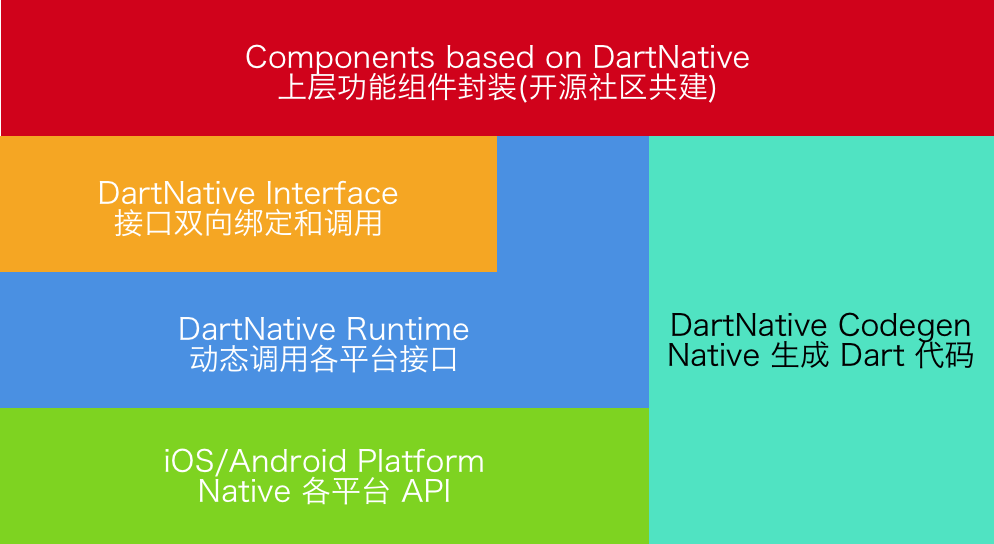
The design and vision of this package:
Requirements
DartNative Version
Flutter Requirements
Codegen Version
0.4.x - 0.7.x
Flutter 2.2.0 (Dart 2.13.0)
2.x
0.3.x
Flutter 1.20.0 (Dart 2.9.1)
1.2.x
0.2.x
Flutter 1.12.13 (Dart 2.7)
1.x
Supported Platforms
iOS & macOS & Android
Usage
Basic usage: Interface binding
Add dart_native to dependencies and build_runner to dev_dependencies. Then you can write code. Here are some examples:
Dart calls Native
Dart code:
finalinterface = Interface("MyFirstInterface");
// Exampleforstringtype.
StringhelloWorld() {
returninterface.invokeMethodSync('hello', args: ['world']);
}
// Example for num type.Future<int> sum(int a, int b) {
returninterface.invokeMethod('sum', args: [a, b]);
}
// load libdart_native.so
DartNativePlugin.loadSo();

@InterfaceEntry(name = "MyFirstInterface")
public class InterfaceDemo extends DartNativeInterface {

    @InterfaceMethod(name = "hello")
    public String hello(String str) {
        return "hello " + str;
    }

    @InterfaceMethod(name = "sum")
    public int sum(int a, int b) {
        return a + b;
    }
}
NOTE: If your so path is custom, you need pass specific path.
invokeMethod("totalCost", new Object[]{0.123456789, 10, Arrays.asList("hello", "world")},
             new DartNativeResult() {
                @Override
                public void onResult(@Nullable Object result) {
                    Map retMap = (Map) result;
                    // do something
                }

                @Override
                public void error(@Nullable String errorMessage) {
                    // do something
                }
              }
);
Dart finalizer
final foo = Bar(); // A custom instance.
unitTest.addFinalizer(() { // register a finalizer callback.print('The instance of \'foo\' has been destroyed!'); // When `foo` is destroyed by GC, this line of code will be executed.
});
Data types support
Dart
Objective-C
Swift
Java
null
nil
nil
null
bool
BOOL
Bool
bool
int
NSInteger
Int
int
double
double
Double
double
String
NSString
String
String
List
NSArray
Array
List, ArrayList
Map
NSDictionary
Dictionary
Map, HashMap
Set
NSSet
Set
Set, HashSet
Function
Block
Closure
Promise
Pointer
void *
UnsafeMutableRawPointer
-
NativeByte
NSData
Data
DirectByteBuffer
NativeObject
NSObject
NSObject
Object
Advanced usage: Invoke methods dynamically
Step 1: Add dart_native to dependencies and build_runner to dev_dependencies.
Step 2: Generate Dart wrapper code with @dartnative/codegen or write Dart code manually.
Step 3: Generate code for automatic type conversion using dart_native_gen with the following steps (3.1-3.3):
3.2 Annotate your own entry (such asmain()) with @nativeRoot.
@nativeRootvoidmain() {
runApp(App());
}
3.3 Run
flutter packages pub run build_runner build --delete-conflicting-outputs
to generate files into your source directory.
Note: we recommend running clean first:
flutter packages pub run build_runner clean
Step 4: Call autogenerated function in <generated-name>.dn.dart in 3.3. The function name is determined by name in pubspec.yaml.
@nativeRootvoidmain() {
// Function name is generated by name in pubspec.yaml.runDartNativeExample();
runApp(App());
}
Step 5: Then you can write code. Here are some examples:
5.1 iOS:
Dart code (generated):
// new Objective-C object.RuntimeStub stub = RuntimeStub();
// Dart function will be converted to Objective-C block.
stub.fooBlock((NSObject a) {
print('hello block! ${a.toString()}');
return101;
});
// support built-in structs.CGRect rect = stub.fooCGRect(CGRect(4, 3, 2, 1));
print(rect);