Search packages, repositories and app categories

Package detailsv1.0.1

dashed_container

A Dashed Container plugin for Flutter, easy to implement dashed line for your widgets.

30-day downloads
79
Likes
15
Pub points
25

Install package

flutter pub add dashed_container

Package Overview

Package selection guidance compiled from public package information, community data, and project usage.

The dashed_container package is a Flutter plugin that simplifies the creation of dashed borders around widgets. It provides an easy-to-use container with customizable dashed line styles, including dash length, gap, color, and stroke width. Ideal for UI elements requiring visual separation or emphasis, such as form fields, cards, or decorative outlines. The package leverages Flutter's painting system to render smooth, scalable dashed lines without complex custom painting code. It integrates seamlessly into existing Flutter projects via a simple pub dependency.

Use cases

  • Adding dashed borders to UI components
  • Creating form field highlights
  • Designing decorative card outlines
  • Visual separation in layouts
  • Customizing border aesthetics

Key features

  • Simple API for dashed borders
  • Configurable dash length and gap
  • Support for custom colors and stroke width
  • Lightweight and efficient
  • Works with any widget inside

Suitable for

  • UI designers seeking visual variety
  • Developers building forms or cards
  • Projects needing lightweight decoration
  • Flutter beginners exploring custom borders
  • Apps with modern, minimalist design

Considerations

  • Limited to border decoration only
  • No support for dashed fills
  • Does not handle complex clipping
  • Best suited for simple rectangular shapes
  • May require manual alignment in complex layouts
Original README

Original README snapshot from the linked source repository. Visit the repository for the latest content.

dashed_container

A Dashed Container plugin for Flutter, easy to implement dashed line for your widgets

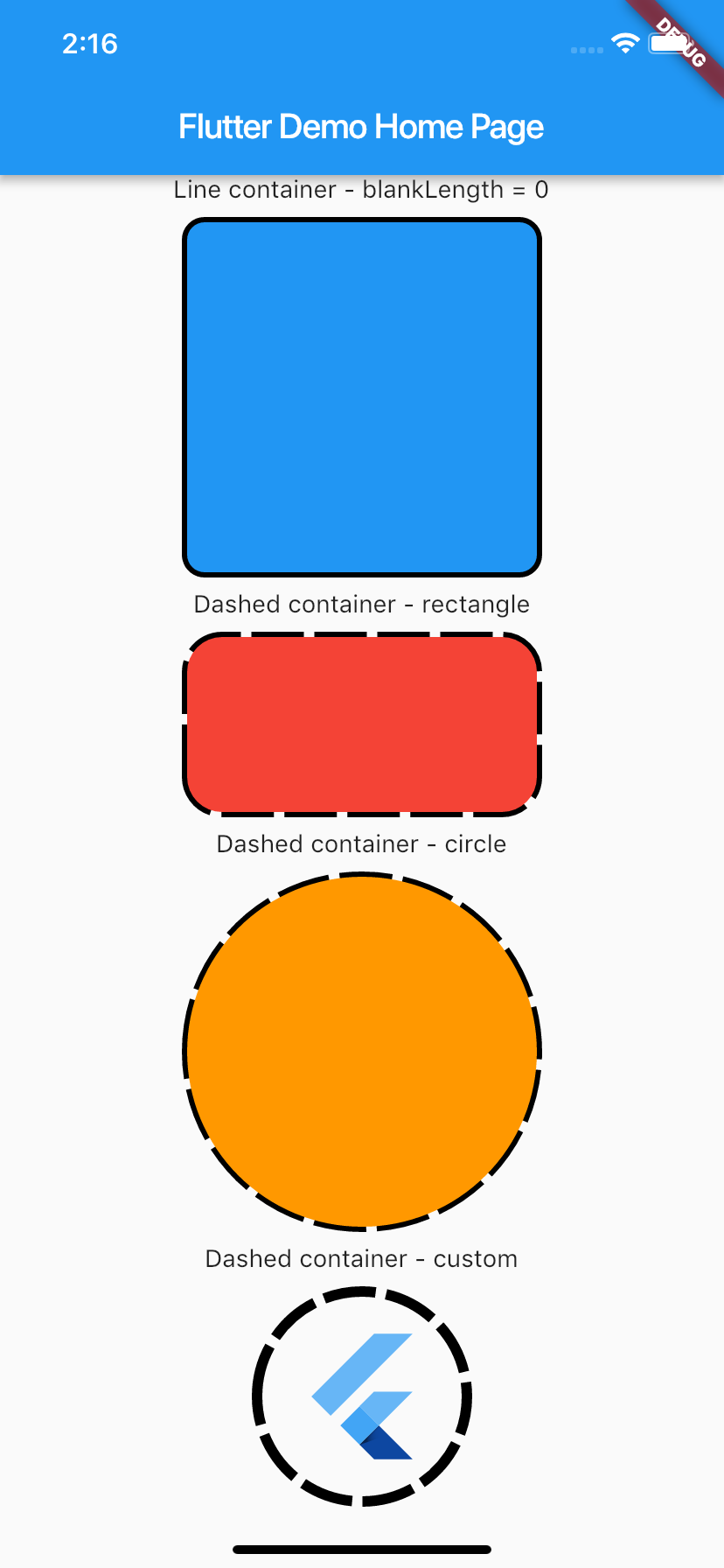
Demo

Demo:

Usage

To use plugin, just import package import 'package:dashed_container/dashed_container.dart';

Example

You can check example directory to know how to use it like the demo image.

    import 'package:flutter/material.dart';
    import 'package:dashed_container/dashed_container.dart';

    void main() => runApp(MyApp());

    class MyApp extends StatelessWidget {
      @override
      Widget build(BuildContext context) {
        return MaterialApp(
          title: 'Flutter Demo',
          theme: ThemeData(
            primarySwatch: Colors.blue,
          ),
          home: MyHomePage(title: 'Flutter Demo Home Page'),
        );
      }
    }

    class MyHomePage extends StatefulWidget {
      MyHomePage({Key key, this.title}) : super(key: key);

      final String title;

      @override
      _MyHomePageState createState() => _MyHomePageState();
    }

    class _MyHomePageState extends State<MyHomePage> {
      @override
      Widget build(BuildContext context) {
        return Scaffold(
          appBar: AppBar(title: Text(widget.title)),
          body: SingleChildScrollView(
            child: Center(
              child: Column(
                mainAxisSize: MainAxisSize.max,
                crossAxisAlignment: CrossAxisAlignment.center,
                mainAxisAlignment: MainAxisAlignment.center,
                children: <Widget>[
                  Text('Line container - blankLength = 0'),
                  _buildSpace(),
                  DashedContainer(
                    child: Container(
                      height: 200.0,
                      width: 200.0,
                      decoration: BoxDecoration(color: Colors.blue, borderRadius: BorderRadius.circular(10.0)),
                    ),
                    dashColor: Colors.black,
                    borderRadius: 10.0,
                    dashedLength: 30.0,
                    blankLength: 0.0,
                    strokeWidth: 6.0,
                  ),
                  _buildSpace(),
                  Text('Dashed container - rectangle'),
                  _buildSpace(),
                  DashedContainer(
                    child: Container(
                      height: 100.0,
                      width: 200.0,
                      decoration: BoxDecoration(color: Colors.red, borderRadius: BorderRadius.circular(20.0)),
                    ),
                    dashColor: Colors.black,
                    borderRadius: 20.0,
                    dashedLength: 30.0,
                    blankLength: 6.0,
                    strokeWidth: 6.0,
                  ),
                  _buildSpace(),
                  Text('Dashed container - circle'),
                  _buildSpace(),
                  DashedContainer(
                    child: Container(
                      height: 200.0,
                      width: 200.0,
                      decoration: BoxDecoration(color: Colors.orange, shape: BoxShape.circle),
                    ),
                    dashColor: Colors.black,
                    boxShape: BoxShape.circle,
                    dashedLength: 30.0,
                    blankLength: 6.0,
                    strokeWidth: 6.0,
                  ),
                  _buildSpace(),
                  Text('Dashed container - custom'),
                  _buildSpace(),
                  DashedContainer(
                    child: Padding(
                      padding: const EdgeInsets.all(20.0),
                      child: FlutterLogo(
                        size: 80,
                      ),
                    ),
                    dashColor: Colors.black,
                    boxShape: BoxShape.circle,
                    dashedLength: 30.0,
                    blankLength: 6.0,
                    strokeWidth: 6.0,
                  ),
                  _buildSpace(),
                ],
              ),
            ),
          ),
        );
      }

      Widget _buildSpace() {
        return SizedBox(height: 10.0);
      }
    }

Categories

Source repository

Projects using this package

No data available yet.