Package selection guidance compiled from public package information, community data, and project usage.
The debug_overlay package provides a centralized overlay in Flutter apps to display debug information and adjust settings dynamically during development. It enables developers to view real-time app metrics, toggle features, and inspect state without restarting the app. The overlay is accessible via a simple gesture and integrates seamlessly into Android and iOS builds. Designed for ease of use, it enhances debugging workflows by offering quick access to diagnostic data and configurable options directly within the app interface.
Use cases
Real-time debugging during development
Toggling app features on-the-fly
Monitoring app performance metrics
Inspecting state changes
Testing different configurations
Quick access to debug tools
Key features
Centralized debug overlay
Gesture-based activation
Live setting adjustments
Platform support for Android and iOS
Minimal setup with pub add
Display of runtime app information
Suitable for
Flutter developers in active development
Teams needing rapid debugging
Apps requiring dynamic feature toggles
Prototyping and testing phases
Developers focused on UX during debugging
Considerations
Not intended for production use
Overlay may interfere with UI during testing
Requires manual removal before release
Limited customization options
No built-in security for sensitive debug data
May impact performance slightly in large apps
Original README
Original README snapshot from the linked source repository. Visit the repository for the latest content.
debug_overlay
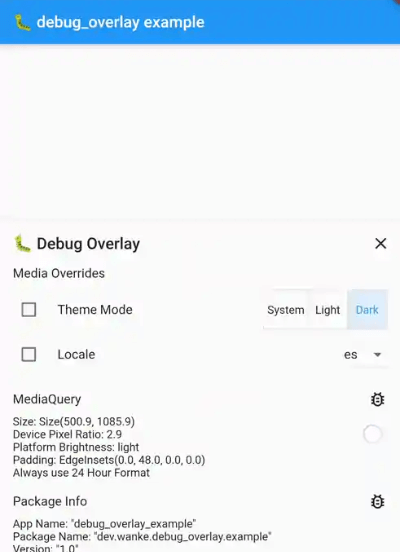
🐛 View debug infos and change settings via a central overlay for your app.
To add a debug overlay to your app, pass DebugOverlay.builder() to MaterialApp/CupertinoApp/WidgetsApp.builder:
MaterialApp(
  builder: DebugOverlay.builder(),
  // And other customization...
)
The debug overlay only works in debug mode and is not included in your widget tree in profile or release mode unless you pass enableOnlyInDebugMode: false.
To open the overlay, call DebugOverlay.show().
By default, this overlay includes MediaQueryDebugHelper, PackageInfoDebugHelper, and DeviceInfoDebugHelper.
Debug Helpers
To add a debug helper, you have to register it by calling either of the following two (which accept any sliver widget):
DebugOverlay.prependHelper(myDebugHelper) to add it to the front of the list
DebugOverlay.appendHelper(myDebugHelper) to add it to the end of the list
Or, if you want to override all currently registered overlays, set DebugOverlay.helpers.value to a list of sliver widget.
The error field can also hold data for non-error logs.
If it stores JSON data (on an object with a toJson() method), the data can be inspected using json_view.
MediaOverridesDebugHelper
This allows you to override the theme mode and locale of your app. To use it, follow these steps:
Store its mutable state, e.g., in a global variable:
final mediaOverrideState = ValueNotifier(MediaOverrideState());
Register the helper and supply its state, e.g., in main():
voidmain() {
if (kDebugMode) {
DebugOverlay.prependHelper(MediaOverrideDebugHelper(
mediaOverrideState,
// To support overriding locales, this value must be set and should// contain the same locales as passed to [MaterialApp.supportedLocales],// [CupertinoApp.supportedLocales] or [WidgetsApp.supportedLocales].
supportedLocales: supportedLocales,
));
}
runApp(MyApp());
}
When building your MaterialApp/CupertinoApp/WidgetsApp, wrap it in a ValueListenableBuilder that uses the state from step 1:
ValueListenableBuilder<MediaOverrideState>(
valueListenable: mediaOverrideState,
builder: (context, overrideState, child) {
returnMaterialApp(
// You can access overridden values via [overrideState]:
themeMode: overrideState.themeMode,
locale: overrideState.locale,
builder: DebugOverlay.builder(),
supportedLocales: supportedLocales,
// And your other customizations...
);
},
);
To implement your own debug helper, you can use the provided DebugHelper class for the layout.
If your information can be represented with Flutter's DiagnosticsNode, you can use DiagnosticsBasedDebugHelper which automatically provides filtering.
This is also used internally by DeviceInfoDebugHelper, MediaQueryDebugHelper, and PackageInfoDebugHelper.