
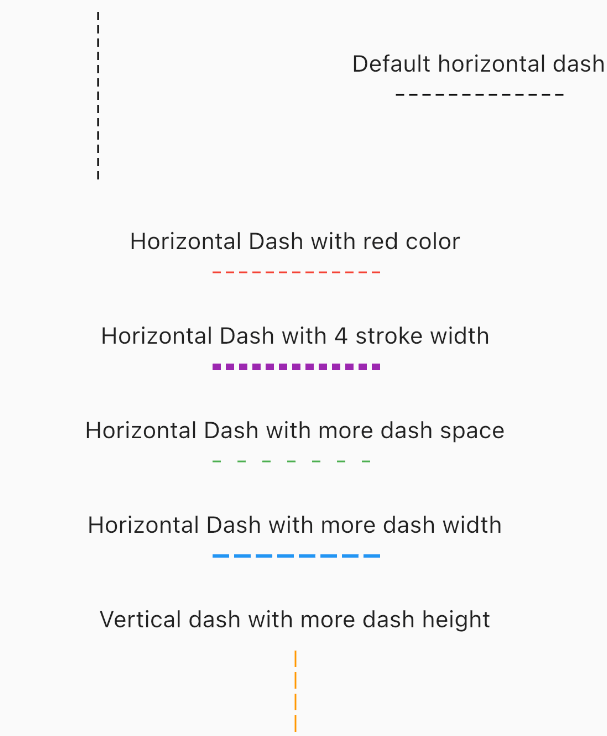
Overview
The dotted_dashed_line package enables developers to easily draw horizontal or vertical dashed or dotted lines in Flutter applications across all platforms. It provides a simple and customizable way to add decorative lines for UI separation, dividers, or visual cues. The package is lightweight and integrates seamlessly into existing layouts using standard Flutter widgets. It supports both horizontal and vertical orientations with adjustable dash patterns, spacing, and stroke width. Ideal for enhancing UI design without complex custom painting.
Use cases
- Creating UI dividers
- Adding visual separation in lists
- Designing form sections
- Enhancing card or container borders
- Building custom line-based layouts
Key features
- Supports horizontal and vertical lines
- Customizable dash and dot patterns
- Adjustable stroke width and spacing
- Cross-platform compatibility
- Simple integration with Flutter widgets
- Lightweight and performant
Suitable for
- UI designers seeking decorative elements
- Developers building forms or lists
- Apps requiring clean visual separators
- Cross-platform Flutter projects
- Projects needing minimal custom painting
Considerations
- Limited to straight lines only
- No support for curved or angled dashes
- Requires manual positioning within layout
- Not suitable for complex path drawings
- Best used for simple decorative purposes