Search packages, repositories and app categories

dotted_decoration cover
Package detailsv3.0.0

dotted_decoration

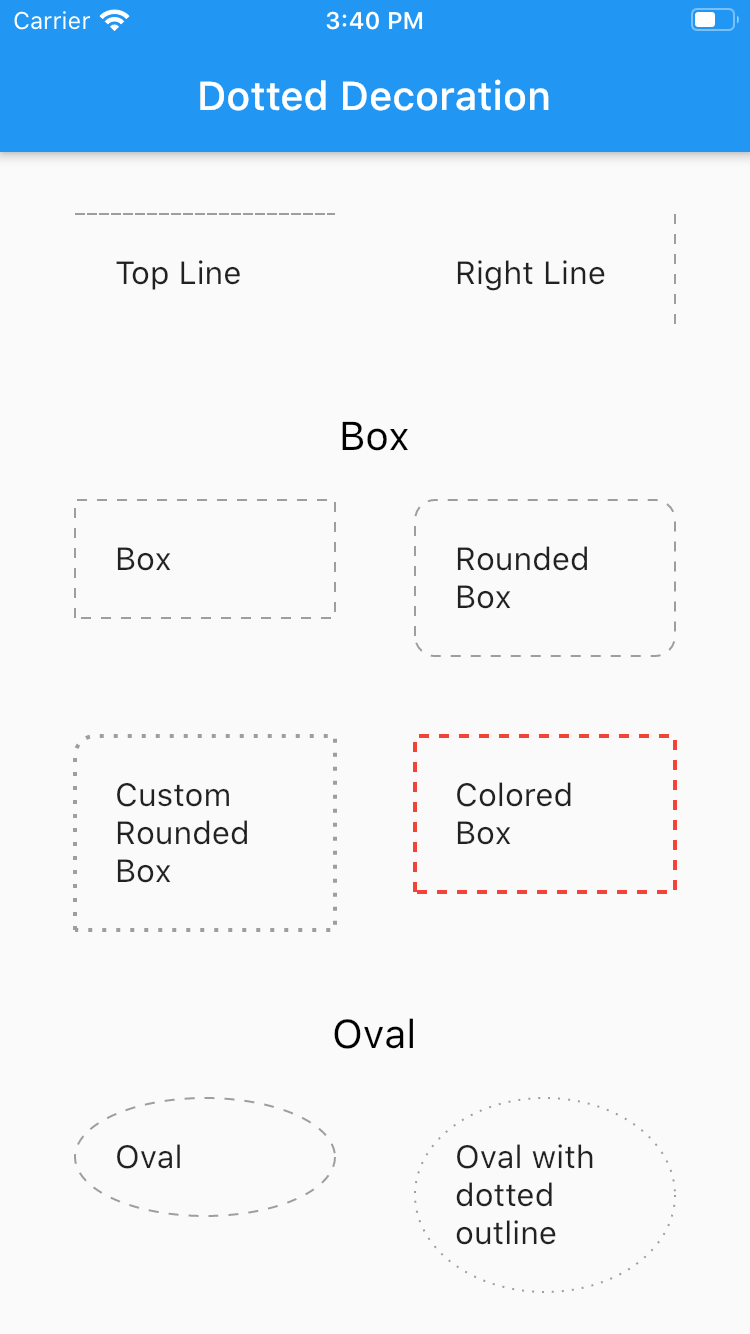
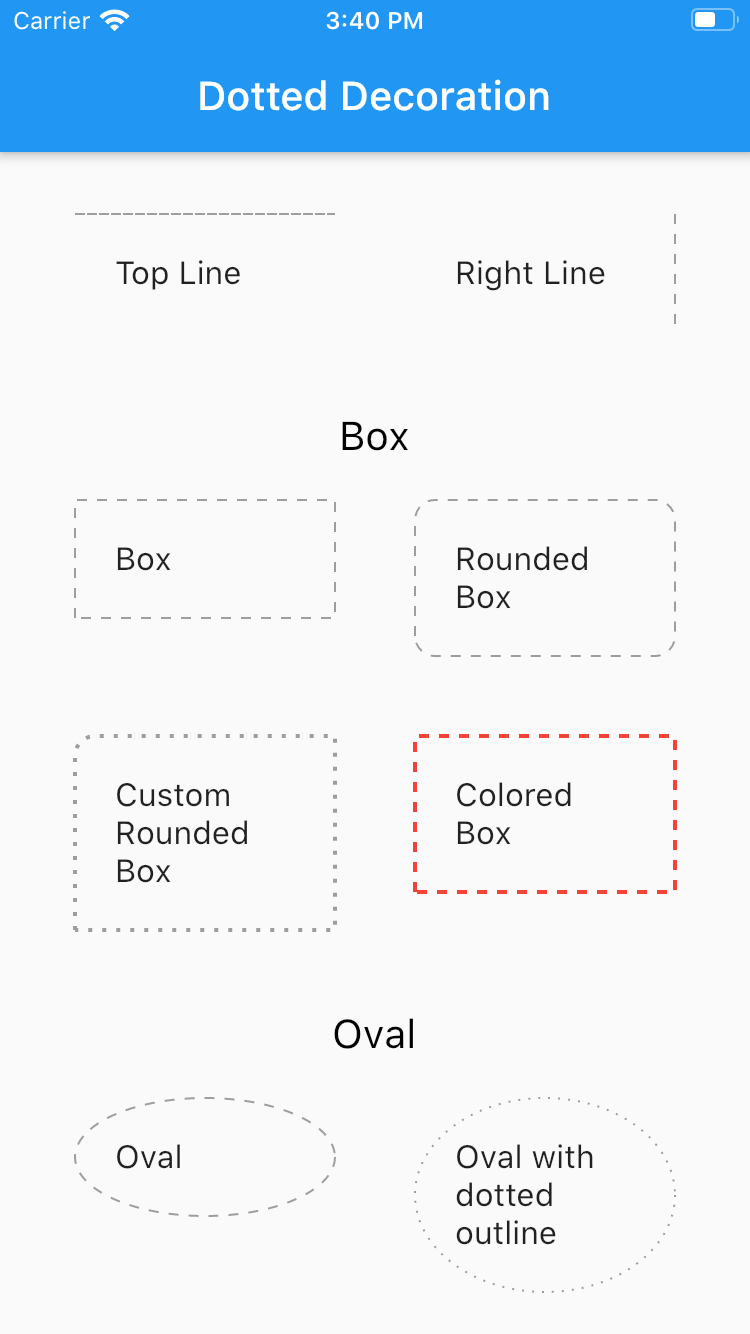
Dotted line decoration is handly package to draw dotted divider, dotted border for rectangle, circle or rounded rectangle.

AndroidiOSWebmacOSWindowsLinux
30-day downloads
105K
Likes
156
Pub points
150

Install package

flutter pub add dotted_decoration

Package Overview

Package selection guidance compiled from public package information, community data, and project usage.

The dotted_decoration package provides a simple and flexible way to create dotted lines and borders in Flutter applications. It enables developers to draw dotted dividers, borders around rectangles, circles, or rounded rectangles with customizable dot size, spacing, and color. Ideal for UI elements like separators, outlines, or decorative accents, it enhances visual design without complex custom painting. The package is lightweight and compatible across all major platforms including Android, iOS, Web, macOS, Windows, and Linux.

Use cases

  • Creating dotted dividers in lists
  • Adding dotted borders to cards or containers
  • Designing circular or rounded dotted outlines
  • Enhancing form field styling
  • Building custom UI separators
  • Adding decorative line patterns

Key features

  • Easy-to-use dotted decoration class
  • Supports rectangles, circles, and rounded rectangles
  • Customizable dot size and spacing
  • Configurable color and stroke width
  • Cross-platform compatibility
  • Lightweight and minimal dependencies

Suitable for

  • UI designers seeking decorative elements
  • Developers building forms or lists
  • Apps requiring visual separation or emphasis
  • Projects with consistent design systems
  • Flutter beginners exploring custom decorations

Considerations

  • Limited to basic dotted patterns
  • No support for dashed or custom stroke styles
  • May require manual alignment for precise layouts
  • Not ideal for high-performance animations
  • Best suited for static or low-frequency rendering
Original README

Original README snapshot from the linked source repository. Visit the repository for the latest content.

dotted_decoration

Dotted line decoration is custom decoration as simple as BoxDocoration can be used in Container widget to draw dotted divider, dotted border for rectangle, oval or circle.

Preview

Flutter Dotted Decoration screenshot

Installing

To use this package, add dotted_decoration as a dependency in your pubspec.yaml file.

Usage

Create a container widget and assign DottedDecoration as decoration

Container(
    decoration: DottedDecoration()
    child: Text('Dotted Decoration')
)
Container(
    decoration: DottedDecoration()
    child: Text('Dotted Decoration')
)

To draw line

DottedDecoration(
  shape: Shape.line, linePosition: LinePosition.bottom),

To add rounded rection

DottedDecoration(
  shape: Shape.box,
  borderRadius: BorderRadius.circular(10), //remove this to get plane rectange
),

To add circle

//make sure width & height of container is same to get perfect circle or else it will end up in oval
DottedDecoration(shape: Shape.circle, dash: <int>[1, 4]);

Parameters

Shape

Kind of outline shape, default shape is Shape.line.

shape: Shape.line shape: Shape.box shape: Shape.oval

linePosition

Where line is located, default shape is LinePosition.bottom.

linePosition: LinePosition.bottom linePosition: LinePosition.left linePosition: LinePosition.right linePosition: LinePosition.top

dash

Border line order, first in dash and second is space.

dash: <int>[2, 5]

strokeWidth

Line width.

strokeWidth: 2

color

Color of line, default shape is Colors.grey.

color: Colors.red

Categories

Source repository

Projects using this package