Search packages, repositories and app categories

dragsheet cover
Package detailsv0.0.4

dragsheet

Physics-y, bouncy, draggable sheet & modal for Flutter. Built to fill a gap I hit in my own app.

AndroidiOSWebmacOSWindowsLinux
30-day downloads
71
Likes
4
Pub points
160

Install package

flutter pub add dragsheet

Package Overview

Package selection guidance compiled from public package information, community data, and project usage.

Dragsheet is a Flutter package that provides physics-based, bouncy, and draggable bottom sheets and modals. Designed to offer a more dynamic and responsive user experience, it fills a gap in standard Flutter bottom sheet implementations by adding realistic drag interactions with spring-like animations. Ideal for apps needing interactive, gesture-driven panels that feel natural and engaging.

Use cases

  • Interactive bottom panels
  • Gesture-driven modals
  • Dynamic UI components
  • Mobile-first design patterns
  • Customizable sheet transitions
  • Enhanced user engagement

Key features

  • Physics-based drag interactions
  • Bouncy animation effects
  • Smooth gesture responsiveness
  • Cross-platform support
  • Customizable drag thresholds
  • Easy integration with existing Flutter apps

Suitable for

  • Developers seeking advanced bottom sheet behavior
  • Apps requiring tactile, animated UIs
  • Designers focused on fluid motion
  • Flutter projects with interactive bottom panels
  • Users wanting a drop-in replacement for standard BottomSheet

Considerations

  • May require tuning for optimal physics behavior
  • Additional performance overhead from animations
  • Not suitable for simple static sheets
  • Best used with clear visual feedback
  • Limited customization beyond drag mechanics
  • Requires understanding of physics simulation principles

Original README

Original README snapshot from the linked source repository. Visit the repository for the latest content.

Dragsheet: Bouncy, Fun, & Draggable ✨

Simple Flutter package for creating bouncy, fun, and most importantly draggable sheets.

Developed because I wanted this for my own app, was familiar with the React Native versions of this, but couldn't find a matching one in the Flutter ecosystem.

Examples

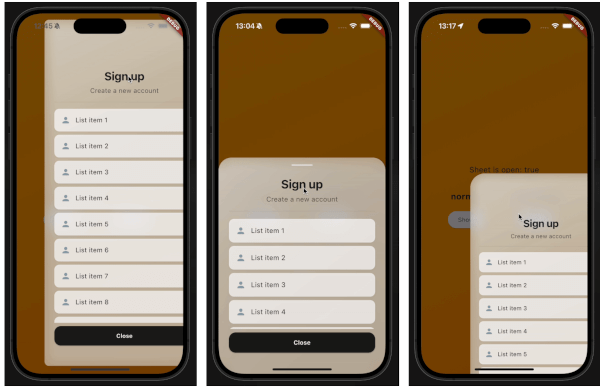
demo gif 1 demo gif 2 demo gif 3

This demo "sign up" blurry sheet is not included with the package. I created it to demonstrate what you are capable of doing with the dragsheet package.

Usage

  1. Initialize the controller.

    final controller = DragSheetController();
    
  2. Open YourWidget via the controller.

    controller.show(
        context,
        (ctx) => YourWidget(),
    ),
    
  3. If you want to close the sheet, use the controller.

    controller.close();
    
  4. If you want to listen to the state of the sheet, use the controller.

    controller.addListener(() {
        print(controller.isOpen);
    });
    
  5. Remember to dispose of the controller when you're done with it.

    @override
    void dispose() {
        super.dispose();
        controller.dispose();
    }
    
  6. If you care about customization, you won't be disapointed. However, the defaults should be solid enough. The main properties to know about are shrinkWrap, which will make the dragsheet shrink to the size of the child you provide it, and if shrinkWrap is true, closeOnShrinkWrapTap, which will close the sheet when you tap outside of the sheet.

    void show(
        BuildContext context,
        WidgetBuilder builder, {
        bool shrinkWrap = false,
        bool closeOnShrinkWrapTap = true, 
        double minScale = 0.85,
        double maxScale = 1.0,
        double minRadius = 0.0,
        double maxRadius = 30.0,
        double minOpacity = 0.0,
        double maxOpacity = 0.5,
        Duration entranceDuration = const Duration(milliseconds: 200),
        Duration exitDuration = const Duration(milliseconds: 200),
        Duration gestureFadeDuration = const Duration(milliseconds: 200),
        Duration programmaticFadeDuration = const Duration(milliseconds: 200),
        double effectDistance = 220.0,
        BgOpacity? bgOpacity,
        double swipeVelocityMultiplier = 2.5,
        double swipeAccelerationThreshold = 50.0,
        double swipeAccelerationMultiplier = 12.0,
        double swipeMinVelocity = 1000.0,
        double swipeMaxVelocity = 10000.0,
        double swipeFriction = 0.09,
        VoidCallback? onShow,
        VoidCallback? onDismiss,
        Duration opacityDuration = const Duration(milliseconds: 200),
        ApplyBorderRadius applyBorderRadius = ApplyBorderRadius.toTop,
    })
    

Categories

Source repository

Projects using this package

No data available yet.