Package selection guidance compiled from public package information, community data, and project usage.
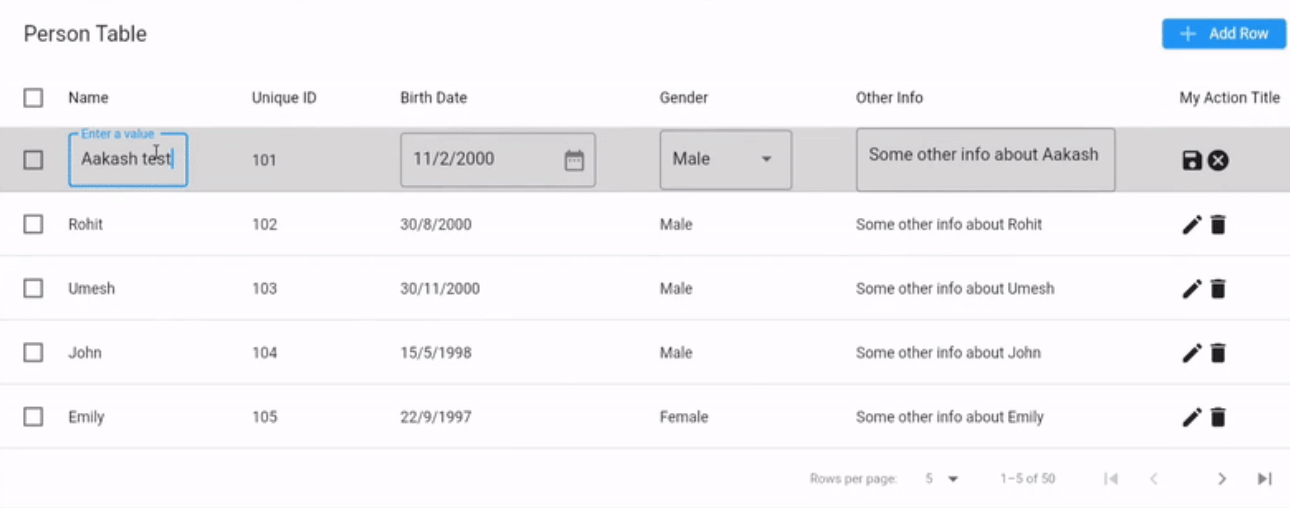
A highly customizable data table package for Flutter that enables real-time editing, deletion, addition, and updating of table values. Designed for seamless integration into Flutter projects across multiple platforms, it provides an intuitive interface for managing structured data. The package supports dynamic column and row manipulation, making it ideal for forms, dashboards, and data entry interfaces. With a focus on flexibility and ease of use, it empowers developers to build interactive tables without extensive boilerplate code.
Use cases
Interactive data entry forms
Real-time dashboard data management
User-editable spreadsheets in apps
Dynamic list management
Data visualization with user input
Admin panel data tables
Key features
Editable cells
Add/delete rows dynamically
Customizable columns
Real-time updates
Cross-platform support
Simple API integration
Suitable for
Developers building data-heavy apps
UI designers needing interactive tables
Apps requiring user-driven data modification
Prototyping rapid data interfaces
Projects targeting Android, iOS, Web, macOS, Windows, and Linux
Considerations
Requires careful state management
May need custom styling for complex layouts
Performance with very large datasets
Limited built-in validation
Not optimized for read-only scenarios
Depends on external dependencies for advanced features
Original README
Original README snapshot from the linked source repository. Visit the repository for the latest content.
Dynamic_Table
A fully customizable data table for your flutter project in which you can edit, delete, add and update values in the table.
Invoked when the user selects or unselects every row, using the
checkbox in the heading row.
void Function(int)? onPageChanged
Invoked when the user switches to another page.
The value is the index of the first row on the currently displayed page.
void Function(int?)? onRowsPerPageChanged
Invoked when the user selects a different number of rows per page.
If this is null, then the value given by [rowsPerPage] will be used
and no affordance will be provided to change the value.
bool Function(int, List<dynamic>)? onRowEdit
Called when the user clicks on the edit icon of a row.
Return true to allow the edit action, false to prevent it.
If the action is allowed, the row will be editable.
boolonRowEdit(int index, List<dynamic> row){
//Do some validation on row and return false if validation failsif (index%2==1) {
ScaffoldMessenger.of(context).showSnackBar(
constSnackBar(
content: Text("Cannot edit odd rows"),
),
);
returnfalse; // The row will not open in editable mode
}
returntrue; // The row will open in editable mode
}
bool Function(int, List<dynamic>)? onRowDelete
Called when the user clicks on the delete icon of a row.
Return true to allow the delete action, false to prevent it.
If the delete action is allowed, the row will be deleted from the table.
boolonRowDelete(int index, List<dynamic> row){
//Do some validation on row and return false if validation failsif (row[0] == null) {
ScaffoldMessenger.of(context).showSnackBar(
constSnackBar(
content: Text("Name cannot be null"),
),
);
returnfalse;
}
returntrue;
}
Called when the user clicks on the save icon of a row.
Return List<dynamic> newValue to allow the save action, null to prevent it.
The newValue must be a list of the same length as the column.
If the save action is allowed, the row will be saved to the table.
The oldValue is the value of the row before the edit.
The newValue is the value of the row after the edit.
List<dynamic>? onRowSave(int index, List<dynamic> oldValue, List<dynamic> newValue) {
//Do some validation on new value and return null if validation failsif (newValue[0] == null) {
ScaffoldMessenger.of(context).showSnackBar(
constSnackBar(
content: Text("Name cannot be null"),
),
);
returnnull;
}
// Do some modification to `newValue` and return `newValue`
newValue[0] = newValue[0].toString().toUpperCase(); // Convert name to uppercase// Save new data to you list
myData[index] = newValue;
return newValue;
}
Available Methods
First create a GlobalKey of DynamicTableState.
Pass the key to DynmaicTable constructor.
final tableKey = GlobalKey<DynamicTableState>();
DynamicTable(key:tableKey);
addRow()
tableKey.currentState?.addRow();
Add new empty row at the 0th position in the table. The showActions parameter must be true because the row will be added in editing mode and to save the row we need actions.