Search packages, repositories and app categories

dynamic_themes cover
Package detailsv1.1.0

dynamic_themes

Allows you to specify a number of color themes for the user to choose from. Persits the selected theme across app restarts.

AndroidiOSWebmacOSWindowsLinux
30-day downloads
2.7K
Likes
43
Pub points
150

Install package

flutter pub add dynamic_themes

Package Overview

Package selection guidance compiled from public package information, community data, and project usage.

Dynamic Themes is a Flutter package that enables developers to implement customizable color themes, allowing users to select and switch between multiple predefined themes. It automatically persists the user's selected theme across app restarts, ensuring a consistent experience. The package supports all major platforms including Android, iOS, Web, macOS, Windows, and Linux, making it ideal for cross-platform applications requiring dynamic theming capabilities.

Use cases

  • App with user-selectable light and dark modes
  • Multi-theme support in a single application
  • Persistent theme preferences after app restart
  • Cross-platform theme consistency
  • Custom brand color schemes
  • User preference retention

Key features

  • Easy theme configuration
  • Automatic theme persistence
  • Support for all Flutter platforms
  • Simple API for theme switching
  • Built-in light/dark mode presets
  • Extensible theme system

Suitable for

  • Developers building apps with customizable UI themes
  • Apps targeting multiple platforms
  • Projects requiring persistent user preferences
  • Design systems with branded color palettes
  • Applications focused on user experience and accessibility

Considerations

  • Requires manual setup of theme colors
  • Limited to predefined theme sets
  • No runtime theme generation
  • Theme switching may require rebuilds
  • Depends on shared preferences for persistence
  • Not optimized for very large theme collections

Original README

Original README snapshot from the linked source repository. Visit the repository for the latest content.

dynamic_themes

"Buy Me A Coffee"

Dynamically change between multiple themes

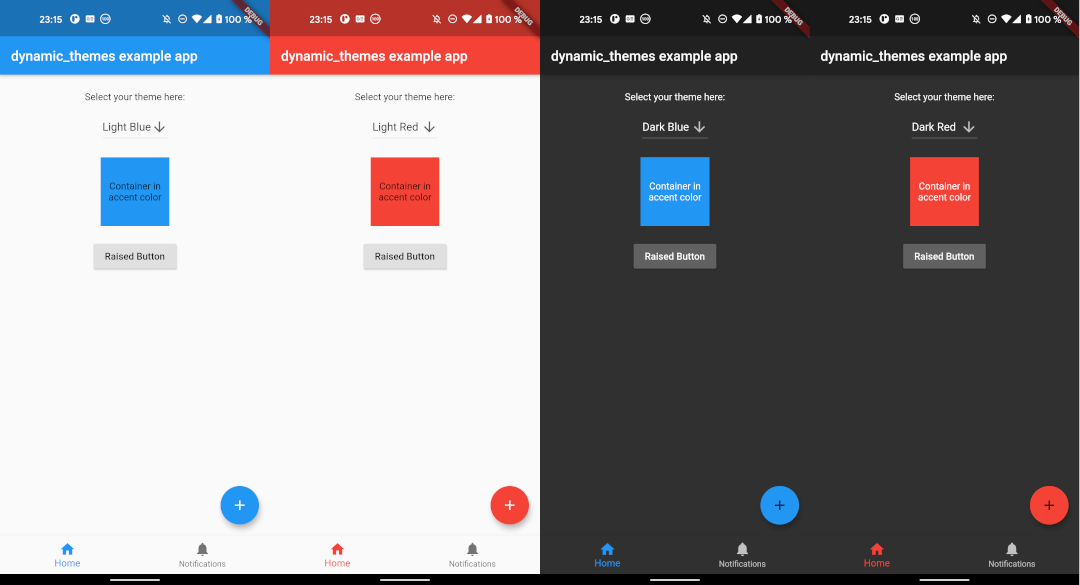
This package allows you to specify multiple themes for the user to choose from. The theme can be updated dynamically during runtime. The package persits the selected theme across app restarts.

image

Getting Started

Follow the instructions here.

Usage

This package allows for an arbitrary number of themes to be defined. Each theme has a unique ID of type int. To create the themes and map them to IDs, first you have to create an instance of ThemeCollection, e. g.:

final themeCollection = ThemeCollection(
    themes: {
        0: ThemeData(primarySwatch: Colors.blue),
        1: ThemeData(primarySwatch: Colors.red),
        2: ThemeData.dark(),
    },
    fallbackTheme: ThemeData.light(), // optional fallback theme, default value is ThemeData.light()
);

However, I would recommend to introduce a class with static const int values to associate a name to each ID value:


class AppThemes {
    static const int LightBlue = 0;
    static const int LightRed = 1;
    static const int Dark = 2;
}
final themeCollection = ThemeCollection(
    themes: {
        AppThemes.LightBlue: ThemeData(primarySwatch: Colors.blue),
        AppThemes.LightRed: ThemeData(primarySwatch: Colors.red),
        AppThemes.Dark: ThemeData.dark(),
    },
    fallbackTheme: ThemeData.light(),
);

Now, wrap your material app like this:

return DynamicTheme(
    themeCollection: themeCollection,
    defaultThemeId: AppThemes.LightBlue, // optional, default id is 0
    builder: (context, theme) {
        return MaterialApp(
            title: 'dynamic_themes example',
            theme: theme,
            home: HomePage(title: 'dynamic_themes example app'),
        );
    }
);

The theme can be set anywhere in the app, provided you have a BuildContext, e. g.:

DynamicTheme.of(context).setTheme(AppThemes.LightRed);

By setting the theme, its ID is automatically saved via the shared_preferences package, so the next time the app starts, the theme can be restored automatically.

Provided you have wrapped the MaterialApp in the DynamicTheme widget, you can access the current theme like you are used to it by calling

final theme = Theme.of(context);

If for any reason you can't access the theme this way, you can also call

final theme = DynamicTheme.of(context).theme;

To get the ID of the current theme, for example to create a selection UI as done in the example app provided with this package, call

final themeId = DynamicTheme.of(context).themeId;

Example

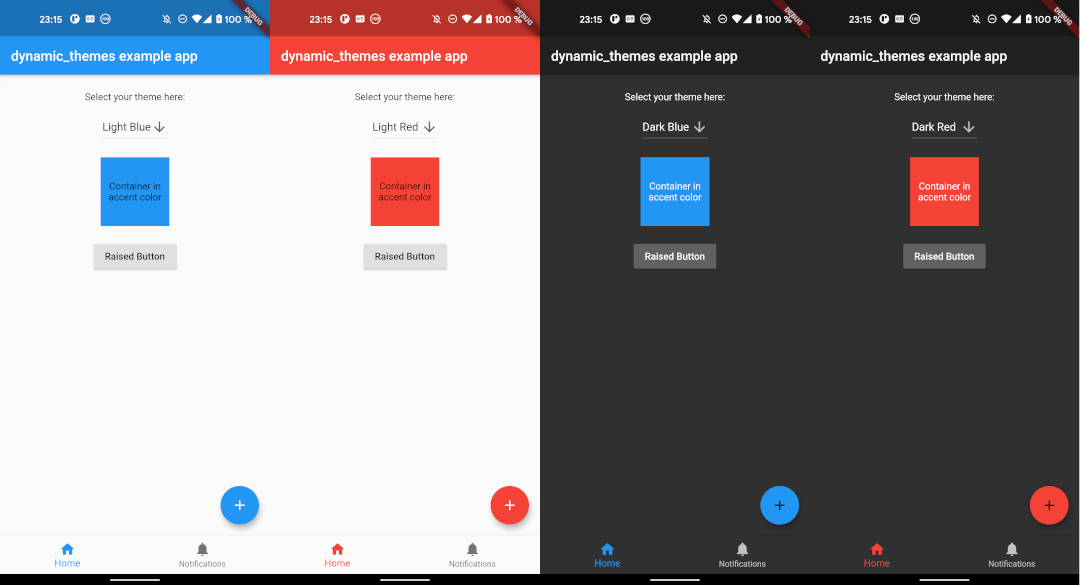
The example app can be found in the example folder. It implements a dropdown menu to select between 4 themes. The app is the source for the screenshots above.

Maintainer

If you experience any problems using this package, please create an issue on Github. Pull requests are also very welcome.

Many thanks to the dynamic_theme package from Norbert Kozsir this package was inspired by!

Categories

Dependencies

Dependency list 1 items

Source repository

Projects using this package

No data available yet.