Search packages, repositories and app categories

Package detailsv0.8.2

easy_event_bus

It's an easy-to-use and elegant event bus-based library.

AndroidiOSWebmacOSWindowsLinux
30-day downloads
699
Likes
9
Pub points
145

Install package

flutter pub add easy_event_bus

Package Overview

Package selection guidance compiled from public package information, community data, and project usage.

Easy EventBus is a lightweight, intuitive event bus library for Flutter applications, enabling simple and efficient communication between components through events. It provides an elegant API for publishing and subscribing to events without tight coupling, making it ideal for state management and inter-component messaging. The library supports all major platforms, including Android, iOS, Web, macOS, Windows, and Linux, ensuring cross-platform consistency. With minimal setup and clean syntax, it enhances code maintainability and scalability in complex apps.

Use cases

  • Real-time notifications
  • Cross-widget communication
  • Decoupling UI from business logic
  • Event-driven architecture
  • State synchronization across screens
  • Plugin or module integration

Key features

  • Simple publish/subscribe pattern
  • Cross-platform support
  • Minimal boilerplate
  • Type-safe event handling
  • Lightweight dependency
  • Clean and readable API

Suitable for

  • Developers seeking lightweight state management
  • Apps with frequent inter-component communication
  • Projects requiring decoupled architecture
  • Teams prioritizing code simplicity
  • Flutter beginners exploring event-driven design

Considerations

  • Not suitable for large-scale state management
  • Limited built-in error handling
  • No built-in persistence
  • Requires careful event naming to avoid conflicts
  • Best used alongside other state management solutions

Original README

Original README snapshot from the linked source repository. Visit the repository for the latest content.

pub package GitHub

EasyEventBus

Discord Server Invite Kakao_Talk

It's an easy-to-use and elegant library based on event bus. It was greatly inspired by EventBus and made much simpler.

About Event Bus

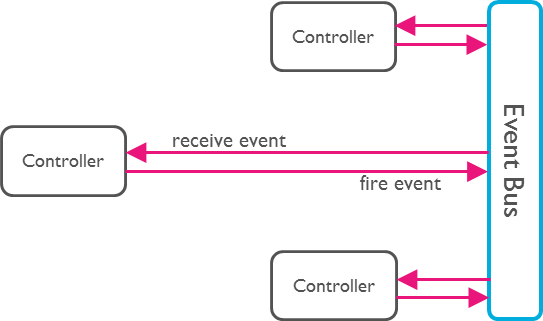
An Event Bus follows the publish/subscribe pattern. It allows listeners to subscribe for events and publishers to fire events. This enables objects to interact without requiring to explicitly define listeners and keeping track of them.

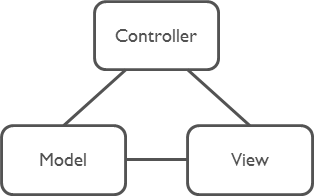
The Event Bus pattern is especially helpful for decoupling MVC (or MVP) applications.

One group of MVC is not a problem.

Model-View-Controller

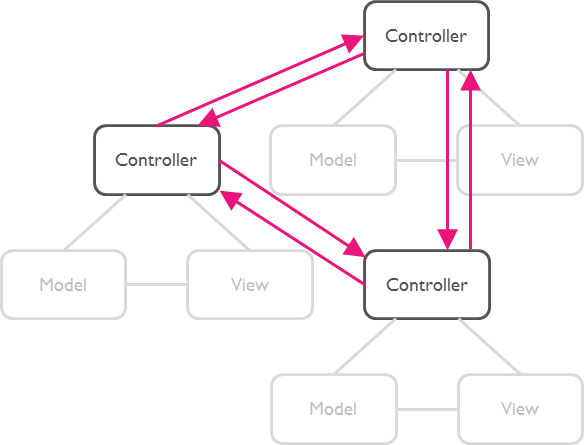
But as soon as there are multiple groups of MVCs, those groups will have to talk to each other. This creates a tight coupling between the controllers.

Multi Model-View-Controllers

By communication through an Event Bus, the coupling is reduced.

Event Bus

Usage

Step 1: Subscribe to an Event

First, set up a subscription for the desired event. This allows you to listen for and react to the event whenever it is triggered.

EasyEventBus.on('sayHello', (event) {
  print(event); // write your code here.
});
Step 2: Trigger the Event

Next, trigger the event at the appropriate time in your application. This will notify all subscribers of the event.

EasyEventBus.fire('sayHello', 'hello world'); // Triggers the event with a any data.

Note: The event data can be of any type, giving you flexibility in what information you pass to the subscribers.

That's All!

Advance

1. Cancel Subscription

To cancel a subscription, you call the cancel method. This example shows how to cancel all subscriptions for the 'sayHello' event, both anonymous and with identifiers.

// Cancel all subscriptions to the 'sayHello' event.
EasyEventBus.cancel('sayHello');
2. Cancel Specific Subscription

Before canceling a specific subscription, you first need to create a subscription with an identifier (id). Here is how to subscribe to an event with an id and then cancel that specific subscription by calling the cancel method with the same id.

First, subscribe to an event with an id:

// Subscribe to the 'sayHello' event with an identifier.
EasyEventBus.on('sayHello', (event) {
  print('Received: $event');
}, id: 'uniqueId123');

Then, cancel the subscription using the same id:

// Cancel the subscription to the 'sayHello' event using the identifier 'uniqueId123'.
EasyEventBus.cancel('sayHello', id: 'uniqueId123');
3. Cancel All Subscriptions

You can cancel all subscriptions by calling the cancelAll method. This method cancels all subscriptions for all events and closes all event controllers.

// Cancel all subscriptions and close all event controllers.
EasyEventBus.cancelAll();

Categories

Source repository

Projects using this package