Search packages, repositories and app categories

easy_folder_picker cover
Package detailsv1.3.4

easy_folder_picker

Easy directory picker for Flutter, you can choose directory or create directory for further action

AndroidiOSWindows
30-day downloads
359
Likes
34
Pub points
140

Install package

flutter pub add easy_folder_picker

Package Overview

Package selection guidance compiled from public package information, community data, and project usage.

Easy Folder Picker is a Flutter package that simplifies directory selection and creation in mobile and desktop applications. It enables users to browse and pick existing directories or create new ones, making it ideal for file management workflows. The package supports Android, iOS, and Windows platforms, offering a consistent interface across devices. With minimal setup via `flutter pub add easy_folder_picker`, developers can integrate folder selection into their apps quickly. It's particularly useful for apps requiring user-controlled file storage or organization.

Use cases

  • File management apps
  • Document storage tools
  • Backup and export features
  • User-defined project folders
  • Data import/export workflows

Key features

  • Simple directory selection
  • Create new directories
  • Cross-platform support (Android, iOS, Windows)
  • Minimal configuration
  • Native-like UI experience

Suitable for

  • Developers building file-centric apps
  • Apps needing user-controlled folder paths
  • Cross-platform file picker integration
  • Prototyping rapid file navigation
  • Educational or productivity software

Considerations

  • Requires platform-specific permissions on Android/iOS
  • Limited customization of picker UI
  • No built-in file preview functionality
  • Depends on native OS file system access
  • May require handling permission requests manually

Original README

Original README snapshot from the linked source repository. Visit the repository for the latest content.

Easy Folder Picker

Easy directory picker for Flutter

pub

A flutter package to pick directories and handles requesting required permissions as well. This package only supports ANDROID.

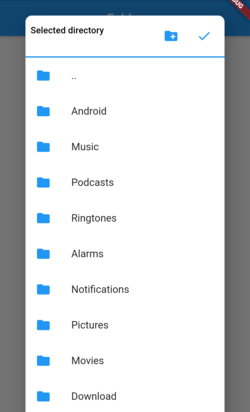
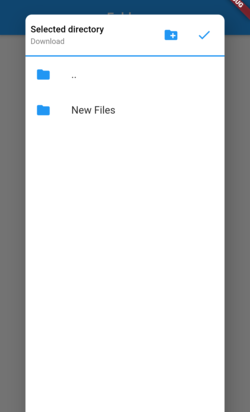
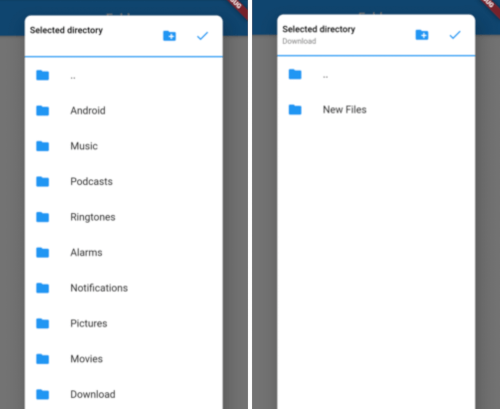
Picker Screenshot1 Picker Screenshot2

Installation

Add below line to your pubspec.yaml and run flutter packages get

  easy_folder_picker: ^latest version

Permissions

Add below line to your android/app/src/main/AndroidManifest.xml

<uses-permission android:name="android.permission.READ_EXTERNAL_STORAGE" />

If you want to allow creating new folders directly from picker then add the below permission also

<uses-permission android:name="android.permission.WRITE_EXTERNAL_STORAGE" />
Android 10 (Q)

In Android 10, you need to add the Following Lines in AndroidManifest file:

<application
      android:requestLegacyExternalStorage="true"
Android 11

From Android 11, you need to manage permission within your app, if you want to write in different folders of external storage.

Steps
  1. Add the following Lines in AndroidManifest file
  <uses-permission android:name="android.permission.MANAGE_EXTERNAL_STORAGE"/>
  1. Add device_info package to check android version
  2. Check permission if app can manage external storage if its android 11 or greater Note: This is a runtime permission (might not show it in app info's permission section )
  var status = await Permission.manageExternalStorage.status;
      if (status!.isRestricted) {
        status = await Permission.manageExternalStorage.request();
      }

      if (status!.isDenied) {
        status = await Permission.manageExternalStorage.request();
      }
      if (status!.isPermanentlyDenied) {
        ScaffoldMessenger.of(context).showSnackBar(SnackBar(
          backgroundColor: Colors.green,
          content: Text('Please add permission for app to manage external storage'),
        ));
      }

Flutter Usage

import 'package:easy_folder_picker/FolderPicker.dart';

// In any callback call the below method
  Future<void> _pickDirectory(BuildContext context) async {
    Directory directory = selectedDirectory;
    if (directory == null) {
      directory = Directory(FolderPicker.ROOTPATH);
    }

    Directory newDirectory = await FolderPicker.pick(
        allowFolderCreation: true,
        context: context,
        rootDirectory: directory,
        shape: RoundedRectangleBorder(
            borderRadius: BorderRadius.all(Radius.circular(10))));
    setState(() {
      selectedDirectory = newDirectory;
      print(selectedDirectory);
    });
  }

Categories

Dependencies

Dependency list 2 items

Source repository

Projects using this package

No data available yet.