Search packages, repositories and app categories

expand_tap_area cover
Package detailsv1.1.1

expand_tap_area

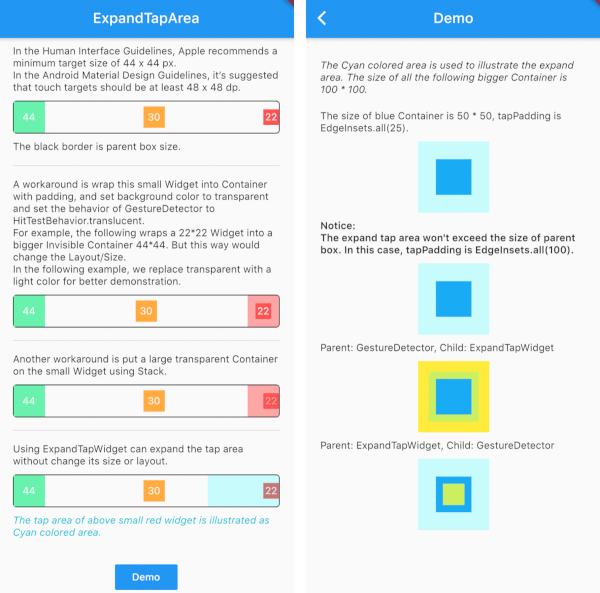
Manually expand the tap area of a widget without changing its size or layout. Similar with the hitTest in iOS development.

AndroidiOSWebmacOSWindowsLinux
30-day downloads
22.9K
Likes
60
Pub points
140

Install package

flutter pub add expand_tap_area

Package Overview

Package selection guidance compiled from public package information, community data, and project usage.

The expand_tap_area package allows developers to manually increase the touchable area of a widget without altering its visual size or layout. This is particularly useful for improving usability on touch devices, especially for small interactive elements. It mimics the hitTest behavior found in iOS development, enabling precise control over gesture recognition zones. The package works across all major platforms including Android, iOS, Web, macOS, Windows, and Linux.

Use cases

  • Improving touch target size for small buttons
  • Enhancing accessibility in mobile apps
  • Creating larger tap zones for icons
  • Optimizing UI for users with motor impairments
  • Designing responsive touch interfaces

Key features

  • Non-intrusive tap area expansion
  • No layout changes required
  • Cross-platform compatibility
  • Simple API integration
  • Supports custom expansion offsets

Suitable for

  • Mobile app developers
  • Accessibility-focused projects
  • UI/UX designers
  • Cross-platform Flutter applications

Considerations

  • May affect overlapping gesture detection
  • Requires careful offset tuning
  • Not suitable for complex gesture chains
  • Limited to tap interactions
  • Potential visual confusion if expanded too much

Original README

Original README snapshot from the linked source repository. Visit the repository for the latest content.

ExpandTapArea

Manually expand the tap area of a widget without changing its size or layout. Similar with the hitTest in iOS development.

Context

In the Human Interface Guidelines, Apple recommends a minimum target size of 44 x 44 px. 
In the Android Material Design Guidelines, it’s suggested that touch targets should be at least 48 x 48 dp.

Inspired by issue

Usage

ExpandTapWidget(
  onTap: () {},
  tapPadding: EdgeInsets.all(25.0),
  child: smallWidget(),
),

Demo

Attention

  1. ExpandTapWidget can be wrapped inside/outside GestureDetector: To avoid the conflict of gesture, it is better to apply on the innermost/smallest widget.
  2. The expanded area wouldn't exceed the boundary of the Parent Box. You can set debugPaintExpandAreaEnabled = true to display the actual expanded area.

Categories

Source repository

Projects using this package