Flutter Debug Bridge - CLI for AI agents to interact with running Flutter apps on device. Launch, reload, screenshot, inspect widget tree, filter logs.
Package selection guidance compiled from public package information, community data, and project usage.
FDB (Flutter Debug Bridge) is a command-line tool that enables AI agents to interact with running Flutter applications on physical devices or emulators. It supports launching apps, performing hot reloads, capturing screenshots, inspecting the widget tree, and filtering logs—streamlining debugging and development workflows. Designed for automation and integration, FDB enhances developer productivity by providing programmatic access to Flutter's debugging capabilities across Android, iOS, macOS, Windows, and Linux platforms.
Use cases
Automated testing workflows
AI-powered debugging assistance
Real-time app inspection during development
CI/CD pipeline integration
Remote device debugging
Key features
Launch and reload Flutter apps
Capture device screenshots
Inspect widget trees
Filter and analyze logs
Cross-platform device control
Suitable for
Developers using AI agents in workflows
Teams integrating Flutter into CI/CD pipelines
Debugging on physical devices
Automation-focused development environments
Considerations
Requires device connection or emulator running
Limited to CLI interaction
May need additional setup for AI agent integration
Not intended for end-user app interaction
Original README
Original README snapshot from the linked source repository. Visit the repository for the latest content.
Give your AI agent eyes and hands on your Flutter app.
fdb is a CLI that lets AI coding agents launch, hot reload, screenshot, inspect, and kill Flutter apps running on real devices and simulators -- all from the terminal, no IDE required.
AI agents are great at writing Flutter code. But they can't see what the app looks like, read runtime logs, or inspect the widget tree.
fdb fixes that:
Launch a Flutter app on any connected device or simulator
Hot reload / restart after code changes
Screenshot so the agent can see the UI
Read logs filtered by tag
Inspect the widget tree
Select widgets by tapping on device
Zero dependencies. Pure Dart. Works on macOS and Linux.
Why not the official Flutter MCP server?
The Dart & Flutter MCP server handles code analysis, pub.dev search, formatting, and can also introspect a running app via the Flutter inspector. fdb does something different: runs the app on a real device and lets the agent interact with it via a bash-native CLI — no MCP client required.
fdb
Flutter MCP server
Architecture
CLI -- plain bash commands
MCP protocol -- requires a compatible client
Context cost
Minimal. Agent runs a command, gets text output.
MCP tool schemas and responses are injected into context on every call, eating tokens even when unused.
Works with
Any agent that can run bash (Claude Code, OpenCode, Cursor, custom scripts, CI)
Only MCP-compatible clients
Progressive disclosure
Ships a skill file — agent loads best practices on demand, not upfront
Widget tree inspection and runtime errors via Flutter inspector (read-only)
Setup
dart pub global activate -- done
Per-client MCP config (JSON, YAML, or GUI depending on client)
tl;dr: Use the Flutter MCP server for code analysis and package management. Use fdb when your agent needs to run the app, see it, and interact with it.
Install
Using an AI agent? Just tell it:
Fetch and follow instructions from https://raw.githubusercontent.com/andrzejchm/fdb/main/doc/README.agents.md
Or install manually:
dart pub global activate fdb
Requires Dart SDK >= 3.0.0. Make sure ~/.pub-cache/bin is in your PATH.
Runs on macOS, Linux, and Windows. Windows support is newer and less battle-tested than
macOS/Linux — see Troubleshooting if fdb launch/fdb kill behave
unexpectedly on Windows.
Or from git (latest main):
dart pub global activate --source git https://github.com/andrzejchm/fdb.git
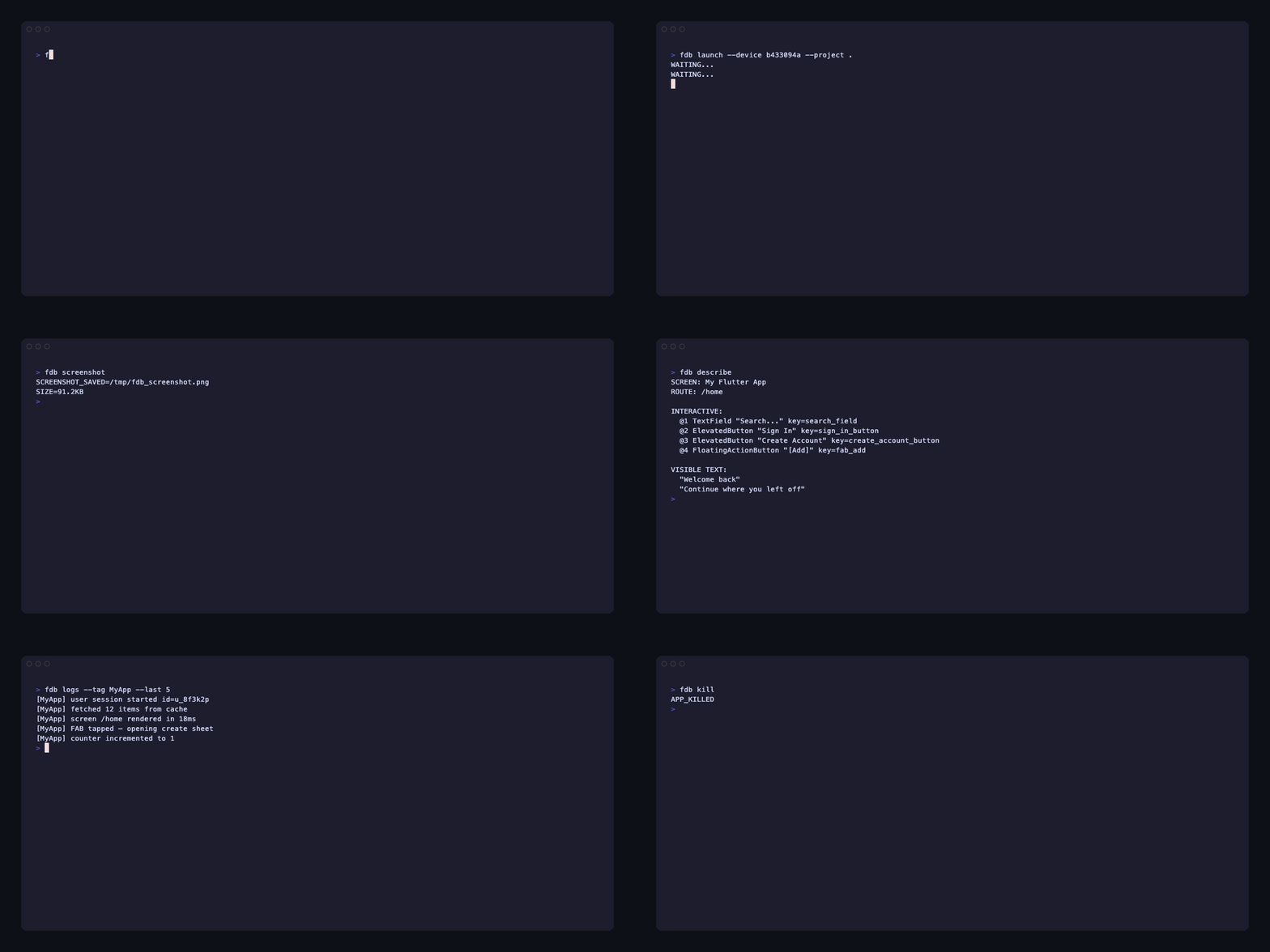
Quick Start
# Launch your app on a connected device
fdb launch --device <device_id> --project /path/to/your/flutter/app

# Or pass compile-time config through to flutter run
fdb launch --device <device_id> --project /path/to/your/flutter/app \
  --dart-define API_BASE_URL=https://example.com/v1,canary \
  --dart-define-from-file config/dev.json

# Or launch into an interactive fdb session
fdb launch --device <device_id> --project /path/to/your/flutter/app -i

# Or attach to an app already launched from Xcode, Android Studio, or another tool
fdb attach --device <device_id> --project /path/to/your/flutter/app

# See what it looks like
fdb screenshot

# Make a code change, then hot reload
fdb reload

# Check the widget hierarchy
fdb tree --depth 5 --user-only

# Read filtered logs
fdb logs --tag "MyFeature" --last 30

# Done? Kill the app
fdb kill
Launch app, wait for start (--timeout, default 600s); use repeatable define flags to pass compile-time config through to flutter run, and -i/--interactive to stay in an fdb REPL
fdb reload
Hot reload
fdb restart
Hot restart
fdb doctor
Pre-flight check for app, VM service, fdb_helper, platform tools, and device state. Takes no options (no --device); reads the device from the session
Fetch the most recent OS-level crash record (jetsam, LMK, native crashes)
fdb tree --depth <n> [--user-only]
Widget tree
fdb describe
Compact screen snapshot: interactive elements + visible text (requires fdb_helper). Each element has an @N ref that names that widget while it stays mounted (refs survive scrolling and rebuilds and are never reused). Non-EditableText inputs (e.g. Quill) show as @N QuillRawEditor(editable) "text"; disabled widgets as @N ElevatedButton(disabled) "Send"
fdb select on/off
Widget selection mode
fdb selected
Get selected widget info
Interaction
Widget-targeted commands require fdb_helper; native-tap, native-swipe, native-button and deeplink do not.
Command
Description
fdb native-button home|lock
Press one OS hardware button on the exact session device, without a VM or helper connection. iOS simulator uses the cached Swift HID hardware-button builder; Android uses adb -s <session-id> shell input keyevent KEYCODE_HOME or KEYCODE_POWER. Home returns to OS home when unlocked, not universal unlock. Lock presses power/lock and may sleep or wake depending on state; it is not an idempotent lock request. No passcode unlocking. Physical iOS and desktop targets are unsupported. Success: NATIVE_BUTTON=<home or lock> PLATFORM=<android or ios-simulator> confirms delivery, not final screen state. Uncertain delivery fails without retry.
fdb double-tap --text/--key/--type <selector> [--index N] | @N | --x X --y Y | --at X,Y
Swipe OS UI, including Notification Center, Control Center, native sheets and other apps, on the exact recorded session device. All flags required; duration is a nominal down-to-up time of 1-60000 integer milliseconds. iOS simulator: cached Swift HID helper, linear moves at about 60 Hz, coordinates in points in the current orientation. Android: adb -s <session-id> shell input swipe, coordinates in physical pixels. Both endpoints are checked before touch down. Works while Flutter is backgrounded or unresponsive, with no VM or helper connection. Physical iOS and desktop targets are unsupported. Success: NATIVE_SWIPED=<android or ios-simulator> FROM=x,y TO=x,y DURATION_MS=ms. See fdb skill interact for timing, coordinate conversion and partial-delivery behavior.
Tap native (non-Flutter) UI anywhere on screen, including system dialogs and permission prompts. Android: adb shell input tap, physical pixels; --logical takes Flutter logical pixels (the units fdb tap prints) and multiplies them by the device pixel ratio. --text on Android finds the element in a uiautomator dump by text, content-desc or resource-id and taps its center: NATIVE_TAPPED=android X=<px> Y=<px> TEXT="<label>". If the OEM blocks input injection (for example Xiaomi/HyperOS, OPPO/OnePlus/Realme), it fails with ERROR: Android blocked input injection (INJECT_EVENTS) and names the Developer options switch. iOS simulator: a real touch through the simulator's HID stack, in points in the current orientation (the same as fdb tap --at and fdb describe, portrait or landscape; fdb screenshot pixels are downscaled and must be converted), that reaches SpringBoard (permission prompts, "Open in ?", the paste prompt). Needs Xcode; the first tap compiles a small helper (5-10 s) cached in ~/Library/Caches/fdb/ (FDB_CACHE_DIR overrides). Coordinates outside the screen fail with ERROR: coordinates X,Y are outside the screen (WxH points, <orientation>). --text on the iOS simulator reads the accessibility tree (the app, or SpringBoard while an alert is up) and taps the matched element by accessibility label or identifier, for example fdb native-tap --text Allow: NATIVE_TAPPED=ios-simulator X=<x> Y=<y> TEXT="<label>". It can't type; use fdb input for text. Physical iOS and macOS not supported: use fdb tap --at instead.
fdb tap --text/--key/--type <selector>, --at x,y, or @N [--expect-text T] [--expect-type T]
Tap a widget, coordinates, or describe ref. @N taps the widget the ref names, like a selector (fails if off screen or covered); a ref whose widget was removed fails with ERROR: @N is stale: .... --expect-text/--expect-type fail without tapping if the widget's text or type changed. A selector or @N tap on a disabled widget (e.g. onPressed: null) waits until it is enabled, up to --timeout, then fails with ERROR: <Type> is disabled
fdb longpress --text/--key/--type <selector> [--duration <ms>], @N, or --at x,y
Replace the text of the focused or selected field. Works with any text input (TextField, flutter_quill, custom TextInputClient editors), no keyboard needed. --action send|done|next|... sends an IME action after the text, or alone
fdb scroll <direction> [--at x,y] [--distance px]
Scroll in a direction
fdb scroll --from x,y --to x,y
Drag gesture between two points
fdb scroll-to --text/--key/--type <selector> [--index N] or @N
Dispatch a freeform multi-point gesture as a single continuous stroke (drawing/handwriting/signature)
fdb back
Press the system back button, like the Android back button
fdb deeplink <url> [--device <id>]
Open a deep link on the session's device (--device: an iOS simulator UDID or Android serial)
iOS Simulator(no running app required. Every subcommand accepts --device <udid> after the action; without it, fdb uses the session's simulator, else the only booted one, and fails listing the candidates if several are booted.)
Target order: --device <udid>, then the session's device (.fdb/device.txt) if it is an iOS simulator, then the only booted iOS simulator. Put --device after the action (fdb simulator appearance dark --device <udid>). With several booted and none of those, the command fails with ERROR: and one <UDID> (<name>) per line. Point at another project's session with fdb --session-dir <path/to/.fdb> simulator ... (the flag goes before simulator); without it fdb walks up from the current directory. A stale session can be cleared with fdb kill. Details: fdb skill simulator.
Data & state
shared-prefs and clean require fdb_helper; grant-permission does not.
Grant, revoke, or reset a runtime permission. iOS sim: xcrun simctl privacy; Android: adb pm grant/revoke. macOS: reset only (tccutil). Physical iOS, Windows, Linux: unsupported. Pass --bundle and --device to pre-grant an iOS simulator app before launch.
fdb shared-prefs get|get-all|set|remove|clear
Read/write SharedPreferences
fdb clean
Clear app cache and data directories
VM service extensions
Command
Description
fdb ext list
List all registered ext.* VM service extensions across isolates, sorted and deduplicated
fdb ext call <method> [--arg key=value ...]
Invoke a VM service extension and print the JSON result
# Discover what debug hooks are registered in the running app
fdb ext list
# ext.dart.io.getOpenFiles# ext.flutter.debugPaint# ext.flutter.imageCache.clear# ext.flutter.imageCache.size# ext.flutter.platformOverride# ext.myapp.clearAuthCache# ext.myapp.dumpRouterStack# Get image cache stats
fdb ext call ext.flutter.imageCache.size
# Switch platform overlay to iOS
fdb ext call ext.flutter.platformOverride --arg value=iOS
# Invoke an app-specific extension that collects leak reports (see fdb #46)
fdb ext call ext.flutter.collectLeaks
Memory & heap(pure VM service — no fdb_helper needed)
Capture a DevTools-loadable heap snapshot (.heapsnapshot)
Three-tier heap workflow:
fdb mem — inspect live per-isolate heap state (usage, external, capacity) to get a quick health check.
fdb mem profile --output before.json — capture a full allocation-profile snapshot as a baseline before exercising the feature under test.
fdb mem profile --output after.json followed by fdb mem diff before.json after.json — compare the two snapshots to see exactly which classes grew in instance count or byte size.
Memory leak investigation (5-step ladder):
Confirm growth — fdb gc && fdb mem before and after the interaction; if heap returns to baseline after GC, no leak.
Find the culprit class — fdb mem profile --output before.json, repeat the interaction, fdb mem profile --output after.json, then fdb mem diff before.json after.json.
Find what retains it — check fdb ext list | grep collectLeaks:
Present (leak_tracker path): fdb ext call ext.flutter.collectLeaks — returns structured JSON with retaining paths and culprit/victim analysis.
Absent (fallback): no dedicated fdb command today — use DevTools → Memory → Trace Instances → Retaining Path, or query the VM service directly via getInstances + getRetainingPath RPCs (see the skill for the websocat snippet).
Suggest leak_tracker — when collectLeaks is missing, recommend adding leak_tracker to the app's dev dependencies for ongoing automated detection.
DevTools fallback — for leaks the above can't resolve, use DevTools → Memory → Diff Snapshots / Trace Instances. Connect via the VM_SERVICE_URI from fdb status.
For the full walkthrough see the fdb skill → "Investigating memory leaks".
Utility
Command
Description
fdb skill
Print the AI agent skill file (SKILL.md)
fdb --version
Print the fdb version
Global options
Option
Description
fdb --session-dir <path> <command>
Use a specific .fdb/ session directory instead of auto-resolving
fdb automatically locates the active .fdb/ session by walking up from the current directory, so you can run any command from a subdirectory without changing to the project root. Pass --session-dir to override this and point at a specific session directory. It must come before the command: fdb --session-dir <path> input "x" works, fdb input --session-dir <path> "x" does not.
Interactive REPL
Use -i or --interactive when you want to launch the app and stay in an
fdb prompt instead of running separate shell commands:
Use fdb attach when the app must be started by native tooling first. This is
the recommended workflow for iOS Firebase Analytics DebugView, because Firebase
expects native Xcode launch arguments rather than Flutter --dart-define values:
Auto-discovery — when --debug-url is omitted, fdb scans the device logs
for the Dart VM service URI automatically. Add fdb_helper to your app to emit
a stable [FDB_VM_URI] marker that makes discovery more reliable across Flutter
version changes.
Platform
Discovery method
Notes
Android (physical + emulator)
adb logcat -d -s flutter
Also runs adb forward so the device port is accessible on the host
iOS Simulator
xcrun simctl spawn <udid> log show --last 5m
Looks back up to 5 minutes; no permission prompts
Physical iOS
idevicesyslog archive --age-limit 300 + log show --archive
Looks back up to 5 minutes; requires brew install libimobiledevice
macOS / Linux / Windows
Not supported
Pass --debug-url from Xcode console, flutter logs, or fdb status
If auto-discovery fails or the platform is unsupported, copy the Dart VM service URL
from Xcode, app logs, or fdb status and pass it directly. Both http://.../
and ws://.../ws forms are accepted:
The REPL accepts the same commands as the CLI, plus short aliases for the
common launch/debug loop:
fdb> s                 # status
fdb> d                 # describe the current screen
fdb> tap @1            # tap a ref from describe
fdb> tap --text Jobs   # tap by visible text
fdb> r                 # hot reload
fdb> R                 # hot restart
fdb> back              # navigate back
fdb> logs --last 50    # show recent app logs
fdb> kill              # stop the app and exit
fdb> detach            # leave the app running and exit the REPL
fdb> q                 # stop the app and exit
detach exits only the REPL; the controller and app keep running, so later
commands such as fdb status, fdb reload, or fdb kill still work from a
normal shell.
Widget Interaction (tap, input, scroll)
Requires fdb_helper in your app. Adding it also enables automatic VM service URI discovery for fdb attach on Android and iOS (no manual --debug-url needed):
Release builds compile a safe fdb_helper stub on Android, iOS, and macOS, so App Store / Play Store binaries no longer ship the private-API native tap. Debug and profile builds keep the real native tap implementation, so fdb native-tap works in profile builds distributed via Firebase App Distribution or TestFlight internal. See packages/fdb_helper/README.md for build-mode details.
Troubleshooting
fdb: command not found - Add ~/.pub-cache/bin to your PATH.
Can't load Kernel binary: Invalid kernel binary format version (expected X, found Y) - fdb was activated with one Dart SDK and dart on PATH is another (common with FVM or after an SDK upgrade). Pub's launcher in ~/.pub-cache/bin runs the snapshot built for the activating SDK, so the VM prints this line, then pub runs fdb anyway. fdb follows it with WARNING: fdb was activated with Dart X but 'dart' on PATH is Y and otherwise works normally. To get rid of both lines, run dart pub global activate fdb (or the activate command you installed with) using the Dart you use. fdb only reads the launcher; it never changes files in ~/.pub-cache.
WARNING: App is not in the foreground (lifecycle=paused) - describe and screenshot print this on stderr when the app isn't the visible app (e.g. another app is in front on the same simulator). Output reflects the app's last frame. Bring the app to the front and retry. Needs a current fdb_helper.
WARNING: The app runs fdb_helper X but the project resolves Y - describe (stderr) and doctor (DOCTOR_CHECK=fdb_helper_version STATUS=warn) print this when the app was built with a different fdb_helper than .dart_tool/package_config.json now resolves, usually after changing fdb_helper in pubspec.yaml. Hot reload and hot restart do not reload it (its native code comes from the last build), so commands may fail with errors from the old helper. Run fdb kill, then fdb launch. WARNING: fdb X with fdb_helper Y means the helper is older than the CLI: update fdb_helper to ^X and rebuild. Helpers older than 1.13 do not report their version.
Launch hangs - Check the device ID (fdb devices) and the project path.
LAUNCH_TIMEOUT on a first build - Large apps can take longer than the default 600 seconds to build in debug mode the first time. Pass a longer wait, e.g. fdb launch ... --timeout 1200.
WARNING: Cleaned up a stale session - The previous app or its controller was no longer running (for example the app was killed outside fdb or the simulator was shut down). fdb launch stopped the leftover fdb processes and removed the old session files before starting. No action needed.
Screenshot fails - check the tool for your platform is on PATH: adb (Android), xcrun (iOS simulator), screencapture (macOS), xdotool + import (Linux X11). Physical iOS, Windows, and Linux Wayland use fdb_helper — add it to your app and call FdbBinding.ensureInitialized().
Empty widget tree - App may still be starting. Retry, or use fdb describe instead.
RUNNING=false right after launch - The process crashed. When the log contains a recognisable failure, fdb launch prints LAUNCH_ERROR=<CATEGORY>, LAUNCH_ERROR_CAUSE=<description>, and HINT: <remediation> to stderr so you can act on it directly without reading the raw log. If the category is UNKNOWN, inspect the flutter run output above for the first error near the end. See also fdb logs --last 50.
RUNNING=false when running from a subdirectory - fdb walks up the directory tree to find the nearest .fdb/ session automatically. If it still shows RUNNING=false, the app may not be running or the session has a stale PID. Use fdb --session-dir <project>/.fdb status to point directly at the session directory.
Widget interaction fails - fdb_helper missing from pubspec.yaml, or FdbBinding.ensureInitialized() not called.
Reaching for simctl, idb, or adb directly - check fdb first: fdb grant-permission, fdb simulator push|location|appearance|text-size|status-bar|defaults, fdb clean, and fdb deeplink already wrap them.
Stuck on an iOS simulator system prompt - tap its button by label with fdb native-tap --text Allow (or --text Open, --text "Don't Allow"), or by coordinates with fdb native-tap --at x,y. Coordinates are points; fdb screenshot is downscaled to 1200px on its longest side, so convert with points = screenshot px * (screen width in points / screenshot width). When you know the permission, pre-granting with fdb grant-permission before the app asks is more reliable (notifications aren't covered because simctl privacy has no notifications service). Use fdb input instead of pasting, and add an app test hook for the system photo picker. If native-tap prints WARNING: iOS simulator HID tap unavailable, it fell back to an in-process tap that can't reach system prompts; the warning gives the reason.
No software keyboard on the iOS simulator - Simulator connects the Mac keyboard as a hardware keyboard by default, so iOS shows no on-screen keyboard and viewInsets.bottom stays 0. fdb input doesn't need it. To show it: I/O > Keyboard > Toggle Software Keyboard (Cmd+K).
ERROR: @N is stale - the widget behind the ref was removed or replaced (navigation, a rebuilt list). Refs never move to another widget; run fdb describe again for current refs.
Agent setup fails mid-flow - Run fdb doctor to check app process, VM service reachability, fdb_helper, platform tools, and stored device state before continuing.
Running fdb itself on Windows - fdb resolves platform tools (adb, xcrun, etc.) via where instead of which, and probes process liveness via tasklist instead of kill -0. Ctrl-C (SIGINT) is handled during fdb launch/fdb attach; graceful SIGTERM shutdown is not available on Windows (Dart itself doesn't support watching it there) — fdb kill/fdb launch's cleanup falls back to a forceful terminate. This is newer, less-tested territory than macOS/Linux; please file an issue with the exact command and error if something doesn't work.