Search packages, repositories and app categories

flip_box_bar_plus cover
Package detailsv1.0.0

flip_box_bar_plus

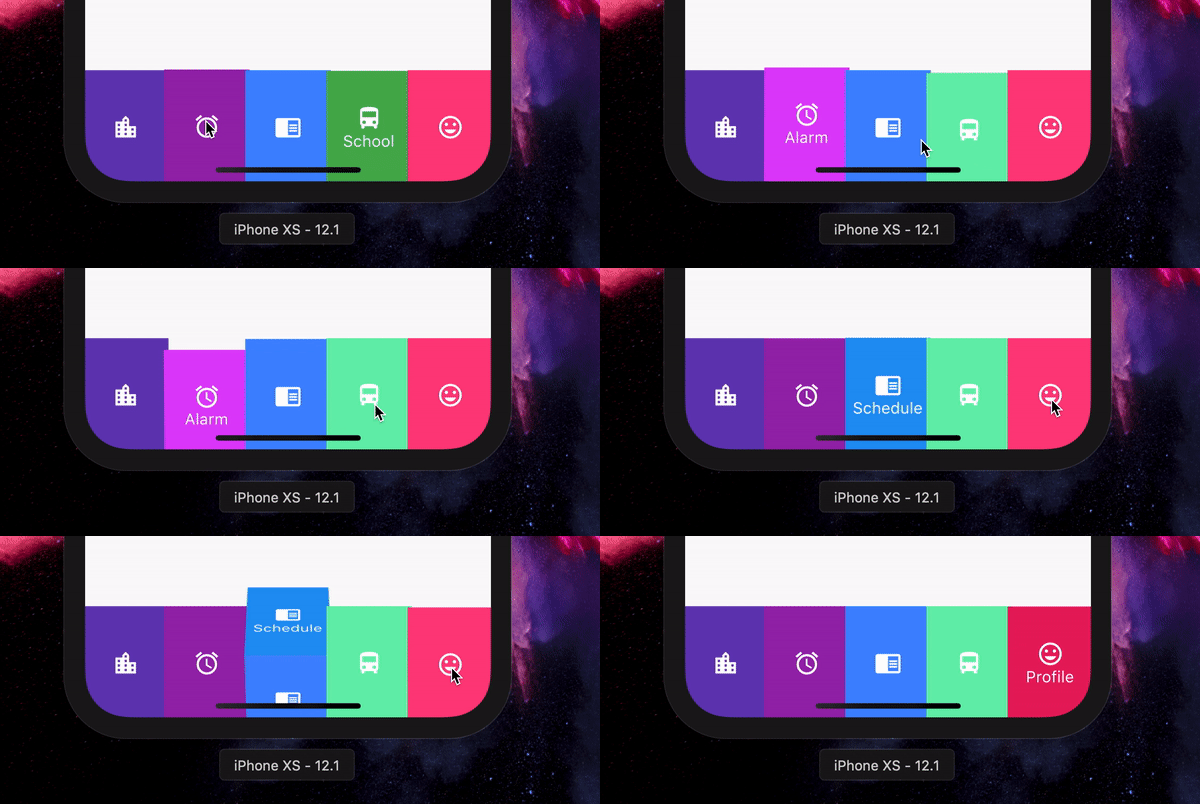
A 3D BottomNavigationBar inspired by Dribbble design by Dannniel

AndroidiOSWebmacOSWindowsLinux
30-day downloads
38
Likes
34
Pub points
140

Install package

flutter pub add flip_box_bar_plus

Package Overview

Package selection guidance compiled from public package information, community data, and project usage.

FlipBoxBarPlus is a 3D-inspired bottom navigation bar for Flutter, drawing design inspiration from a Dribbble concept by Dannniel. It features dynamic, flipping animation effects that enhance user interaction and visual appeal. The component supports multiple platforms including Android, iOS, Web, macOS, Windows, and Linux, making it highly versatile. With smooth transitions and customizable styling, it's ideal for modern app interfaces seeking a playful yet professional touch. The package is easy to integrate via pub.dev and open-source, encouraging community contributions.

Use cases

  • Modern mobile app interfaces
  • Interactive UI elements
  • Cross-platform applications
  • Design-focused dashboards
  • Animated navigation bars

Key features

  • 3D flipping animations
  • Cross-platform compatibility
  • Customizable appearance
  • Smooth transition effects
  • Open-source and community-driven

Suitable for

  • Developers seeking animated navigation
  • Design-conscious app creators
  • Flutter projects with interactive UIs
  • Apps targeting multiple operating systems
  • Creative and visually engaging apps

Considerations

  • May impact performance on low-end devices
  • Requires careful tuning for optimal animation speed
  • Limited customization beyond core features
  • Best suited for apps with minimal navigation items
  • Not recommended for accessibility-heavy applications
Original README

Original README snapshot from the linked source repository. Visit the repository for the latest content.

Flip_box_bar_plus

Forked from Flip_box_bar, added support for vertical position

Installation Guide

A 3D BottomNavigationBar inspired by Dribbble design by Dannniel.

Demo

Example Use

      // In Scaffold
      int selectedIndex = 0;
      
      FlipBoxBarPlus(
              selectedIndex: index,
              items: [
                FlipBarItem(icon: Icon(Icons.map), text: Text("Map"), frontColor: Colors.blue, backColor: Colors.blueAccent),
                FlipBarItem(icon: Icon(Icons.add), text: Text("Add"), frontColor: Colors.cyan, backColor: Colors.cyanAccent),
                FlipBarItem(icon: Icon(Icons.chrome_reader_mode), text: Text("Read"), frontColor: Colors.orange, backColor: Colors.orangeAccent),
                FlipBarItem(icon: Icon(Icons.print), text: Text("Print"), frontColor: Colors.purple, backColor: Colors.purpleAccent),
                FlipBarItem(icon: Icon(Icons.print), text: Text("Print"), frontColor: Colors.pink, backColor: Colors.pinkAccent),
              ],
              onIndexChanged: (newIndex) {
                setState() {
                    selectedIndex = newIndex;
                }
              },
            ),

For vertical position set isVerticalBar = true

Properties

List<FlipBarItem> items;

The items to be displayed in the NavBar.

Duration animationDuration;

The duration of the animation of the box flip.

ValueChanged<int> onIndexChanged;

Callback for getting value of item selection.

int initialIndex;

The initial selected index of the NavBar.

double navBarHeight;

The height of the NavBar when it is in bottom nav position.

bool isVerticalBar;

Set the navigation bar as vertical.

double navBarWidth;

The width of the NavBar when it is in vertical position.

Categories

Source repository

Projects using this package

No data available yet.