Search packages, repositories and app categories

flutter_collapsing_toolbar cover
Package detailsv1.0.0

flutter_collapsing_toolbar

A Flutter package to create a Romantic Collapsing Toolbar. It will be useful for your awesome app.

AndroidiOSWebmacOSWindowsLinux
30-day downloads
163
Likes
51
Pub points
150

Install package

flutter pub add flutter_collapsing_toolbar

Package Overview

Package selection guidance compiled from public package information, community data, and project usage.

A Flutter package that enables the creation of a romantic-style collapsing toolbar, ideal for enhancing app navigation with dynamic, visually engaging headers. It supports smooth transitions as the user scrolls, revealing or hiding content based on scroll position. Designed for modern UIs, it integrates seamlessly into apps requiring immersive experiences on Android, iOS, Web, macOS, Windows, and Linux. The package is lightweight and easy to implement with minimal configuration.

Use cases

  • Creating immersive app headers
  • Implementing scroll-driven UI transitions
  • Enhancing mobile and web app aesthetics
  • Designing elegant landing pages
  • Building responsive navigation bars

Key features

  • Smooth collapsing animation
  • Customizable header behavior
  • Cross-platform compatibility
  • Easy integration with existing widgets
  • Support for scroll physics customization

Suitable for

  • Developers seeking romantic-themed UIs
  • Apps with rich visual storytelling
  • Content-heavy applications
  • Design-focused Flutter projects
  • Mobile and web apps with dynamic headers

Considerations

  • Requires understanding of ScrollController
  • May impact performance with complex nested content
  • Limited documentation available
  • Best suited for single-scroll contexts
  • Not recommended for simple navigation layouts

Original README

Original README snapshot from the linked source repository. Visit the repository for the latest content.

Flutter Collapsing Toolbar

A Flutter package to create a Romantic Collapsing Toolbar. It will be useful for your awesome app. This widget is created to be able to standalone with any views, helps you able to add it into any complex ScrollView or ListView.

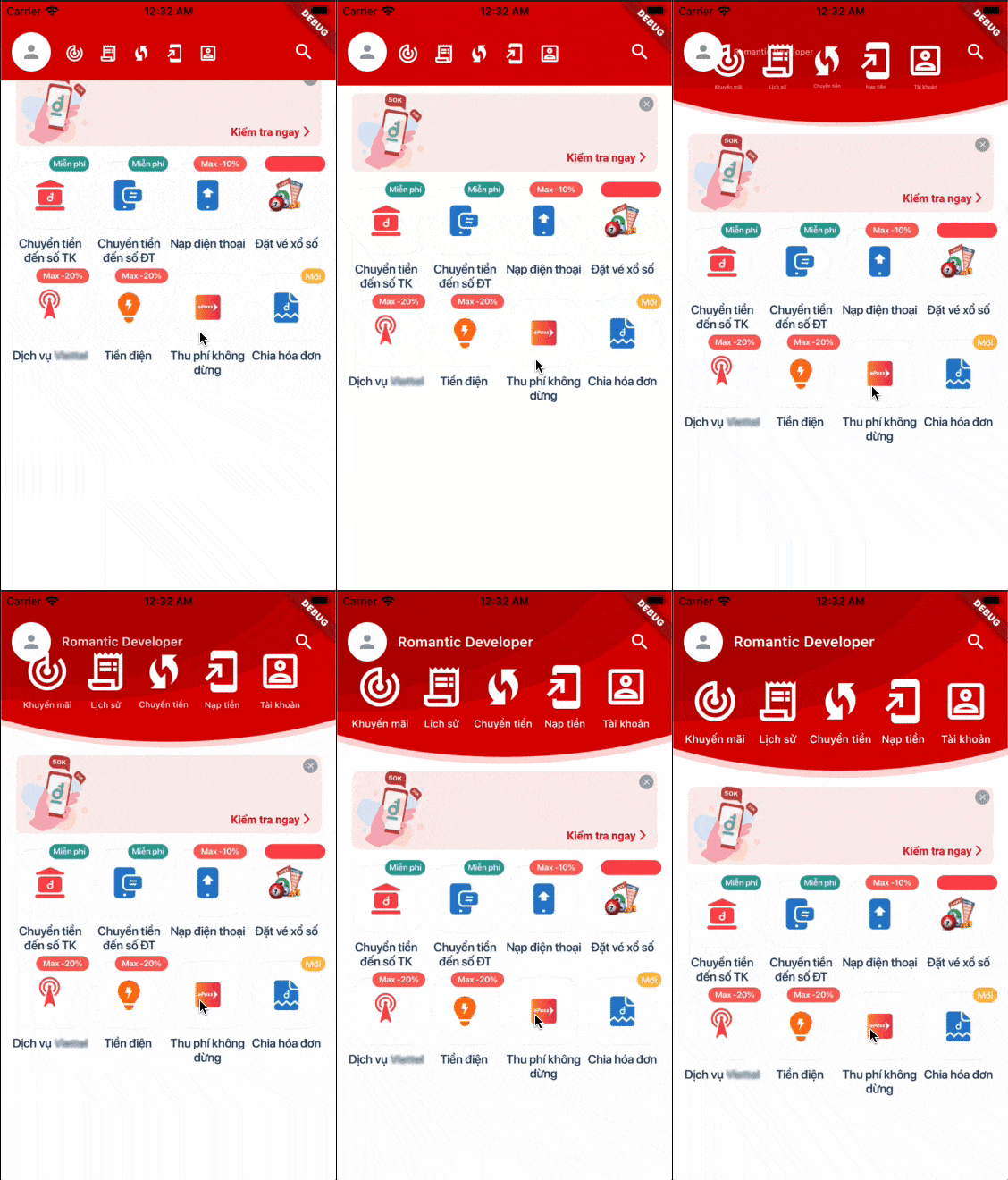
This is a present from Romantic Project. More from Romantic Developer

Demo

Example
import 'package:flutter/material.dart';
import 'package:flutter_collapsing_toolbar/flutter_collapsing_toolbar.dart';

void main() => runApp(MyApp());

const kSampleIcons = [
  Icons.track_changes_outlined,
  Icons.receipt_long_outlined,
  Icons.wifi_protected_setup_outlined,
  Icons.add_to_home_screen_outlined,
  Icons.account_box_outlined,
];
const kSampleIconLabels = [
  'Khuyến mãi',
  'Lịch sử',
  'Chuyển tiền',
  'Nạp tiền',
  'Tài khoản',
];

class MyApp extends StatefulWidget {
  @override
  _MyAppState createState() => _MyAppState();
}

class _MyAppState extends State<MyApp> {
  final controller = ScrollController();
  double headerOffset = 0.0;

  @override
  Widget build(BuildContext context) {
    return MaterialApp(
      title: 'Example',
      theme: ThemeData(
        primarySwatch: Colors.red,
      ),
      home: Scaffold(
        body: Container(
          margin: const EdgeInsets.only(top: 24.0),
          child: Column(
            children: [
              Align(
                alignment: Alignment.topCenter,
                child: CollapsingToolbar(
                  controller: controller,
                  expandedHeight: 160,
                  collapsedHeight: 64,
                  decorationForegroundColor: Color(0xffd90000),
                  decorationBackgroundColor: Colors.white,
                  onCollapsing: (double offset) {
                    setState(() {
                      headerOffset = offset;
                    });
                  },
                  leading: Container(
                    margin: EdgeInsets.only(left: 12),
                    padding: EdgeInsets.all(4),
                    decoration: ShapeDecoration(
                      color: Colors.white,
                      shape: CircleBorder(),
                    ),
                    child: Icon(
                      Icons.person,
                      size: 24,
                      color: Colors.black38,
                    ),
                  ),
                  title: Text(
                    'Romantic Developer',
                    style: TextStyle(
                      fontSize: 16,
                      color: Colors.white,
                      fontWeight: FontWeight.w600,
                    ),
                  ),
                  actions: [
                    ElevatedButton(
                      onPressed: () {},
                      style: ButtonStyle(
                        shape: MaterialStateProperty.all(CircleBorder()),
                        backgroundColor:
                            MaterialStateProperty.all(Colors.transparent),
                        elevation: MaterialStateProperty.all(0.0),
                      ),
                      child: Padding(
                        padding: const EdgeInsets.all(8.0),
                        child: Icon(
                          Icons.search,
                          color: Colors.white,
                          size: 24,
                        ),
                      ),
                    ),
                  ],
                  featureCount: 5,
                  featureIconBuilder: (context, index) {
                    return Icon(
                      kSampleIcons[index],
                      size: 54,
                      color: Colors.white,
                    );
                  },
                  featureLabelBuilder: (context, index) {
                    return Text(
                      kSampleIconLabels[index],
                      textAlign: TextAlign.center,
                      maxLines: 1,
                      style: TextStyle(
                        fontSize: 12,
                        color: Colors.white,
                      ),
                    );
                  },
                  featureOnPressed: (context, index) {},
                ),
              ),
              Expanded(
                child: Container(
                  color: Colors.white,
                  child: SingleChildScrollView(
                    controller: controller,
                    child: Column(
                      children: [
                        Container(
                          height: headerOffset,
                        ),
                        Image.asset('assets/sample.jpg'),
                        Container(
                          height: 350,
                          color: Colors.white,
                        ),
                      ],
                    ),
                  ),
                ),
              ),
            ],
          ),
        ),
      ),
    );
  }
}

Development environment
[✓] Flutter (Channel stable, 2.0.5, on macOS 11.2.3 20D91 darwin-x64, locale en-VN)
    • Flutter version 2.0.5
    • Framework revision adc687823a (11 days ago), 2021-04-16 09:40:20 -0700
    • Engine revision b09f014e96
    • Dart version 2.12.3

[✓] Android toolchain - develop for Android devices (Android SDK version 30.0.3)
    • Platform android-30, build-tools 30.0.3
    • Java binary at: /Applications/Android Studio.app/Contents/jre/jdk/Contents/Home/bin/java
    • Java version OpenJDK Runtime Environment (build 1.8.0_242-release-1644-b3-6915495)
    • All Android licenses accepted.

[✓] Xcode - develop for iOS and macOS
    • Xcode at /Applications/Xcode_12.app/Contents/Developer
    • Xcode 12.4, Build version 12D4e
    • CocoaPods version 1.10.1

[✓] Chrome - develop for the web
    • Chrome at /Applications/Google Chrome.app/Contents/MacOS/Google Chrome

[✓] Android Studio (version 4.1)
    • Android Studio at /Applications/Android Studio.app/Contents
    • Flutter plugin can be installed from:
      🔨 https://plugins.jetbrains.com/plugin/9212-flutter
    • Dart plugin can be installed from:
      🔨 https://plugins.jetbrains.com/plugin/6351-dart
    • Java version OpenJDK Runtime Environment (build 1.8.0_242-release-1644-b3-6915495)

Categories

Source repository

Projects using this package

No data available yet.