Search packages, repositories and app categories

flutter_funding_choices cover
Package detailsv1.1.0

flutter_funding_choices

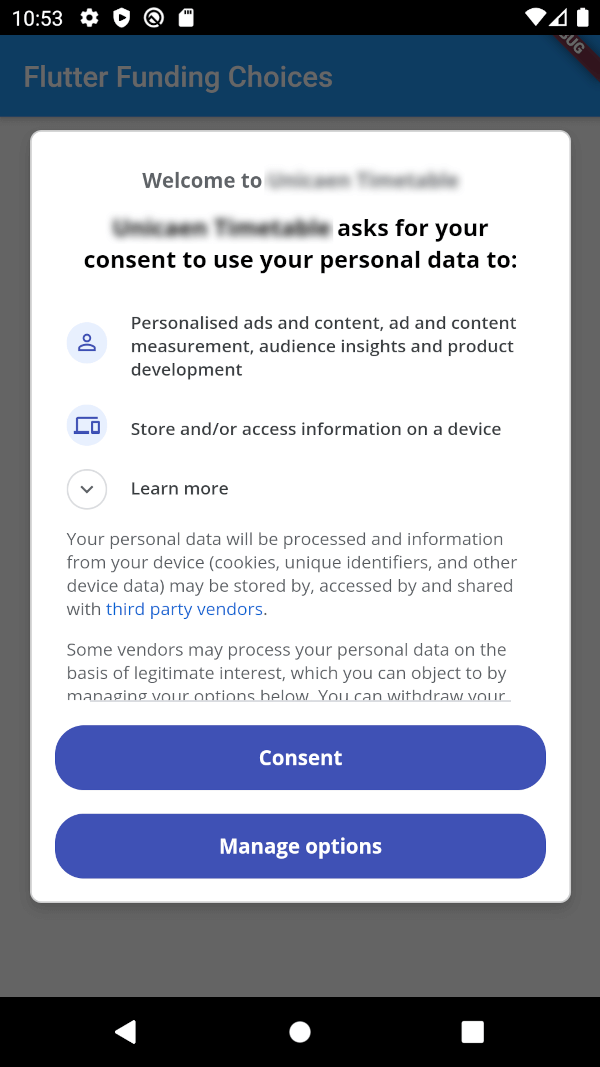
The Flutter implementation of Funding Choices, a Google service that allows to request user consent for personalized ads in AdMob.

AndroidiOS
30-day downloads
76
Likes
55
Pub points
150

Install package

flutter pub add flutter_funding_choices

Package Overview

Package selection guidance compiled from public package information, community data, and project usage.

Flutter Funding Choices is a Flutter package that integrates Google's Funding Choices API, enabling apps to request user consent for personalized ads in AdMob. It provides a seamless way to comply with privacy regulations by displaying the required consent dialog on Android and iOS platforms. The package simplifies implementation with straightforward methods to check consent status and trigger the consent flow. It ensures adherence to GDPR and other privacy standards while maintaining compatibility with existing ad serving workflows.

Use cases

  • Requesting user consent for personalized ads
  • Complying with GDPR and privacy regulations
  • Integrating with AdMob in Flutter apps
  • Displaying consent dialogs on Android and iOS
  • Managing ad personalization preferences

Key features

  • Official Google Funding Choices integration
  • Support for both Android and iOS
  • Simple API for consent checks and dialogs
  • Automatic handling of consent state
  • Lightweight and easy to integrate

Suitable for

  • Flutter apps using AdMob
  • Developers targeting EU users
  • Apps requiring GDPR compliance
  • Publishers managing ad personalization
  • Mobile app developers focused on privacy

Considerations

  • Requires AdMob setup
  • Consent must be obtained before showing personalized ads
  • Limited to Google's Funding Choices service
  • May require additional UI for consent management
  • Not applicable for non-personalized ad scenarios

Original README

Original README snapshot from the linked source repository. Visit the repository for the latest content.

Flutter Funding Choices

Flutter Funding Choices is an unofficial Flutter implementation of Funding Choices, a Google service that allows to request user consent for personalized ads in AdMob.

Prerequisites

You must have linked your FundingChoices account to your Admob account. See this documentation on Google Support.

Installation

Android

Your app must use Android Embedding V2. Also, you need to add an app id in your AndroidManifest.xml (in the application tag) :

<?xml version="1.0" encoding="utf-8"?>
<manifest xmlns:android="http://schemas.android.com/apk/res/android"
   package="fr.skyost.example">

   <application
       <!--
         Some attributes here...
        -->
    >
       <meta-data
           android:name="com.google.android.gms.ads.APPLICATION_ID"
           android:value="YOUR-APP-ID"/>
       <!--
         Activities, ...
        -->
   </application>

</manifest>

You can obtain your app ID by following these instructions.

iOS

You need to add an app id in your Info.plist :

<key>GADApplicationIdentifier</key>
<string>YOUR-APP-ID</string>

You can obtain your app ID by following these instructions. You may also need to handle Apple's App Tracking Transparency message by putting this in your Info.plist :

<key>NSUserTrackingUsageDescription</key>
<string>This identifier will be used to deliver personalized ads to you.</string>

Feel free to configure the message as you want.

How to use

There are three methods :

  • FlutterFundingChoices.requestConsentInformation() : Allows to get current user consent information (whether you need to show the consent form, whether the user wants personalized ads, ...).
  • FlutterFundingChoices.showConsentForm() : Loads and shows the consent form. You must check first that there is a consent form (with isConsentFormAvailable on the returned object of the previous method).
  • FlutterFundingChoices.reset() : Resets the consent information.

You typically want to use it like this on Android :

@override
void initState() {
  super.initState();
  WidgetsBinding.instance.addPostFrameCallback((_) async {
    ConsentInformation consentInfo = await FlutterFundingChoices.requestConsentInformation();
    if (consentInfo.isConsentFormAvailable && consentInfo.consentStatus == ConsentStatus.required) {  
      await FlutterFundingChoices.showConsentForm();
      // You can check the result by calling `FlutterFundingChoices.requestConsentInformation()` again !
    }
  });
}

Contributions

You have a lot of options to contribute to this project ! You can :

Categories

Source repository

Projects using this package

No data available yet.