Search packages, repositories and app categories

flutter_instagram_stories cover
Package detailsv1.0.3+4

flutter_instagram_stories

Display stories (videos and images) like Whatsapp & Instagram.

30-day downloads
69
Likes
176
Pub points
80

Install package

flutter pub add flutter_instagram_stories

Package Overview

Package selection guidance compiled from public package information, community data, and project usage.

A Flutter package that enables developers to display stories with image and video support, mimicking the look and feel of Instagram and WhatsApp. It provides a clean, customizable interface for presenting sequential media content in a full-screen, swipeable format. The package is designed for simplicity and ease of integration into existing apps. It supports automatic progression between stories and allows customization of appearance and behavior. Ideal for social apps, messaging platforms, or any app requiring a story-like experience.

Use cases

  • Social media apps
  • Messaging applications
  • Content sharing platforms
  • User profile highlights
  • Interactive storytelling features

Key features

  • Image and video story support
  • Swipe navigation
  • Auto-advance between stories
  • Customizable UI
  • Full-screen presentation
  • Simple integration via pub.dev

Suitable for

  • Developers building social features
  • Apps needing story-like interfaces
  • Projects with media-rich content
  • Mobile-first design implementations
  • Fast prototyping of interactive feeds

Considerations

  • Limited platform-specific optimizations
  • No built-in analytics tracking
  • Requires manual handling of story completion events
  • Minimal documentation beyond basic usage
  • No support for story replies or reactions

Original README

Original README snapshot from the linked source repository. Visit the repository for the latest content.

flutter_instagram_stories Pub

If you need a help to implement stories in your app, contact me https://github.com/awaik

A Flutter package for displaying stories just like Whatsapp & Instagram. Built-in groups (multiple stories with one icon), cache, video, gifs.

The package can be used in any app for displaying news, educational content and etc. Look the sample app here.

Note: This package is under active development, and there are some known bugs and a lot of features to implement. Please, add issues or feature requests here: issue

The project was initially copied from https://github.com/blackmann/story_view - great thanks for this excellent package. In case, you need more flexible functionality, you can check the original repository.

Showcase|100x100, 10%

Important notes:

  1. For now, the package works with Firebase only.
  2. This is a first beta version, please add all issues and feature requests here: issue

Features

  • Only one line of code to implement this package to the app.
  • Display images, gifs, videos.
  • Adjustable titles on icons.
  • Preliminary caching after app started.
  • Multilanguage support.
  • Callback when a user closed stories - helps to implement subscriptions after first launch and etc.

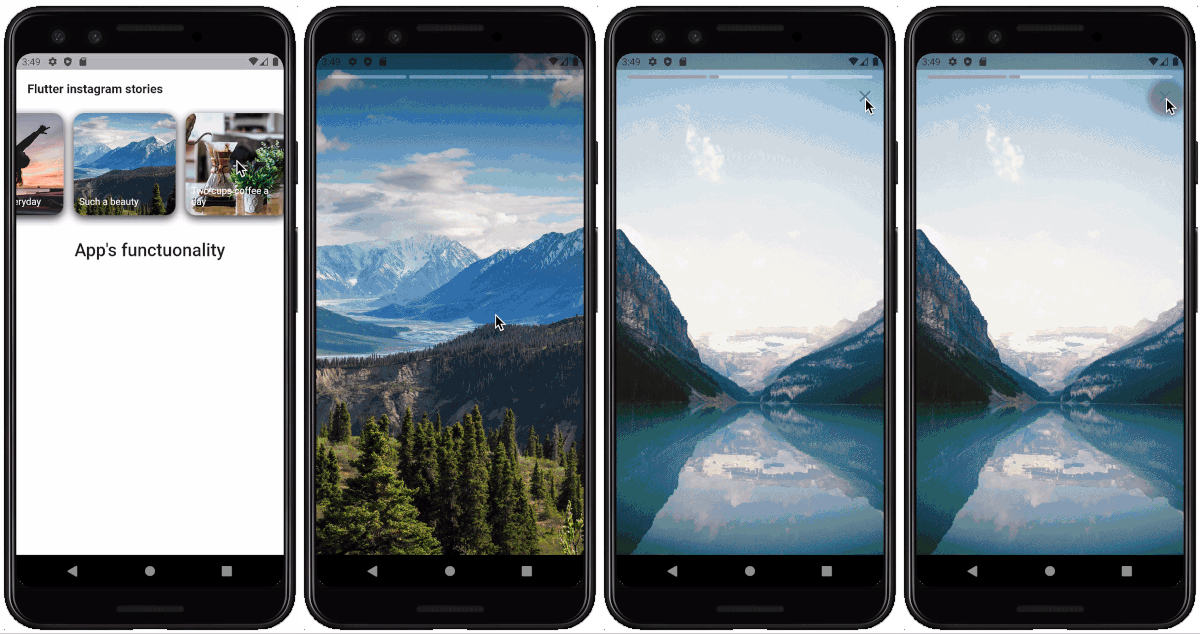
Installing

Look how to install here https://pub.dev/packages/flutter_instagram_stories#-installing-tab-

Now in your Dart code, you can use:

import 'package:flutter_instagram_stories/flutter_instagram_stories.dart';

iOS

For playing video, the package uses official video_player https://pub.dev/packages/video_player

From documentation:

  1. Warning: The video_player plugin doesn’t work on iOS simulators. You must test videos on real iOS devices.

  2. For iOS, add the following to the Info.plist file found at /ios/Runner/Info.plist.

<key>NSAppTransportSecurity</key>
  <dict>
    <key>NSAllowsArbitraryLoads</key>
    <true/>
  </dict>

Usage

You can find a complete working example here https://github.com/awaik/flutter_instagram_stories/tree/master/example

Dart code

Connect to the collection where you keep stories

    static String collectionDbName = 'instagram_stories_db';
    CollectionReference dbInstance =
      Firestore.instance.collection(collectionDbName);

And add stories full functionality to your app.

    FlutterInstagramStories(
        collectionDbName: collectionDbName,
        showTitleOnIcon: true,
        backFromStories: () {
          _backFromStoriesAlert();
        },
        iconTextStyle: TextStyle(
          fontSize: 14.0,
          color: Colors.white,
        ),
        iconImageBorderRadius: BorderRadius.circular(15.0),
        iconBoxDecoration: BoxDecoration(
          borderRadius: BorderRadius.all(Radius.circular(15.0)),
          color: Color(0xFFffffff),
          boxShadow: [
            BoxShadow(
              color: Color(0xff333333),
              blurRadius: 10.0,
              offset: Offset(
                0.0,
                4.0,
              ),
            ),
          ],
        ),
        iconWidth: 150.0,
        iconHeight: 150.0,
        textInIconPadding:
            EdgeInsets.only(left: 8.0, right: 8.0, bottom: 12.0),
        //how long story lasts in seconds
        imageStoryDuration: 7,
        progressPosition: ProgressPosition.top,
        repeat: true,
        inline: false,
        languageCode: 'en',
        backgroundColorBetweenStories: Colors.black,
        closeButtonIcon: Icon(
          Icons.close,
          color: Colors.white,
          size: 28.0,
        ),
        closeButtonBackgroundColor: Color(0x11000000),
        sortingOrderDesc: true,
        lastIconHighlight: true,
        lastIconHighlightColor: Colors.deepOrange,
        lastIconHighlightRadius: const Radius.circular(15.0),
        captionTextStyle: TextStyle(
          fontSize: 22,
          color: Colors.white,
        ),
        captionMargin: EdgeInsets.only(
          bottom: 50,
        ),
        captionPadding: EdgeInsets.symmetric(
          horizontal: 24,
          vertical: 8,
        ),
      ),

Firestore database

The package works with Firestore database and package https://pub.dev/packages/cloud_firestore already included into the package.

You can use example with the sample database in the example folder, or, create your own database.

Steps to create:

  1. Add Firebase to your app
  • Android https://firebase.google.com/docs/flutter/setup?platform=android
  • iOS https://firebase.google.com/docs/flutter/setup?platform=ios
  1. Create Firestore database
  • Create a collection with any name. After you will use this name in dart code only once.
  • Create documents inside the collection with exact structure, like on the image below

Showcase|100x100, 10%

Important! Pay attention to array, map types. Otherwise you will have a null error https://github.com/awaik/flutter_instagram_stories/issues/20

Data structure

That's it! Now your app has instagram stories with caching and other powerful features.

Use cases in real apps

App for Android and iOS - https://lifext.app/

Lifext app

Categories

Dependencies

Source repository

Projects using this package

No data available yet.