Search packages, repositories and app categories

flutter_interactive_keyboard cover
Package detailsv0.2.0

flutter_interactive_keyboard

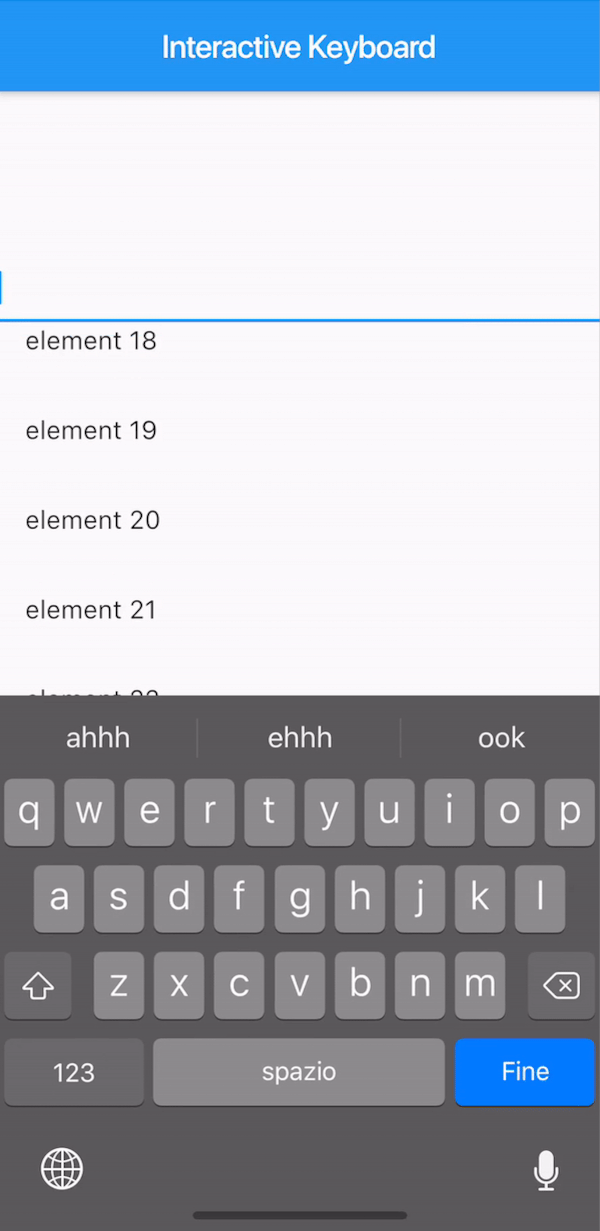
A flutter plugin to dismiss the keyboard interactively similar to the IOS native behavior. On Android the functionality is mimed without drag.

AndroidiOS
30-day downloads
56
Likes
33
Pub points
140

Install package

flutter pub add flutter_interactive_keyboard

Package Overview

Package selection guidance compiled from public package information, community data, and project usage.

A Flutter plugin that enables interactive keyboard dismissal, replicating iOS's native drag-to-dismiss behavior. On iOS, users can swipe the keyboard down to close it. On Android, a similar gesture is emulated without actual drag interaction. The plugin enhances user experience by providing intuitive keyboard control across platforms, maintaining consistency with native mobile behaviors. It integrates seamlessly into existing Flutter apps with minimal setup.

Use cases

  • Interactive keyboard dismissal in forms
  • Enhancing UX in chat or input-heavy apps
  • Mimicking iOS native keyboard gestures on Android
  • Improving accessibility through gesture-based controls

Key features

  • iOS-style drag-to-dismiss gesture
  • Android gesture emulation
  • Minimal integration effort
  • Cross-platform consistency
  • Smooth animation during dismissal

Suitable for

  • Developers targeting iOS-like UX
  • Apps with frequent keyboard usage
  • UX-focused mobile applications
  • Form-heavy or messaging interfaces

Considerations

  • Limited to keyboard dismissal only
  • No customization for gesture sensitivity
  • Android behavior differs from true drag
  • May conflict with other gesture detectors

Original README

Original README snapshot from the linked source repository. Visit the repository for the latest content.

pub package

This plugin is not under active development. If you'd like to contribute, PRs are welcomed.

Flutter Interactive Keyboard

A way to mimic the iOS interactive dismissable keyboard in Flutter. For Android, the behavior will still be applied without animation due to the Android keyboard limitations.

How to use it

The KeyboardManagerWidget defines the area where the draggable keyboard is enabled. Gestures are passed to the widget in order to permit both scrolling and drag-to-dismiss behavior.

focusNode is required when using a TextField to manage the keyboard opening and closing.

See the full example to see a complete implementation.

KeyboardManagerWidget(
  focusNode: _focusNode,
  child: ListView.builder(
    itemCount: 100,
    itemBuilder: (context,index){
      return ListTile(
        title: Text("element $index"),
      );
    },
  ),
)

Advanced

Change focusNode

If your app has more than one TextField that should trigger the keyboard, you can change the current FocusNode from the KeyboardManagerWidgetState as follows:

// Init variable
GlobalKey<KeyboardManagerWidgetState> _key = GlobalKey();

// In the build method
KeyboardManagerWidget(
  key: _key,
  ...
)

// Wherever you like
_key.currentState.substituteFocusNode = newFocusNode;

Categories

Source repository

Projects using this package

No data available yet.