Search packages, repositories and app categories

Package detailsv0.0.6

flutter_paginator

A customizable pagination package for Flutter. This package can be used to fetch and display data from an API page by page.

30-day downloads
52
Likes
27
Pub points
40

Install package

flutter pub add flutter_paginator

Package Overview

Package selection guidance compiled from public package information, community data, and project usage.

A customizable pagination package for Flutter that enables efficient loading and display of data from APIs in a page-by-page manner. It supports both pull-to-refresh and infinite scroll interactions, making it ideal for list-based applications with large datasets. The package is designed to be flexible, allowing developers to customize the UI, loading indicators, and error states. It integrates seamlessly with async data fetching and handles edge cases like empty results and network failures.

Use cases

  • Loading large datasets in lists
  • Implementing infinite scroll
  • Fetching data from REST APIs
  • Displaying paginated search results
  • Building news or social media feeds

Key features

  • Customizable UI components
  • Pull-to-refresh support
  • Infinite scroll integration
  • Error and empty state handling
  • Configurable loading indicators

Suitable for

  • Apps with extensive data lists
  • API-driven content displays
  • User interfaces requiring lazy loading
  • Developers seeking reusable pagination logic
  • Projects needing responsive pagination UX

Considerations

  • Requires manual API request handling
  • Limited built-in caching
  • Not optimized for very high-frequency updates
  • Depends on external state management
  • May need additional styling for complex layouts

Original README

Original README snapshot from the linked source repository. Visit the repository for the latest content.

Flutter Paginator

pub package

A customizable pagination package for Flutter. This package can be used to fetch and display data from an API page by page.

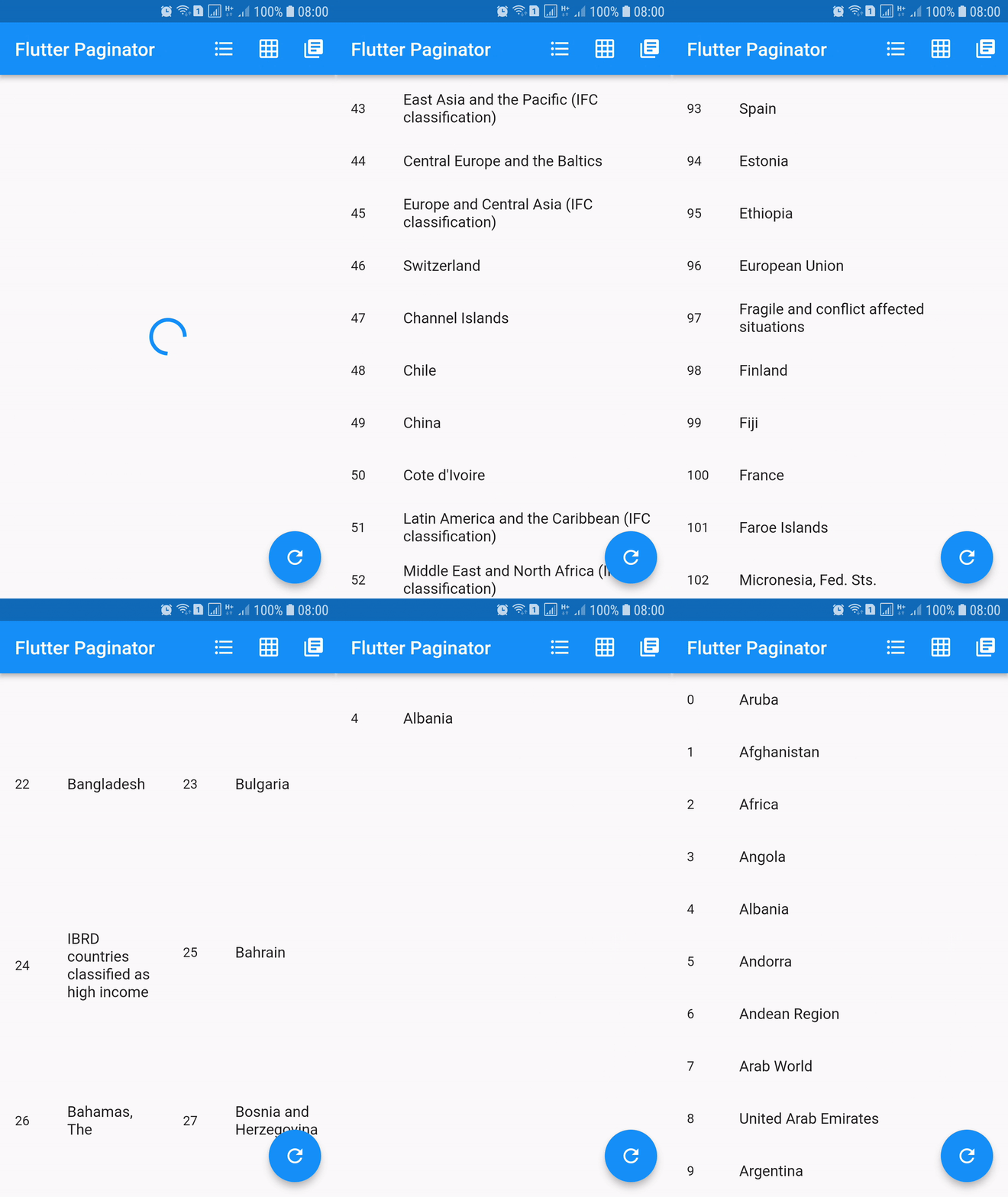
Screenshots

Installing

dependencies:
  flutter_paginator: ^0.0.6

Description

Paginator extends StatefulWidget has 3 constructors namely Paginator.listView, Paginator.gridView and Paginator.pageView. Paginator.listView, Paginator.gridView and Paginator.pageView are descendants of ListView, GridView and PageView. Paginator.listView, Paginator.gridView and Paginator.pageView got all the features of their ancestors and they are need to provide additional functions that are essential in doing their task.

PageLoadFuture
  • Loads the page asynchronously when the page number is given.
  • This should return an instance of a Future.
  • Called when the next page is needed to be loaded.
PageItemsGetter
  • This function should return list of page item data when page data is given.
  • This is called after successful completion of PageLoadFuture.
  • The page items returned by this method is added to the list of all the page items.
ListItemBuilder
  • Builds list item when item data and item index are given.
  • This should return an instance of a Widget.
LoadingWidgetBuilder
  • Builds loading widget.
  • This should return an instance of a Widget.
ErrorWidgetBuilder
  • Builds error widget when page data and error callback are given.
  • This should return an instance of a Widget.
EmptyListWidgetBuilder
  • Builds empty list widget.
  • This is displayed when the total number of list items is zero.
  • This should return an instance of a Widget.
TotalItemsGetter
  • This should return total number of list items when page data is given.
PageErrorChecker
  • This should return true if page has error else false, when page data is given.

Using

import 'dart:async';
import 'dart:convert';
import 'dart:io';

import 'package:flutter/material.dart';
import 'package:http/http.dart' as http;

import 'package:flutter_paginator/flutter_paginator.dart';
import 'package:flutter_paginator/enums.dart';

void main() => runApp(MyApp());

class MyApp extends StatelessWidget {
  @override
  Widget build(BuildContext context) {
    return MaterialApp(
      title: 'Flutter Paginator',
      home: HomePage(),
    );
  }
}

class HomePage extends StatefulWidget {
  @override
  State<StatefulWidget> createState() {
    return HomeState();
  }
}

class HomeState extends State<HomePage> {
  GlobalKey<PaginatorState> paginatorGlobalKey = GlobalKey();

  @override
  Widget build(BuildContext context) {
    return Scaffold(
      appBar: AppBar(
        title: Text('Flutter Paginator'),
        actions: <Widget>[
          IconButton(
            icon: Icon(Icons.format_list_bulleted),
            onPressed: () {
              paginatorGlobalKey.currentState
                  .changeState(listType: ListType.LIST_VIEW);
            },
          ),
          IconButton(
            icon: Icon(Icons.grid_on),
            onPressed: () {
              paginatorGlobalKey.currentState.changeState(
                listType: ListType.GRID_VIEW,
                gridDelegate: SliverGridDelegateWithFixedCrossAxisCount(
                    crossAxisCount: 2),
              );
            },
          ),
          IconButton(
            icon: Icon(Icons.library_books),
            onPressed: () {
              paginatorGlobalKey.currentState
                  .changeState(listType: ListType.PAGE_VIEW);
            },
          ),
        ],
      ),
      body: Paginator.listView(
        key: paginatorGlobalKey,
        pageLoadFuture: sendCountriesDataRequest,
        pageItemsGetter: listItemsGetter,
        listItemBuilder: listItemBuilder,
        loadingWidgetBuilder: loadingWidgetMaker,
        errorWidgetBuilder: errorWidgetMaker,
        emptyListWidgetBuilder: emptyListWidgetMaker,
        totalItemsGetter: totalPagesGetter,
        pageErrorChecker: pageErrorChecker,
        scrollPhysics: BouncingScrollPhysics(),
      ),
      floatingActionButton: FloatingActionButton(
        onPressed: () {
          paginatorGlobalKey.currentState.changeState(
              pageLoadFuture: sendCountriesDataRequest, resetState: true);
        },
        child: Icon(Icons.refresh),
      ),
    );
  }

  Future<CountriesData> sendCountriesDataRequest(int page) async {
    try {
      String url = Uri.encodeFull(
          'http://api.worldbank.org/v2/country?page=$page&format=json');
      http.Response response = await http.get(url);
      return CountriesData.fromResponse(response);
    } catch (e) {
      if (e is IOException) {
        return CountriesData.withError(
            'Please check your internet connection.');
      } else {
        print(e.toString());
        return CountriesData.withError('Something went wrong.');
      }
    }
  }

  List<dynamic> listItemsGetter(CountriesData countriesData) {
    List<String> list = [];
    countriesData.countries.forEach((value) {
      list.add(value['name']);
    });
    return list;
  }

  Widget listItemBuilder(value, int index) {
    return ListTile(
      leading: Text(index.toString()),
      title: Text(value),
    );
  }

  Widget loadingWidgetMaker() {
    return Container(
      alignment: Alignment.center,
      height: 160.0,
      child: CircularProgressIndicator(),
    );
  }

  Widget errorWidgetMaker(CountriesData countriesData, retryListener) {
    return Column(
      mainAxisAlignment: MainAxisAlignment.center,
      children: <Widget>[
        Padding(
          padding: const EdgeInsets.all(16.0),
          child: Text(countriesData.errorMessage),
        ),
        FlatButton(
          onPressed: retryListener,
          child: Text('Retry'),
        )
      ],
    );
  }

  Widget emptyListWidgetMaker(CountriesData countriesData) {
    return Center(
      child: Text('No countries in the list'),
    );
  }

  int totalPagesGetter(CountriesData countriesData) {
    return countriesData.total;
  }

  bool pageErrorChecker(CountriesData countriesData) {
    return countriesData.statusCode != 200;
  }
}

class CountriesData {
  List<dynamic> countries;
  int statusCode;
  String errorMessage;
  int total;
  int nItems;

  CountriesData.fromResponse(http.Response response) {
    this.statusCode = response.statusCode;
    List jsonData = json.decode(response.body);
    countries = jsonData[1];
    total = jsonData[0]['total'];
    nItems = countries.length;
  }

  CountriesData.withError(String errorMessage) {
    this.errorMessage = errorMessage;
  }
}

Categories

Source repository

Projects using this package

No data available yet.