A Flutter package providing physics-based animations including customizable spring and gravity simulations that can be used both as physics simulations and animation curves.
Package selection guidance compiled from public package information, community data, and project usage.
flutter_physics is a Flutter package that enables physics-based animations with customizable spring and gravity simulations. It allows developers to create realistic motion effects by leveraging physical principles such as mass, stiffness, and damping. The package can be used both as a simulation engine and as a source of animation curves, offering smooth and natural transitions in UI elements. Ideal for interactive components like draggable widgets, bouncing effects, or dynamic layouts, it supports all major platforms including Android, iOS, Web, macOS, Windows, and Linux.
Use cases
Interactive drag-and-drop interfaces
Bouncing or elastic UI elements
Dynamic layout transitions
Simulating real-world physics in apps
Creating fluid scroll effects
Key features
Customizable spring dynamics
Gravity-based motion simulation
Support for animation curves
Cross-platform compatibility
Real-time physics updates
Configurable mass, stiffness, and damping
Suitable for
Developers building interactive UIs
Apps requiring natural motion effects
Animations needing physical realism
Cross-platform mobile and web apps
Design systems emphasizing fluidity
Considerations
Requires understanding of physics parameters
May impact performance with complex simulations
Not ideal for simple linear animations
Needs careful tuning for desired behavior
Limited documentation beyond basic examples
Original README
Original README snapshot from the linked source repository. Visit the repository for the latest content.
Flutter Physics
Physics-based animation primitives for Flutter, with drop-in replacements for Flutter's animation controllers and implicitly animated widgets. Unify curves and physics in one powerful system!
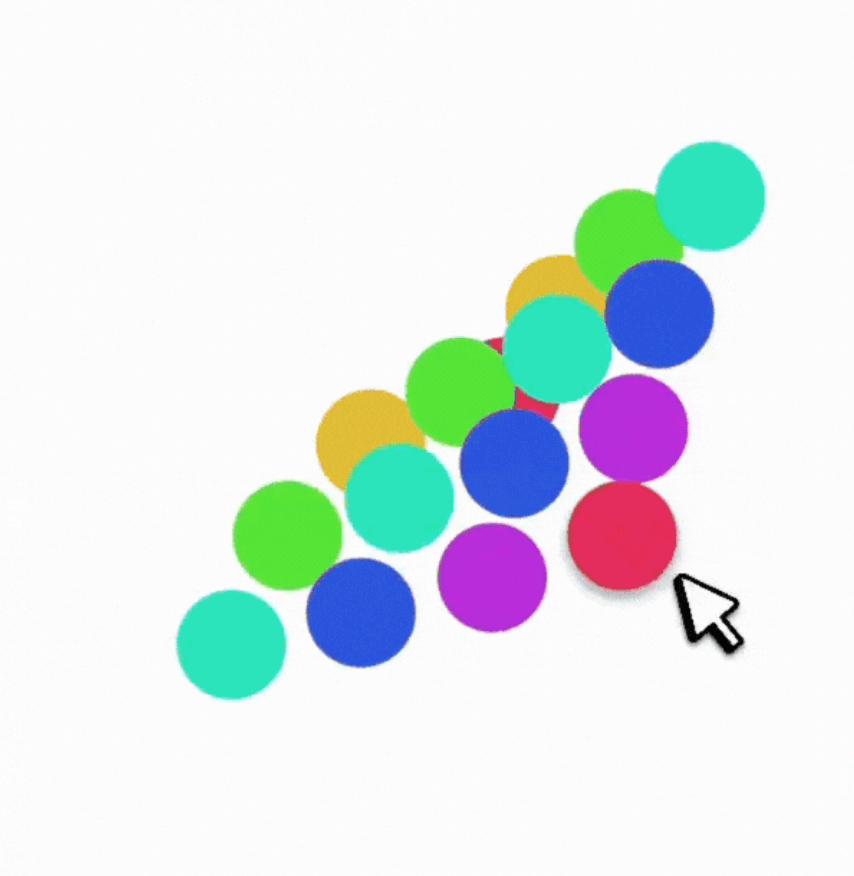
A springy grid of cells that:
Can be dragged around with Spring physics
Smoothly reacts to being "grabbed" mid-flight
Observe how the physics-based AContainer's velocity is preserved when the container is resized mid-flight, while the standard AnimatedContainer results in a sudden jump in velocity.
flutter_physics extends Flutter’s animation system with physics-based motion. It seamlessly merges curves (e.g. Curves.easeInOut) and dynamic simulations (e.g. Spring, Gravity) under a single type called Physics.(*) This means you can freely swap a spring simulation for a standard curve, without changing your widget structure or controller logic.
You’ll find:
🎮 PhysicsController: A drop-in replacement for AnimationController that supports both curves and physics.
🎨 ImplicitlyPhysicsAnimatedWidget and friends: Physics-based versions of Flutter's implicitly animated widgets (AContainer, APadding, ASize, ASwitcher, etc.).
🏗️ PhysicsBuilder and PhysicsBuilder2D: Builder widgets for single or 2D animations with physics.
🚀 Better velocity management: Physics simulations can preserve velocity on target changes, enabling fluid gesture-based UIs.
⚡ Unified animations: Use standard duration for curve-based motion or let the physics simulation drive the timing automatically.
(*) Note: Physics is just an alias for Curve — but the PhysicsSimulation class implements both Curve and Simulation.
In traditional Flutter animations, you typically define a Curve (e.g., Curves.easeOut) and rely on a 0→1 tween. Physics animations replace or supplement that approach by calculating the object’s position over time based on forces like springs, gravity, or friction.
But in this library, Physics can be either a Curve or a PhysicsSimulation. Yes, that means you can do:
physics: Curves.easeInOut
or:
physics: Spring.elegant
…with no other code changes!
PhysicsSimulation = Simulation + Curve
Every built-in physics (e.g. Spring, Gravity) implements both:
This lets them plug into Flutter’s animation system as if they were just curves, while still offering dynamic velocity and “natural” motion.
Example code snippet that looks identical for both scenarios:
// PhysicsController
controller.animateTo(
  100.0,
  physics: Spring.elegant, // or Curves.easeInOut
);
Implementing Your Own Physics
To roll your own simulation, extend PhysicsSimulation:
classMyWackyPhysicsextendsPhysicsSimulation{
MyWackyPhysics() : super(start: 0, end: 100, initialVelocity: 10);
@overridedoubleget duration {
/* Solve for duration in seconds */
}
@overridedoublex(double time) => /* compute position at time (in seconds) */;
@overridedoubledx(double time) => /* compute velocity at time (in seconds) */;
@overrideboolisDone(double time) => /* return true if we've settled */;
@overridePhysicsSimulationcopyWith({/* updated fields */}) {
// Return new instance with updated fields
}
@overridedoublesolveInitialVelocity(double start, double end, double durationInSeconds) {
// Recast the start-end in time
}
}
You can now use your custom physics in PhysicsController or implicitly in AValue, AContainer, etc., just like a curve.
Controllers
PhysicsController (1D)
Drop-in replacement for AnimationController, but supports physics-based animations:
final _controller = PhysicsController(
vsync: this,
defaultPhysics: Spring.withDamping(
mass: 1.0,
dampingFraction: 0.8,
),
);
void_moveToEnd() {
// No duration needed if using a physics simulation:
_controller.animateTo(
1.0,
velocityDelta: 500.0, // add some velocity from a gesture
);
}
If you need N-dimensional motion (like 3D transforms, or more), use PhysicsControllerMulti. It handles arrays of doubles. It’s conceptually the same but scales to an arbitrary number of dimensions.
Implicitly Physics Animated Widgets
We provide physics-based alternatives to all of Flutter’s ImplicitlyAnimatedWidgets, collectively under ImplicitlyPhysicsAnimatedWidget. They animate changes in layout properties using either a curve or a physics simulation, without requiring you to manage a controller yourself.
Examples include:
AContainer (vs AnimatedContainer)
APadding (vs AnimatedPadding)
AAlign (vs AnimatedAlign)
AScale, ARotation, AOpacity, APositioned, etc.
Physics-Animated Properties vs Tween-Animated Properties
In standard implicitly animated widgets, you specify a duration and a curve. Whenever a property changes, the widget re-runs the animation from 0 to 1 via a "Tween" animation.
This approach has some limitations:
Fixed Duration: The animation always takes exactly the specified duration, even if interrupted mid-way. This results in discontinuities when a value is changed successively.
No Velocity Preservation: Each change restarts from 0, losing any momentum from previous animations. This makes interactive animations feel less fluid.
0→1 Constraint: Tweens must map everything to a 0→1 range, which can be unintuitive for properties like position or scale that have natural units. For example, a Tween<double> from 1 to 3 and another from 3 to 100 are treated as having the same length by the animation system.
Curve Limitations: Standard curves can't react dynamically to changes or preserve physical properties like momentum and elasticity.
With a physics-based approach, you achieve dynamic, continuous motion, velocity preservation, and physics-driven timing.
With ImplicitlyPhysicsAnimatedWidget, you can specify either:
AValue<T> automatically animates between values of any type T, be it double, Color, Offset, or your own custom object (by providing normalize and denormalize):
How do I ensure a fixed duration with a physics-based widget?
Provide a duration if you’re using a curve. If you explicitly want a spring to finish in X seconds, you can set up a custom spring or use the copyWith(duration: ...) approach.
Velocity handling
By default, if you set a new target mid-animation, physics-based animations keep going with their prior velocity. If that’s not desired, you can pass velocityOverride: 0.0 in animateTo() calls.
Performance
For most use cases, it’s about the same as the standard animation system (the library piggybacks on the same Ticker logic). As is the case with any animation system, over-animating a huge number of items could degrade performance, so measure carefully.
Thanks for Checking Out flutter_physics!
We hope flutter_physics helps you build delightful, natural-feeling UIs with minimal boilerplate. Physics or curves? You don’t have to choose—this library merges them in one easy place.
Happy animating!
Enjoy building physically reactive Flutter apps!
Send me PRs, issues, and more demos if you come up with interesting new physics or widget patterns!


 Observe how the physics-based