Search packages, repositories and app categories

flutter_stateless_chessboard cover
Package detailsv1.1.2

flutter_stateless_chessboard

A Chessboard Widget for Flutter. This package provides just the chessboard. The game logic can be implemented using chess library.

30-day downloads
103
Likes
25
Pub points
50

Install package

flutter pub add flutter_stateless_chessboard

Package Overview

Package selection guidance compiled from public package information, community data, and project usage.

A lightweight Flutter widget for rendering a chessboard without built-in game logic. Designed to be simple and flexible, it focuses solely on displaying the board, allowing developers to integrate their own game mechanics using external libraries like 'chess'. Ideal for building custom chess applications with full control over rules, moves, and interactions. The package is platform-agnostic and easy to incorporate into existing projects.

Use cases

  • Building custom chess apps
  • Integrating chessboards into games
  • Creating interactive puzzle interfaces
  • Implementing multiplayer chess features
  • Designing educational chess tools

Key features

  • Minimalist design
  • No built-in game logic
  • Easy integration with chess libraries
  • Responsive board layout
  • Customizable piece rendering

Suitable for

  • Developers with game logic in place
  • UI-focused chess app creators
  • Educational app builders
  • Game engine integrators

Considerations

  • Requires external game logic
  • Limited to board display only
  • Manual handling of move validation
  • Dependent on third-party chess libraries
  • No built-in support for animations or sounds

Original README

Original README snapshot from the linked source repository. Visit the repository for the latest content.

flutter_stateless_chessboard

A Stateless Chessboard Widget for Flutter. This package provides just the chessboard. The game logic can be implemented using chess library. Check example/main.dart file, for implementing game logic.

Simple Chess App]
Using the Chessboard

To use Chessboard widget, add flutter_stateless_chessboard as a dependency in your pubspec.yaml

Simple Example
void main() {
  runApp(
    new MaterialApp(
      home: Scaffold(
        body: Center(
          child: Chessboard(
            size: 300,
            fen: "rnbqkbnr/pppppppp/8/8/8/8/PPPPPPPP/RNBQKBNR w KQkq - 0 1",
            onMove: (move) {
              // optional
              // TODO: process the move
              print("move from ${move.from} to ${move.to}");
            },
            orientation: BoardColor.BLACK, // optional
            lightSquareColor: Color.fromRGBO(240, 217, 181, 1), // optional
            darkSquareColor: Color.fromRGBO(181, 136, 99, 1), // optional
          ),
        ),
      ),
    ),
  );
}

Handling Promotion

For handling promotion. You can implement onPromote param. And return the PieceType you want to promote to. See below example.

Chessboard(
  fen: "rnbqkbnr/pppppppp/8/8/8/8/PPPPPPPP/RNBQKBNR w KQkq - 0 1",
  size: 400,
  onMove: ...,
  onPromote: () {
    return showDialog<PieceType>(
      context: context,
      builder: (_) {
        return AlertDialog(
          title: Text('Promotion'),
          content: Column(
            mainAxisSize: MainAxisSize.min,
            children: [
              ListTile(
                title: Text("Queen"),
                onTap: () => navigator.pop(PieceType.QUEEN),
              ),
              ListTile(
                title: Text("Rook"),
                onTap: () => navigator.pop(PieceType.ROOK),
              ),
              ListTile(
                title: Text("Bishop"),
                onTap: () => navigator.pop(PieceType.BISHOP),
              ),
              ListTile(
                title: Text("Knight"),
                onTap: () => navigator.pop(PieceType.KNIGHT),
              ),
            ],
          ),
        );
      },
    );
  },
);
Handling Promotion
Building Custom Pieces

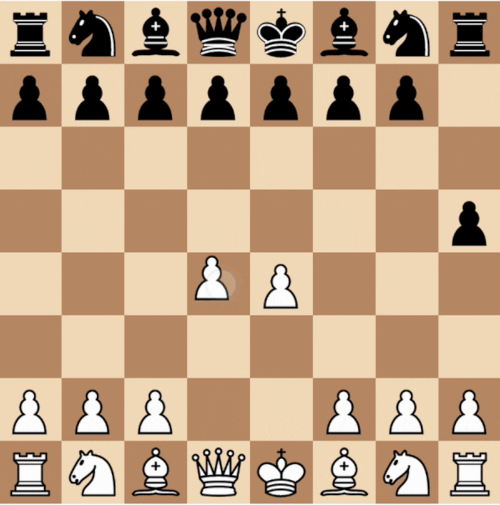
By default, library uses chess_vectors_flutter for pieces. But you can build your own piece widget by implementing buildPiece param. See below example.

Chessboard(
  fen: "rnbqkbnr/pppppppp/8/8/8/8/PPPPPPPP/RNBQKBNR w KQkq - 0 1",
  size: 400,
  buildPiece: (piece, size) {
    if (piece == Piece.WHITE_PAWN) {
      return Icon(
        Icons.person,
        size: size,
        color: Colors.white,
      );
    } else if (piece == Piece.BLACK_PAWN) {
      return Icon(
        Icons.person,
        size: size,
        color: Colors.black,
      );
    }
  },
);

If you don't return widget for a PieceType default widget will be rendered. This is how the above Chessboard will look.

Custom Piece Build

Parameters

fen:

fen that should be show on the board (example rnbqkbnr/pppppppp/8/8/8/8/PPPPPPPP/RNBQKBNR w KQkq - 0 1)

size:

Size of the chessboard widget

onMove (optional):

Called when a move is made on the board. Passing a ShortMove(from, to, promotion).

orientation (optional):

Specify orientation of the chessboard.

lightSquareColor (optional):

color of light square on chessboard.

darkSquareColor (optional):

color of dart square on chessboard.

onPromote (optional):

handle piece promotion

buildPiece (optional):

handle building of custom piece

Categories

Dependencies

Dependency list 4 items

Source repository

Projects using this package

No data available yet.