Search packages, repositories and app categories

flutter_stripe_payment cover
Package detailsv0.0.18

flutter_stripe_payment

Add Stripe to your Flutter Application to Accept Card Payments Using Payment Intents with Strong SCA 3DS Compliance.

AndroidiOS
30-day downloads
85
Likes
57
Pub points
125

Install package

flutter pub add flutter_stripe_payment

Package Overview

Package selection guidance compiled from public package information, community data, and project usage.

flutter_stripe_payment is a Flutter package that enables seamless integration of Stripe's payment processing into mobile applications. It supports card payments via Payment Intents, ensuring compliance with Strong Customer Authentication (SCA) and 3D Secure (3DS) requirements. Designed for Android and iOS, the package simplifies secure transaction handling with built-in support for tokenization and real-time payment confirmation. Developers can implement robust, PCI-compliant payment flows without managing sensitive card data directly. The SDK handles complex authentication flows, improving checkout success rates while maintaining high security standards.

Use cases

  • In-app purchases
  • E-commerce checkout
  • Subscription billing
  • Digital service payments
  • Online donations

Key features

  • SCA and 3DS compliant
  • Payment Intents support
  • Secure card tokenization
  • Real-time payment confirmation
  • Cross-platform (Android & iOS)

Suitable for

  • Mobile e-commerce apps
  • Subscription-based services
  • Apps requiring secure payments
  • Developers using Stripe
  • Projects needing SCA compliance

Considerations

  • Requires Stripe account setup
  • Needs backend for Payment Intent creation
  • Limited to Stripe's payment methods
  • Dependent on network connectivity
  • May require additional configuration for test environments

Original README

Original README snapshot from the linked source repository. Visit the repository for the latest content.

flutter_stripe_payment

Add Stripe to your Flutter Application to Accept Card Payments using Payment Intents and the Latest SCA Compliance 3DS Requirements

Getting Started

Strong Customer Authentication (SCA), a new rule coming into effect on September 14, 2019, as part of PSD2 regulation in Europe, will require changes to how your European customers authenticate online payments. Card payments will require a different user experience, namely 3D Secure, in order to meet SCA requirements. Transactions that don’t follow the new authentication guidelines may be declined by your customers’ banks.

The Payment Intents API is a new way to build dynamic payment flows. It tracks the lifecycle of a customer checkout flow and triggers additional authentication steps when required by regulatory mandates, custom Radar fraud rules, or redirect-based payment methods.

Initialize

final _stripePayment = FlutterStripePayment();
_stripePayment.onCancel = (){
  print("User Cancelled the Payment Method Form");
};

Setup Stripe Environment


_stripePayment.setStripeSettings(
        appConfig.values.stripePublishableKey,
        appConfig.values.applePayMerchantId);

Show Payment Form

var paymentResponse = await _stripePayment.addPaymentMethod();
if(paymentResponse.status == PaymentResponseStatus.succeeded)
  {
    print(paymentResponse.paymentMethodId);
  }

Create Payment Intent On Server

var intent = PaymentIntent();
    intent.amount = widget.order.cart.total;
    intent.isManual = true;
    intent.isConfirmed = false;
    intent.paymentMethodId = paymentResponse.paymentMethodId;
    intent.currency = "usd";
    intent.isOnSession = true;
    intent.isSuccessful = false;
    intent.statementDescriptor = "Dorm Mom, Inc";
    var response = await widget.clientDataStore.createPaymentIntent(intent);

Confirm Payment Intent to Kick Off 3D Authentication

var intentResponse = await _stripePayment.confirmPaymentIntent(
          response.clientSecret, paymentResponse.paymentMethodId, widget.order.cart.total);

      if (intentResponse.status == PaymentResponseStatus.succeeded) {
        widget.order.paymentIntentId = intentResponse.paymentIntentId;
        widget.order.paymentMethodId = paymentResponse.paymentMethodId;
        _submitOrder();
      } else if (intentResponse.status == PaymentResponseStatus.failed) {
        setState(() {
          hideBusy();
        });
        globals.Utility.showAlertPopup(
            context, "Error Occurred", intentResponse.errorMessage);
      } else {
        setState(() {
          hideBusy();
        });
      }

Setup Payment Intent For Future Payments

var intentResponse = await _stripePayment.setupPaymentIntent(
        response.clientSecret, paymentResponse.paymentMethodId);

    if (intentResponse.status == PaymentResponseStatus.succeeded) {
      await _addCardToAccount(paymentResponse.paymentMethodId);
    } else if (intentResponse.status == PaymentResponseStatus.failed) {
      setState(() {
        hideBusy();
      });
      globals.Utility.showAlertPopup(
          context, "Error Occurred", intentResponse.errorMessage);
    } else {
      setState(() {
        hideBusy();
      });
    }

Screenshots

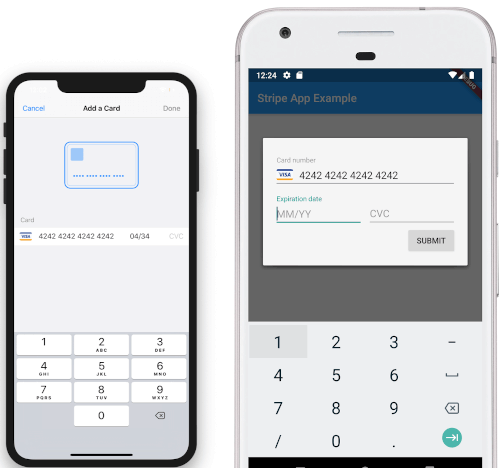
iOS View Android View

To Do

  • [DONE]Android Implementation
  • STPaymentCardTextField Inline Embedding

Categories

Source repository

Projects using this package

No data available yet.