Package selection guidance compiled from public package information, community data, and project usage.
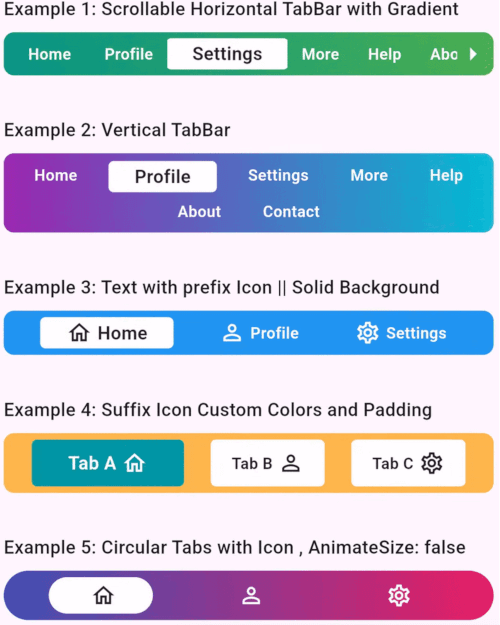
FlutterTabBarLite is a lightweight, customizable tab bar widget for Flutter that supports both horizontal and vertical layouts with smooth animation effects. Designed for simplicity and performance, it offers developers an easy way to implement animated tab transitions across multiple platforms including Android, iOS, Web, macOS, Windows, and Linux. The package enhances user experience with fluid visual feedback during navigation between tabs. It's ideal for apps requiring intuitive tab-based navigation with minimal setup and high flexibility.
Use cases
Simple tab navigation in mobile apps
Vertical tab layouts for compact UIs
Animated tab transitions in web applications
Customizable tab styling for dashboards
Navigation in multi-platform Flutter apps
Key features
Horizontal and vertical tab support
Smooth animation transitions
Lightweight and performant
Cross-platform compatibility
Easy integration with existing Flutter projects
Customizable appearance and behavior
Suitable for
Developers seeking simple tab bar solutions
Apps needing animated tab interactions
Multi-platform Flutter applications
UI designers wanting flexible tab layouts
Projects prioritizing minimal dependencies
Considerations
Limited to basic tab functionality (no advanced swipe gestures)
May require custom styling for complex designs
Animations may vary slightly across platforms
Not suitable for highly dynamic tab content management
Best for static or semi-static tab structures
Original README
Original README snapshot from the linked source repository. Visit the repository for the latest content.
FlutterTabBarLite
A fully customizable and animated tab bar widget for Flutter applications. Designed to make navigation intuitive and visually appealing, this package is perfect for creating modern and dynamic tab interfaces.
Features
Customizable Titles: Unique titles to each tab.
Icon Support: Include prefix and suffix icons for enhanced aesthetics.
Scrollable & Fixed Layouts: Choose between scrollable and fixed tab bar layouts.
Gradient Backgrounds: Apply gradients for a modern look.
Responsive Design: Fully responsive for various screen sizes.
Tab Change Callback: Get notified when the user switches tabs.
Tab Axis Horizontal & Vertical: Horizontal and Vertical Tabs.