
Search packages, repositories and app categories

flutter_update_dialog cover
Package detailsv2.0.0

flutter_update_dialog

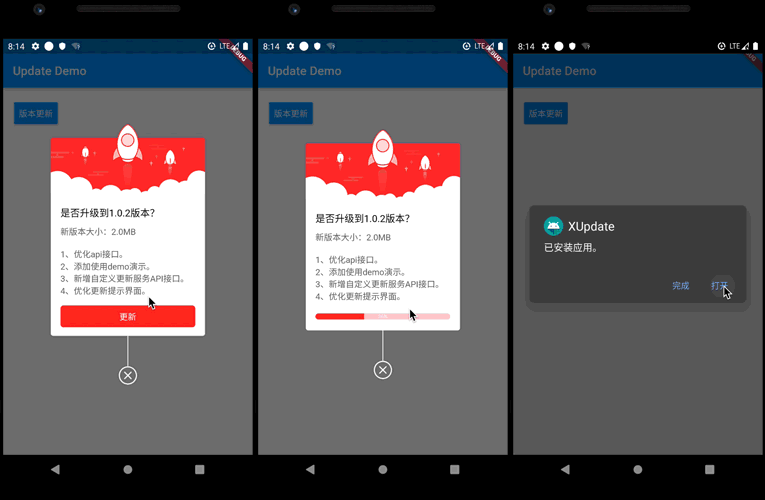
A beautiful application version update dialog for flutter.You can customize your own version update pop-up window!

AndroidiOSWebmacOSWindowsLinux
30-day downloads
227
Likes
58
Pub points
150

Install package

flutter pub add flutter_update_dialog

Package Overview

Package selection guidance compiled from public package information, community data, and project usage.

A customizable and visually appealing version update dialog for Flutter applications. It enables developers to display a modern, user-friendly update prompt when a new app version is available. The dialog supports custom styling, optional changelog display, and seamless integration across multiple platforms including Android, iOS, Web, macOS, Windows, and Linux. Ideal for prompting users to update the app with minimal effort and maximum engagement.

Use cases

  • App version upgrade notifications
  • Customizable update prompts
  • Changelog display in update dialogs
  • Cross-platform update alerts
  • User engagement during updates
  • In-app update reminders

Key features

  • Highly customizable UI
  • Supports changelog display
  • Cross-platform compatibility
  • Easy integration via pub
  • Configurable update behavior
  • Responsive design for all devices

Suitable for

  • Developers seeking modern update dialogs
  • Apps requiring frequent version updates
  • Projects targeting multiple platforms
  • Teams wanting branded update experiences
  • Applications with active user engagement strategies
  • Projects needing lightweight update solutions

Considerations

  • Requires manual handling of update logic
  • Limited to UI presentation, not download functionality
  • May need additional code for auto-update
  • Not suitable for silent background updates
  • Depends on external server for version checks
  • Best paired with a version checking service

Original README

Original README snapshot from the linked source repository. Visit the repository for the latest content.

flutter_update_dialog

Version Build Status Issue Star

Application version update dialog. With it, you can customize the logic of version update.

You can refer to the following project:

https://github.com/xuexiangjys/flutter_app_update_example

Getting Started

You should ensure that you add the flutter_update_dialog as a dependency in your flutter project.

// pub 集成
dependencies:
  flutter_update_dialog: ^2.0.0

//github  集成
dependencies:
  flutter_update_dialog:
    git:
      url: git://github.com/xuexiangjys/flutter_update_dialog.git
      ref: master

UseCase

Default Style
  void defaultStyle() {
    if (dialog != null && dialog.isShowing()) {
      return;
    }
    dialog = UpdateDialog.showUpdate(context,
        title: "是否升级到4.1.4版本?",
        updateContent: "新版本大小:2.0M\n1.xxxxxxx\n2.xxxxxxx\n3.xxxxxxx",
        onUpdate: onUpdate);
  }
Custom Style
  void customStyle() {
    if (dialog != null && dialog.isShowing()) {
      return;
    }
    dialog = UpdateDialog.showUpdate(context,
        width: 250,
        title: "是否升级到4.1.4版本?",
        updateContent: "新版本大小:2.0M\n1.xxxxxxx\n2.xxxxxxx\n3.xxxxxxx",
        titleTextSize: 14,
        contentTextSize: 12,
        buttonTextSize: 12,
        topImage: Image.asset('assets/bg_update_top.png'),
        extraHeight: 5,
        radius: 8,
        themeColor: Color(0xFFFFAC5D),
        progressBackgroundColor: Color(0x5AFFAC5D),
        isForce: true,
        updateButtonTxt: '升级',
        ignoreButtonTxt: '忽略此版本',
        enableIgnore: true, onIgnore: () {
          ToastUtils.waring("忽略");
          dialog.dismiss();
        },
        onUpdate: onUpdate);
  }

Property value

Name Type Default Description
width double 0.618 * screenWidth dialog width
title String / dialog title
updateContent String / Update the modified content
onUpdate VoidCallback / Click on the update button event
titleTextSize double 16.0 The size of the title text
contentTextSize double 14.0 The size of the update content text
buttonTextSize double 14.0 The size of the button text
themeColor Color Colors.red Theme color
progressBackgroundColor Color 0xFFFFCDD2 The background color of the progress bar
topImage Image / Picture at the top
extraHeight double 5.0 Extra height from top image
radius double 4.0 Angle of corner
enableIgnore bool false Whether to enable the ignore version button
updateButtonText String '更新' Update button text
ignoreButtonText String '忽略此版本' Ignore button text
isForce bool false Whether to force update
onIgnore VoidCallback / Click on the ignore button event

Categories

Source repository

Projects using this package

No data available yet.