Search packages, repositories and app categories

flutter_verification_code_field cover
Package detailsv1.2.2

flutter_verification_code_field

Flutter verification code input. Primarily used for entering or pasting OTP codes from authorization emails or messages.

AndroidiOS
30-day downloads
96
Likes
27
Pub points
160

Install package

flutter pub add flutter_verification_code_field

Package Overview

Package selection guidance compiled from public package information, community data, and project usage.

A Flutter package for creating a clean, customizable verification code input field, ideal for entering or pasting OTP codes from emails or SMS. It supports automatic focus management between fields, paste detection, and smooth user experience across devices. Designed with simplicity and usability in mind, it integrates seamlessly into authentication flows requiring one-time passwords.

Use cases

  • OTP entry during login
  • Two-factor authentication
  • Account verification via email/SMS
  • Passwordless login
  • Form validation for 6-digit codes
  • Mobile app onboarding

Key features

  • Auto-focus between code fields
  • Paste detection from clipboard
  • Customizable styling
  • Responsive design for all screen sizes
  • Supports both Android and iOS
  • Easy integration with form controllers

Suitable for

  • Developers building authentication flows
  • Apps requiring OTP input
  • UX-focused mobile applications
  • Projects needing minimal setup for code fields
  • Teams prioritizing accessibility and usability

Considerations

  • Requires manual handling of validation logic
  • Limited to single-line numeric input
  • No built-in support for dynamic field count
  • May need additional styling for non-default themes
  • Not designed for multi-step verification workflows

Original README

Original README snapshot from the linked source repository. Visit the repository for the latest content.

Flutter Verification Code Field

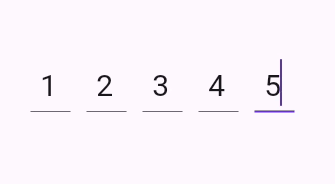
A flutter package which contains a verification code field with a number of advantages, namely with the ability to customize your own validation pattern, customize the number of OTP fields or their size, as well as the spacing between OTP fields, also supports text insertion or character replacement in any cell.


Platform


Table of contents

Installing

1. Depend on it

Add this to your package's pubspec.yaml file:

dependencies:
  flutter_verification_code_field: ^1.0.0
2. Install it

You can install packages from the command line:

with pub:

$ pub get

with Flutter:

$ flutter pub get
3. Import it

Now in your Dart code, you can use:

import 'package:flutter_verification_code_field/flutter_verification_code_field.dart';

Usage

VerificationCodeField is a Hook Widget that can be used for OTP verification. Include it in your code like:

    VerificationCodeField(
      length: 5,
      onFilled: (value) => print(value),
      size: Size(30, 60),
      spaceBetween: 16,
      matchingPattern: RegExp(r'^\d+$'),
    );

It has many configurable properties, including:

  • length – Number of the OTP Fields
  • size – Size of the single OTP Field
  • spaceBetween – Space between the OTP fields
  • matchingPattern – Pattern for validation

There are also custom callback:

  • onFilled – Callback function that is called when the verification code is filled

Bugs or Requests

If you encounter any problems feel free to open an issue. If you feel the library is missing a feature, please raise a ticket on GitHub and I'll look into it. Pull request are also welcome.

Categories

Dependencies

Dependency list 2 items

Source repository

Projects using this package

No data available yet.
