Search packages, repositories and app categories

Package detailsv0.2.1

flutter_wordpress

This library uses WordPress REST-API-V2 to provide a way for your application to interact with your WordPress website.

30-day downloads
65
Likes
120
Pub points
40

Install package

flutter pub add flutter_wordpress

Package Overview

Package selection guidance compiled from public package information, community data, and project usage.

The flutter_wordpress package enables Flutter applications to interact with WordPress websites using the WordPress REST API v2. It provides a structured way to fetch posts, pages, comments, and other content, making it easy to build dynamic apps that pull data from a WordPress backend. The library is designed for developers who want to integrate their existing WordPress sites into mobile applications without complex custom APIs.

Use cases

  • Fetching blog posts from WordPress
  • Displaying pages and custom content
  • Integrating user comments
  • Building mobile apps for WordPress sites
  • Synchronizing content between web and mobile

Key features

  • REST API v2 integration
  • Simple data fetching methods
  • Supports posts, pages, and comments
  • Lightweight and easy to implement
  • Compatible with standard WordPress setups

Suitable for

  • Mobile app developers using WordPress
  • Content-driven apps
  • Blogging platforms
  • Websites with public content
  • Developers seeking quick WordPress integration

Considerations

  • Requires WordPress site with REST API enabled
  • Limited to public endpoints unless authenticated
  • No built-in caching or offline support
  • Depends on external server stability
  • Authentication requires additional setup for private content

Original README

Original README snapshot from the linked source repository. Visit the repository for the latest content.

Flutter Wordpress

pub.dev

This library uses WordPress REST API V2 to provide a way for your application to interact with your WordPress website.

Tutorial - by Ritesh Sharma

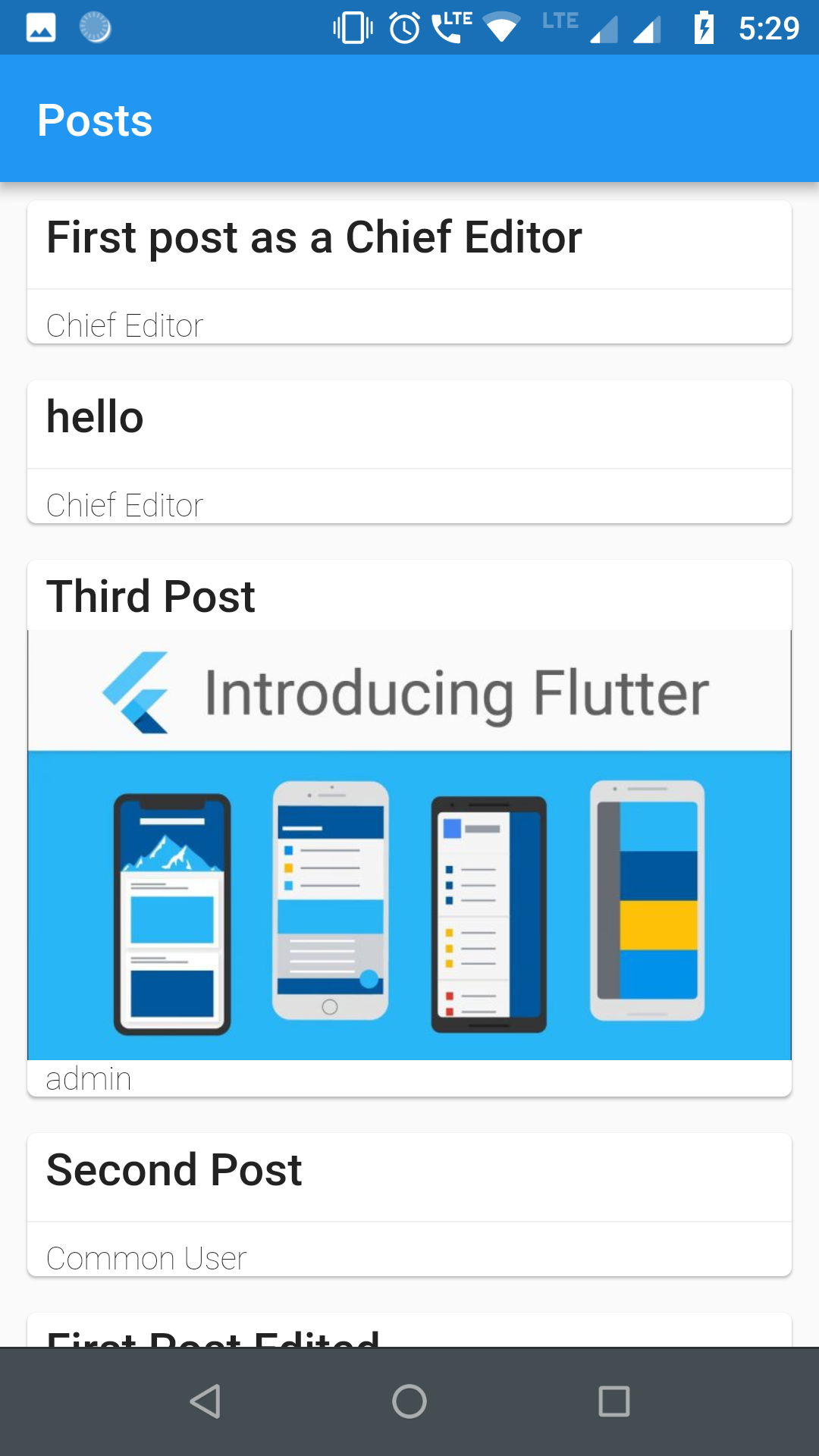
Screenshots

Requirements

For authentication and usage of administrator level REST APIs, you need to use either of the two popular authentication plugins in your WordPress site:

  1. Application Passwords
  2. JWT Authentication for WP REST API (recommended)

Getting Started

1. Import library
First:

Find your pubspec.yaml in the root of your project and add flutter_wordpress: ^0.2.0 under dependencies:

Second:
import 'package:flutter_wordpress/flutter_wordpress.dart' as wp;
2. Instantiate WordPress class
wp.WordPress wordPress;

// adminName and adminKey is needed only for admin level APIs
wordPress = wp.WordPress(
  baseUrl: 'http://localhost',
  authenticator: wp.WordPressAuthenticator.JWT,
  adminName: '',
  adminKey: '',
);
3. Authenticate User
Future<wp.User> response = wordPress.authenticateUser(
  username: 'ChiefEditor',
  password: 'chiefeditor@123',
);

response.then((user) {
  createPost(user);
}).catchError((err) {
  print('Failed to fetch user: $err');
});
4. Fetch Posts
Future<List<wp.Post>> posts = wordPress.fetchPosts(
  postParams: wp.ParamsPostList(
    context: wp.WordPressContext.view,
    pageNum: 1,
    perPage: 20,
    order: wp.Order.desc,
    orderBy: wp.PostOrderBy.date,
  ),
  fetchAuthor: true,
  fetchFeaturedMedia: true,
  fetchComments: true,
  postType: 'post'
);
5. Fetch Users
Future<List<wp.User>> users = wordPress.fetchUsers(
  params: wp.ParamsUserList(
    context: wp.WordPressContext.view,
    pageNum: 1,
    perPage: 30,
    order: wp.Order.asc,
    orderBy: wp.UsersOrderBy.name,
    roles: ['subscriber'],
  ),
);
6. Fetch Comments
Future<List<wp.Comment>> comments = wordPress.fetchComments(
  params: wp.ParamsCommentList(
    context: wp.WordPressContext.view,
    pageNum: 1,
    perPage: 30,
    includePostIDs: [1],
  ),
);
7. Create User
Future<void> createUser({@required String email, @required String username, @required String password, @required List<String> roles}) async {
    await widget.wordPress.createUser(
      user: wp.User(
        email: email,
        password: password,
        username: username,
        roles: roles
      )
    ).then((p) {
      print('User created successfully ${p}');
    }).catchError((err) {
      print('Failed to create user: $err');
    });
  }
8. Create Post
  void createPost({@required wp.User user}) {
    final post = widget.wordPress.createPost(
      post: new wp.Post(
        title: 'First post as a Chief Editor',
        content: 'Blah! blah! blah!',
        excerpt: 'Discussion about blah!',
        authorID: user.id,
        commentStatus: wp.PostCommentStatus.open,
        pingStatus: wp.PostPingStatus.closed,
        status: wp.PostPageStatus.publish,
        format: wp.PostFormat.standard,
        sticky: true,
      ),
    );

    post.then((p) {
      print('Post created successfully with ID: ${p.id}');
    }).catchError((err) {
      print('Failed to create post: $err');
    });
  }
9. create Comment
  void createComment({@required int userId, @required int postId}) {
    final comment = widget.wordPress.createComment(
      comment: new wp.Comment(
        author: userId,
        post: postId,
        content: "First!",
        parent: 0,
      ),
    );

    comment.then((c) {
      print('Comment successfully posted with ID: ${c.id}');
    }).catchError((err) {
      print('Failed to comment: $err');
    });
  }
10. Update Comment
Future<void> updateComment({@required int id, @required int postId, @required wp.User user}) async {
    await widget.wordPress.updateComment(
      comment: new wp.Comment(
        content: "Comment Updated2!",
        author: user.id,
        post: postId,
      ),
      id: id,
    ).then((c) {
      print('Comment updated successfully "$c"');
    }).catchError((err) {
      print('Failed to update Comment: $err');
    });
  }
11. Update Post
Future<void> updatePost({@required int id, @required int userId}) async {
    await widget.wordPress.updatePost(
      post: new wp.Post(
        title: 'First post as a Chief Editor',
        content: 'Blah! blah! blah!',
        excerpt: 'Discussion about blah!',
        authorID: userId,
        commentStatus: wp.PostCommentStatus.open,
        pingStatus: wp.PostPingStatus.closed,
        status: wp.PostPageStatus.publish,
        format: wp.PostFormat.standard,
        sticky: true,
      ),
      id: id, //
    ).then((p) {
      print('Post updated successfully with ID ${p}');
    }).catchError((err) {
      print('Failed to update post: $err');
    });
  }
12. Update User
Future<void> updateUser({@required int id, @required String username, @required String email}) async {
    await widget.wordPress.updateUser(
      user: new wp.User(
        description: "This is description for this user",
        username: username,
        id: id,
        email: email
      ),
      id: id,
    ).then((u) {
      print('User updated successfully $u');
    }).catchError((err) {
      print('Failed to update User: $err');
    });
  }
13. Delete Comment
Future<void> deleteComment({@required int id}) async {
    await widget.wordPress.deleteComment(id: id).then((c) {
      print('Comment Deleted successfully: $c');
    }).catchError((err) {
      print('Failed to Delete comment: $err');
    });
  }
14. Delete Post
  Future<void> deletePost({@required int id}) async {
    await widget.wordPress.deletePost(id: id).then((p) {
      print('Post Deleted successfully: $p');
    }).catchError((err) {
      print('Failed to Delete post: $err');
    });
  }
15. Delete User
  Future<void> deleteUser({@required int id, @required int reassign}) async {
    await widget.wordPress.deleteUser(id: id, reassign: reassign).then((u) {
      print('User Deleted successfully: $u');
    }).catchError((err) {
      print('Failed to Delete user: $err');
    });
  }
16. Upload Media
  uploadMedia(File image) async {
  var media = await wordPress.uploadMedia(image).then((m) {
    print('Media uploaded successfully: $m');
  }).catchError((err) {
    print('Failed to upload Media: $err');
  });
  int mediaID = media['id'];  
}

Future Work

  1. Implementing OAuth 2.0 authentication.

Contributors

Categories

Dependencies

Dependency list 2 items

Source repository

Projects using this package

No data available yet.