Package selection guidance compiled from public package information, community data, and project usage.
flutter_xupdate is a Flutter plugin that integrates XUpdate, an Android-specific library for managing app updates. It enables seamless in-app update functionality on Android devices, supporting both silent background updates and user-triggered update prompts. The plugin simplifies the process of checking for new versions, downloading updates, and installing them without requiring a full app restart. It's designed to enhance user experience by minimizing disruption during updates.
Use cases
In-app update notifications
Silent background updates
Manual update triggers
Version compatibility checks
Update progress tracking
Key features
Android-only support
Background update downloads
Customizable update dialogs
Progress monitoring
Integration with XUpdate library
Suitable for
Android-focused Flutter apps
Apps requiring frequent updates
Developers using XUpdate
Projects needing lightweight update logic
Considerations
Limited to Android platform
Requires manual configuration for update server
No iOS support
Dependent on XUpdate backend setup
May need custom UI adjustments
Original README
Original README snapshot from the linked source repository. Visit the repository for the latest content.
flutter_xupdate
A Flutter plugin for XUpdate -- Android Update Library。See the use Chinese Document for details。
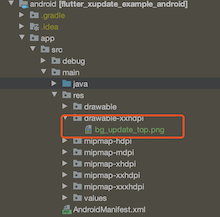
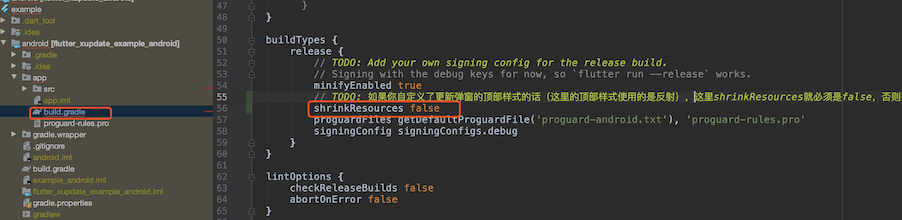
【Note】: When you use the command flutter build apk to make a release package, If you use the topImageRes property, you must configure shrinkResources to false, otherwise the pop-up window will display an exception!
Property value
Initialization
Name
Type
Default
Description
debug
bool
false
Whether Output log
isPost
bool
false
Whether use post request
isPostJson
bool
false
Whether post request upload json format
timeout
int
20000(ms)
Request response timeout
isWifiOnly
bool
true
Whether update only under WiFi
isAutoMode
bool
false
Whether to turn on automatic mode
supportSilentInstall
bool
false
Whether to support silent installation requires that the device has root permission
enableRetry
bool
false
In the process of downloading, if you click Cancel, whether the pop-up window for retrying to switch the download mode will pop up
retryContent
String
''
Try the prompt content of the prompt pop-up window again
retryUrl
String
''
Retrying prompt pop-up URL to jump after clicking
params
Map
/
Public parameters to be set
CheckUpdate
Name
Type
Default
Description
url
String
/
URL of version check
params
Map
/
Parameters
supportBackgroundUpdate
bool
false
Whether to support background updates
isAutoMode
bool
false
Whether to turn on automatic mode
isCustomParse
bool
false
Is it a custom resolution protocol
themeColor
String
''
Apply pop-up theme color
topImageRes
String
''
The name of the top picture resource in the pop-up window
buttonTextColor
String
''
The color of the button text
widthRatio
double
/
Proportion of version update Prompter width to screen
heightRatio
double
/
Proportion of version update Prompter height to screen
overrideGlobalRetryStrategy
bool
false
Whether to override the global retry policy
enableRetry
bool
false
In the process of downloading, if you click Cancel, whether the pop-up window for retrying to switch the download mode will pop up
retryContent
String
''
Try the prompt content of the prompt pop-up window again