Package selection guidance compiled from public package information, community data, and project usage.
A Flutter plugin that enables native Zalo login authentication on Android and iOS devices. It integrates with the official Zalo SDKs to provide a seamless sign-in experience for users who prefer logging in via their Zalo accounts. The plugin handles platform-specific setup and authentication flows, abstracting complexity from developers. It supports secure token retrieval and is designed to work within standard Flutter applications without requiring deep native code knowledge.
Use cases
User authentication using Zalo accounts
Integrating Zalo login into mobile apps
Enabling social login for Vietnamese users
Simplifying OAuth flow with Zalo
Adding Zalo as an identity provider
Key features
Native Zalo SDK integration
Cross-platform support (Android & iOS)
Secure token handling
Minimal boilerplate setup
Easy integration with Flutter apps
Suitable for
Apps targeting Vietnamese audiences
Social login implementations
Authentication systems requiring Zalo support
Developers using Flutter for mobile apps
Projects needing native SDK access
Considerations
Requires Zalo app installation on device
Needs configuration of Zalo App ID and redirect URI
Limited to Zalo account authentication
Platform-specific setup required
May require approval for production use
Original README
Original README snapshot from the linked source repository. Visit the repository for the latest content.
Flutter Zalo Login
1. Installation
Add this to your package's pubspec.yaml file:
dependencies:flutter_zalo_login:
2. Usage
Call init function on initState
ZaloLogin().init();
Login function return type https://pub.dev/documentation/flutter_zalo_login/latest/flutter_zalo_login/ZaloLoginResult-class.html
Get info from user return type https://pub.dev/documentation/flutter_zalo_login/latest/flutter_zalo_login/ZaloProfileModel-class.html
Properties
Type
id
String
name
String
birthday
String
gender
String
picture.data.url
String
ZaloProfileModel info = awaitZaloLogin().getInfo();
3. Setup Zalo developers
To make this plugin working we need to have there key:
YOUR_ZALO_APP_ID
Android Hash Key ( only Android )
YOUR_ZALO_APP_SECRET_KEY ( only IOS )
First go to this page: https://developers.zalo.me and create account/new app
It will have 2 value
ID: YOUR_ZALO_APP_ID
Secret Key: YOUR_ZALO_APP_SECRET_KEY
3.1 :warning: Note
IOS will need YOUR_ZALO_APP_ID and YOUR_ZALO_APP_SECRET_KEY
Android will need YOUR_ZALO_APP_ID and Hash Key
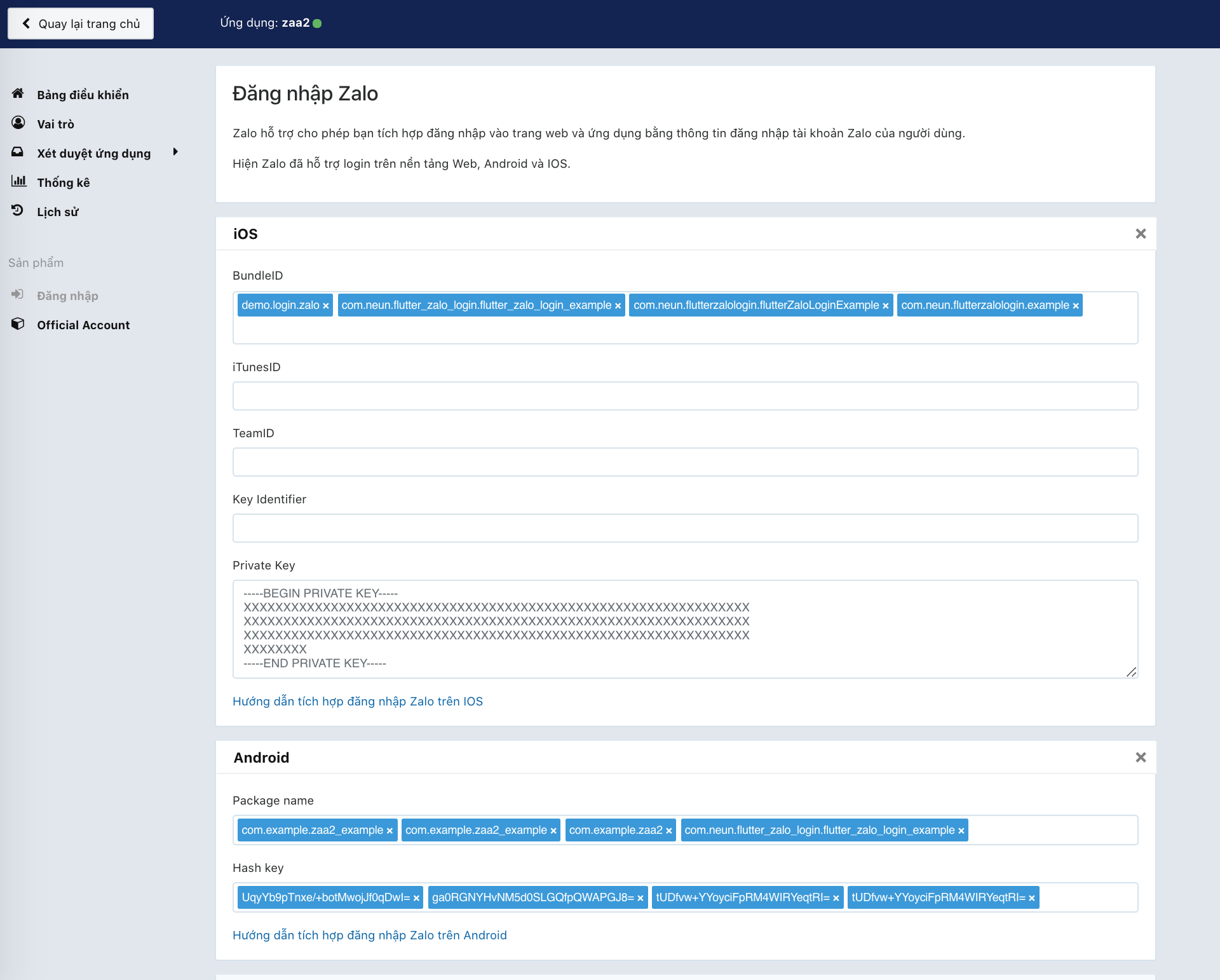
Android Hash Key will be show on console log when you run ZaloLogin().init(); like below
V/ZaloLogin(28932): ---------------------------------------------------------------------------
V/ZaloLogin(28932): |     Please add this Hash Key to Zalo developers dashboard for Login     |
V/ZaloLogin(28932): tUDfvw+YYoyciFpRM4WIRYeqtRI= <-- YOUR ANDROID HASH CODE
V/ZaloLogin(28932): ---------------------------------------------------------------------------
Config your BundleID, Package name, Hash key on zalo develop
4. Setup for Android Kotlin
4.1 This plugin needs minSdkVersion >= 21 for working
As of 0.2.0 the Android side uses Zalo SDK v4 (me.zalo:sdk-* on Maven
Central) with the OAuth PKCE flow, AGP 8, Gradle 8.9 and compileSdk 35.
iOS uses ZaloSDK ~> 4.1 with deployment target 12.0.
Open android/app/build.gradle and edit
minSdkVersion 21 // or bigger
4.2 Open to /android/app/src/main/AndroidManifest.xml and add config on bottom under flutterEmbedding block
<applicationandroid:name=".FlutterApplication"android:label="zaa_example"android:icon="@mipmap/ic_launcher"><!-- ... --><!-- ... --><!-- Don't delete the meta-data below.
This is used by the Flutter tool to generate GeneratedPluginRegistrant.java --><meta-dataandroid:name="flutterEmbedding"android:value="2" /><!-- ADD HERE --><meta-dataandroid:name="com.zing.zalo.zalosdk.appID"android:value="@string/appID" /><activityandroid:name="com.zing.zalo.zalosdk.oauth.BrowserLoginActivity"><intent-filter><actionandroid:name="android.intent.action.VIEW"/><categoryandroid:name="android.intent.category.DEFAULT"/><categoryandroid:name="android.intent.category.BROWSABLE"/><dataandroid:scheme="@string/zalosdk_login_protocol_schema"/></intent-filter></activity><!-- ADD HERE --><!-- ... --></application>
4.3 After that create new string.xml file on folder /android/app/src/main/res/values/string.xml
4.4 Create either MyApplication.kt in the same directory as MainActivity.
:warning: Replace package your.app.name with your app's package name. If you don't know your package name, you can find it at the 1st line in MainActivity.kt.
package your.app.name;  // <-- replace this

import io.flutter.app.FlutterApplication;
import io.flutter.plugin.common.PluginRegistry;
import com.zing.zalo.zalosdk.oauth.ZaloSDKApplication;

class MyApplication : FlutterApplication(), PluginRegistry.PluginRegistrantCallback {
  override fun onCreate() {
    super.onCreate();
    ZaloSDKApplication.wrap(this);
  }
  override fun registerWith(registry: PluginRegistry) {}
}
4.5 Edit MainActivity.kt
:warning: Replace package your.app.name with your app's package name. If you don't know your package name, you can find it at the 1st line in MainActivity.kt.
package your.app.name;  // <-- replace this

import io.flutter.embedding.android.FlutterActivity
import android.content.Intent
import com.zing.zalo.zalosdk.oauth.ZaloSDK // <-- Add this

class MainActivity: FlutterActivity() {
    override fun onActivityResult(requestCode:Int, resultCode:Int, data:Intent) {
        super.onActivityResult(requestCode, resultCode, data)
        ZaloSDK.Instance.onActivityResult(this, requestCode, resultCode, data) // <-- Add this
    }
}
4.6 Now edit AndroidManifest.xml and provide a reference to your custom Application class:
:warning: MyApplication, MainActivity should be the same with the code have been edit
TODO: Lấy danh sách bạn bè
More info: https://developers.zalo.me/docs/sdk/android-sdk/open-api/lay-danh-sach-ban-be-post-437
TODO: Gửi tin nhắn tới bạn bè
More info: https://developers.zalo.me/docs/sdk/android-sdk/open-api/gui-tin-nhan-toi-ban-be-post-1205
TODO: Đăng bài viết
More info: https://developers.zalo.me/docs/sdk/android-sdk/open-api/dang-bai-viet-post-1212
TODO: Mời sử dụng ứng dụng
More info: https://developers.zalo.me/docs/sdk/android-sdk/open-api/moi-su-dung-ung-dung-post-1218
TODO: Gửi tin nhắn tới bạn bè
More info: https://developers.zalo.me/docs/sdk/android-sdk/tuong-tac-voi-app-zalo/gui-tin-nhan-toi-ban-be-post-452
Future shareMessage() async {}
TODO: Đăng bài viết
More info: https://developers.zalo.me/docs/sdk/android-sdk/tuong-tac-voi-app-zalo/dang-bai-viet-post-447