Package selection guidance compiled from public package information, community data, and project usage.
GeoFlutterFire is an open-source Flutter package that enables developers to store and query Firebase Firestore documents using geographic location data. It extends Firestore's capabilities by allowing spatial queries, such as finding nearby locations or checking if a point lies within a region. Built for seamless integration with Firebase, it supports Android, iOS, Web, and macOS platforms. The library simplifies geospatial operations in mobile and web applications, making it ideal for location-based services.
Use cases
Finding nearby users or points of interest
Building location-aware social apps
Implementing delivery or ride-sharing features
Creating geofencing triggers
Mapping real-time location data
Key features
Geospatial queries with Firestore
Support for latitude/longitude coordinates
Integration with Firebase Realtime Database
Efficient proximity searches
Cross-platform compatibility
Suitable for
Developers building location-based apps
Teams using Firebase with geolocation needs
Apps requiring real-time proximity detection
Mobile and web applications with mapping features
Considerations
Requires Firebase Firestore setup
May incur higher costs with frequent queries
Needs accurate GPS data for precise results
Limited to supported platforms (Android, iOS, Web, macOS)
Original README
Original README snapshot from the linked source repository. Visit the repository for the latest content.
GeoFlutterFire :earth_africa:
GeoFlutterFire is an open-source library that allows you to store and query a set of keys based on their geographic location. At its heart, GeoFlutterFire simply stores locations with string keys. Its main benefit, however, is the possibility of retrieving only those keys within a given geographic area - all in realtime.
GeoFlutterFire uses the Firebase Firestore Database for data storage, allowing query results to be updated in realtime as they change. GeoFlutterFire selectively loads only the data near certain locations, keeping your applications light and responsive, even with extremely large datasets.
GeoFlutterFire is designed as a lightweight add-on to cloud_firestore plugin. To keep things simple, GeoFlutterFire stores data in its own format within your Firestore database. This allows your existing data format and Security Rules to remain unchanged while still providing you with an easy solution for geo queries.
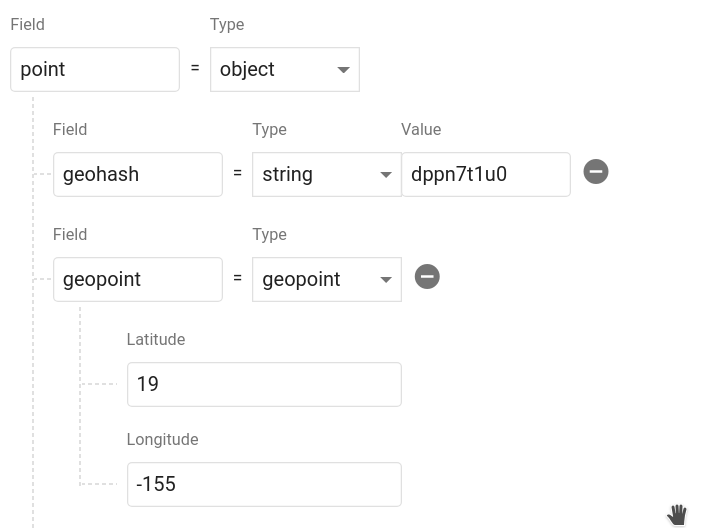
Calling geoFirePoint.data returns an object that contains a geohash string and a Firestore GeoPoint. It should look like this in your database. You can name the object whatever you want and even save multiple points on a single document.
Query Geo data
To query a collection of documents with 50kms from a point
// Create a geoFirePointGeoFirePoint center = geo.point(latitude: 12.960632, longitude: 77.641603);
// get the collection reference or queryvar collectionReference = _firestore.collection('locations');
double radius = 50;
String field = 'position';
Stream<List<DocumentSnapshot>> stream = geo.collection(collectionRef: collectionReference)
.within(center: center, radius: radius, field: field);
The within function returns a Stream of the list of DocumentSnapshot data, plus some useful metadata like distance from the centerpoint.
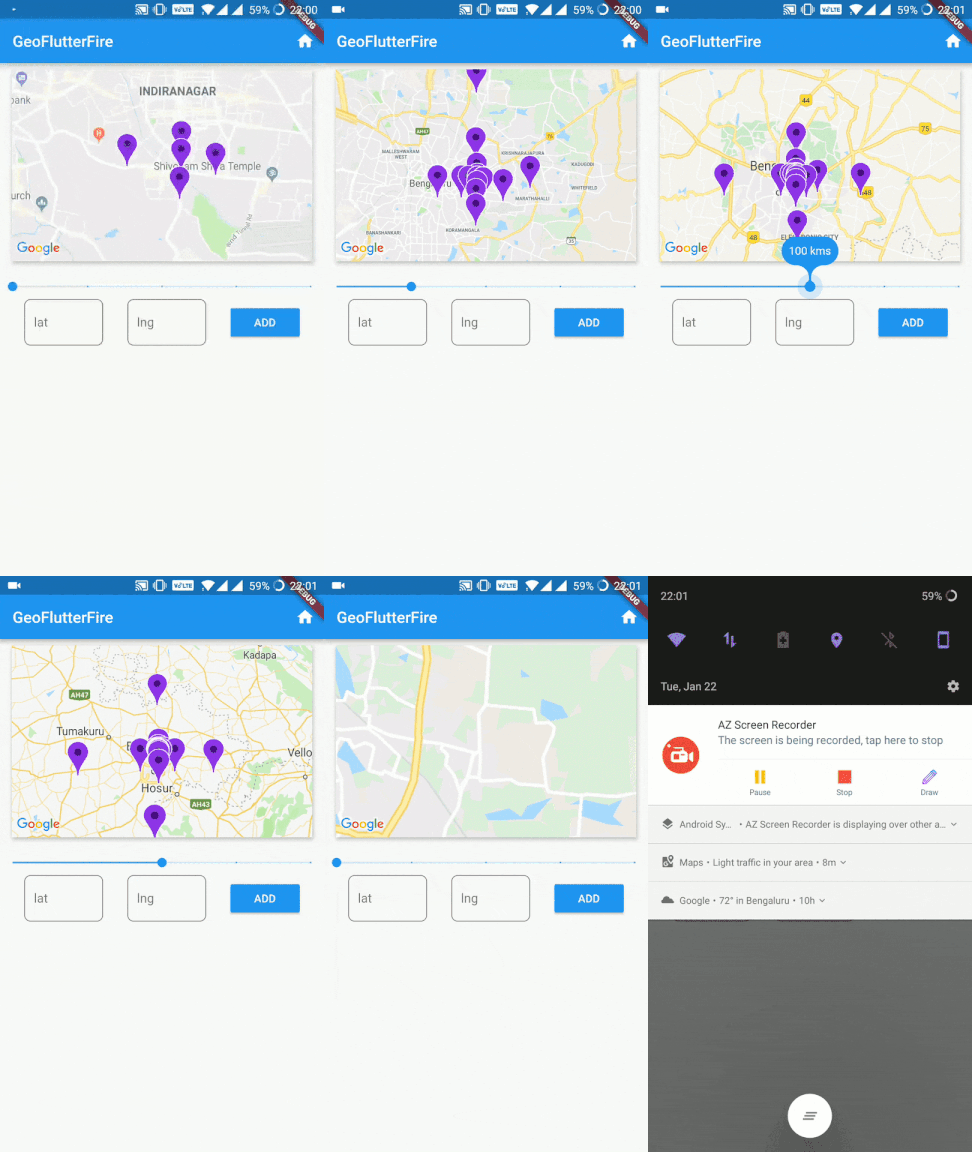
You now have a realtime stream of data to visualize on a map.
:notebook: API
collection(collectionRef: CollectionReference)
Creates a GeoCollectionRef which can be used to make geo queries, alternatively can also be used to write data just like firestore's add / set functionality.
Example:
// Collection ref// var collectionReference = _firestore.collection('locations').where('city', isEqualTo: 'bangalore');var collectionReference = _firestore.collection('locations');
var geoRef = geo.collection(collectionRef: collectionReference);
Note: collectionReference can be of type CollectionReference or Query
Query the parent Firestore collection by geographic distance. It will return documents that exist within X kilometers of the center-point.
field supports nested objects in the firestore document.
Note: Use optional parameter strictMode = true to filter the documents strictly within the bound of given radius.
Example:
// For GeoFirePoint stored at the root of the firestore document
geoRef.within(center: centerGeoPoint, radius: 50, field: 'position', strictMode: true);

// For GeoFirePoint nested in other objects of the firestore document
geoRef.within(center: centerGeoPoint, radius: 50, field: 'address.location.position', strictMode: true);
Each documentSnapshot.data() also contains distance calculated on the query.
Returns:Stream<List<DocumentSnapshot>>
Write Data
Write data just like you would in Firestore
geoRef.add(data)
Or use one of the client's conveniece methods
geoRef.setDoc(String id, var data, {bool merge}) - Set a document in the collection with an ID.
geoRef.setPoint(String id, String field, double latitude, double longitude)- Add a geohash to an existing doc
Read Data
In addition to Geo-Queries, you can also read the collection like you would normally in Firestore, but as an Observable
geoRef.data()- Stream of documentSnapshot
geoRef.snapshot()- Stream of Firestore QuerySnapshot
point(latitude: double, longitude: double)
Returns a GeoFirePoint allowing you to create geohashes, format data, and calculate relative distance.
Example: var point = geo.point(38, -119)
Getters
point.hash Returns a geohash string at precision 9
point.geoPoint Returns a Firestore GeoPoint
point.data Returns data object suitable for saving to the Firestore database
Geo Calculations
point.distance(latitude, longitude) Haversine distance to a point
Using Firestore withConverter method
If you want to use the collections or queries with this method, you should use GeoFlutterFire().collectionWithConverter<T>({ required Query<T> collectionRef }) instead of GeoFlutterFire().collection({ required Query<Map<String, dynamic>> collectionRef }).
Despite the different initializers, the only difference is in the within method, where in the former initialization you have a extra param that needs to return the GeoPoint from the data type in the query.
:zap: Tips
Scale to Massive Collections
It's possible to build Firestore collections with billions of documents. One of the main motivations of this project was to make geoqueries possible on a queried subset of data. You can pass a Query instead of a CollectionReference into the collection(), then all geoqueries will be scoped with the constraints of that query.
Note: This query requires a composite index, which you will be prompted to create with an error from Firestore on the first request.
Example:
var queryRef = _firestore.collection('locations').where('city', isEqualTo: 'bangalore');
var stream = geo
              .collection(collectionRef: queryRef)
              .within(center: center, radius: rad, field: 'position');
Usage of strictMode
It's advisable to use strictMode = false for smaller radius to make use of documents from neighbouring hashes as well.
As the radius increases to a large number, the neighbouring hash precisions fetch documents which would be considerably far from the radius bounds, hence its advisable to use strictMode = true for larger radius.
Note: filtering for strictMode happens on client side, hence filtering at larger radius is at the expense of making unnecessary document reads.
Make Dynamic Queries the RxDart Way
var radius = BehaviorSubject<double>.seeded(1.0);
var collectionReference = _firestore.collection('locations');

stream = radius.switchMap((rad) {
      return geo
          .collection(collectionRef: collectionReference)
          .within(center: center, radius: rad, field: 'position');
    });

// Now update your query
radius.add(25);
Limitations
range queries on multiple fields is not supported by cloud_firestore at the moment, since this library already uses range query on geohash field, you cannot perform range queries with GeoFireCollectionRef.
limit() and orderBy() are not supported at the moment. limit() could be used to limit docs inside each hash individually which would result in running limit on all 9 hashes inside the specified radius. orderBy() is first run on geohashes in the library, hence appending orderBy() with another feild wouldn't produce expected results. Alternatively documents can be sorted on client side.