Package selection guidance compiled from public package information, community data, and project usage.
GetStorage is a lightweight, synchronous key-value storage solution built entirely in Dart, designed for fast and efficient data persistence across multiple platforms. It provides a simple API to store and retrieve basic data types like strings, numbers, booleans, and lists without requiring asynchronous operations. Ideal for small-scale app state management or caching, it runs seamlessly on Android, iOS, Web, macOS, Windows, and Linux. Its minimal footprint and ease of use make it suitable for developers seeking a straightforward alternative to more complex databases.
Use cases
Storing user preferences
Caching small datasets
Persisting app settings
Managing session data
Simple local state management
Key features
Synchronous operations
Lightweight and fast
Supports multiple platforms
Easy-to-use API
No external dependencies
Suitable for
Small to medium apps
Quick prototyping
Simple data persistence needs
Cross-platform development
Apps avoiding complex database setups
Considerations
Not suitable for large datasets
Limited query capabilities
No built-in encryption
Data stored in plain text
Best for simple key-value pairs only
Original README
Original README snapshot from the linked source repository. Visit the repository for the latest content.
get_storage
A fast, extra light and synchronous key-value in memory, which backs up data to disk at each operation.
It is written entirely in Dart and easily integrates with Get framework of Flutter.
Supports Android, iOS, Web, Mac, Linux, and fuchsia and Windows**.
Can store String, int, double, Map and List
If you subscribe to events, be sure to dispose them when using:
disposeListen?.call();
To listen changes on key you can use listenKey:
box.listenKey('key', (value){
  print('new key is $value');
});
To erase your container:
box.erase();
If you want to create different containers, simply give it a name. You can listen to specific containers, and also delete them.
GetStorage g = GetStorage('MyStorage');
To initialize specific container:
awaitGetStorage.init('MyStorage');
SharedPreferences Implementation
classMyPref{
staticfinal _otherBox = () => GetStorage('MyPref');
final username = ''.val('username');
final age = 0.val('age');
final price = 1000.val('price', getBox: _otherBox);
// orfinal username2 = ReadWriteValue('username', '');
final age2 = ReadWriteValue('age', 0);
final price2 = ReadWriteValue('price', '', _otherBox);
}
...
voidupdateAge() {
final age = 0.val('age');
// or final age = ReadWriteValue('age', 0, () => box);
// or final age = Get.find<MyPref>().age;
age.val = 1; // will save to boxfinal realAge = age.val; // will read from box
}
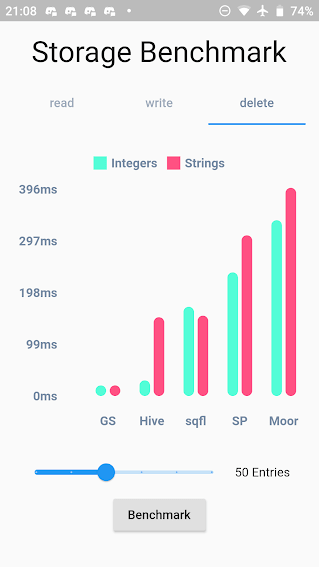
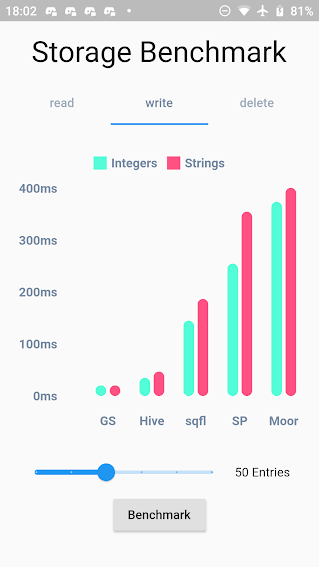
Benchmark Result:
GetStorage is not fast, it is absurdly fast for being memory-based. All of his operations are instantaneous. A backup of each operation is placed in a Container on the disk. Each container has its own file.
What GetStorage is:
Persistent key/value storage for Android, iOS, Web, Linux, Mac and Fuchsia and Windows, that combines fast memory access with persistent storage.
What GetStorage is NOT:
A database. Get is super compact to offer you a solution ultra-light, high-speed read/write storage to work synchronously. If you want to store data persistently on disk with immediate memory access, use it, if you want a database, with indexing and specific disk storage tools, there are incredible solutions that are already available, like Hive and Sqflite/Moor.
As soon as you declare "write" the file is immediately written in memory and can now be accessed immediately with box.read(). You can also wait for the callback that it was written to disk using await box.write().
When to use GetStorage:
simple Maps storage.
cache of http requests
storage of simple user information.
simple and persistent state storage
any situation you currently use sharedPreferences.
When not to use GetStorage:
you need indexes.
when you need to always check if the file was written to the storage disk before starting another operation (storage in memory is done instantly and can be read instantly with box.read(), and the backup to disk is done in the background. To make sure the backup is complete, you can use await, but if you need to call await all the time, it makes no sense you are using memory storage).
You can use this lib even as a modest persistent state manager using Getx SimpleBuilder