Package selection guidance compiled from public package information, community data, and project usage.
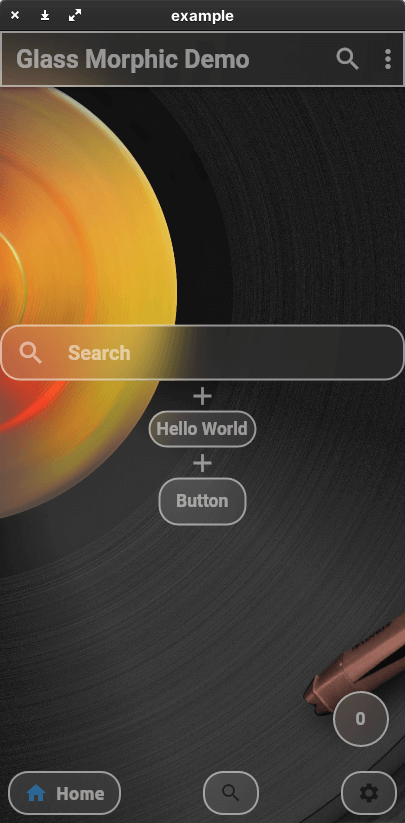
A Flutter package that provides a collection of customizable widgets for creating glass morphism effects in applications. It simplifies the implementation of blurred, translucent UI elements with a modern, frosted glass aesthetic. Developers can easily integrate and tailor these widgets to fit various design needs across multiple platforms. The package supports Android, iOS, Web, macOS, Windows, and Linux, making it ideal for cross-platform projects seeking a sleek, contemporary look.
Use cases
Creating modern app interfaces
Designing floating cards with blur effects
Building visually appealing overlays
Enhancing user experience with depth
Implementing translucent UI components
Key features
Easy-to-use glass morphism widgets
Customizable blur and transparency levels
Cross-platform compatibility
Support for multiple themes
Built-in animation support
Simple integration via pub add
Suitable for
UI designers seeking modern aesthetics
Developers building cross-platform apps
Projects requiring frosted glass effects
Apps focused on visual appeal
Teams using Flutter for rapid prototyping
Considerations
Performance impact with heavy blur effects
May require additional styling for dark mode
Limited customization beyond basic properties
Not suitable for low-end devices
Potential rendering inconsistencies on some platforms
Original README
Original README snapshot from the linked source repository. Visit the repository for the latest content.
Glassmorphism Widgets
About
This package allows you to easily create a Glassmorphism UI.
The AppBar, ListTile, and even the BottomNavigationBar work like Material Design widgets.
The color, shape, and size of the glass are all up to you.
Create your ideal Glassmorphism App!
This package currently supports only stable channel.
Getting started
You should add the following to the pubspec.yaml file:
dependencies:glassmorphism_widgets:
You should then run flutter packages get in your terminal so as to get the package.
Here is an example of how to use Glassmorphism Widgets.
Many of the parameters are based on the original Material Design widget.
If you want to know glass specific parameter.
You should look here.
You should add parameter radius or borderRadius.
borderRadius takes precedence over radius.
I want to create more clear glass or more frosted glass
You should add parameter blur.
If you set blur lower value. GlassWidgets will become clear.
Problem
Master Channel cannot use GlassFloatingActionButton.
Contact
If you have anything you want to inform me (@yama-yeah), such as suggestions to enhance this package or functionalities you want etc, feel free to make issues on GitHub