Search packages, repositories and app categories

Package detailsv0.0.2

golden_layout

A internal window library for Flutter based on http://golden-layout.com/

30-day downloads
21
Likes
36
Pub points
40

Install package

flutter pub add golden_layout

Package Overview

Package selection guidance compiled from public package information, community data, and project usage.

Golden Layout is a Flutter package that brings the powerful window management capabilities of the Golden Layout library to Flutter applications. It enables developers to create complex, resizable, and draggable UI layouts with multiple panels, supporting nested arrangements and dynamic content. Designed for internal application interfaces, it's ideal for tools requiring customizable workspaces such as dashboards, IDEs, or data visualization platforms. The package integrates seamlessly into Flutter’s widget system while maintaining performance and responsiveness.

Use cases

  • Dashboard interfaces
  • IDE-like development environments
  • Data visualization tools
  • Multi-panel reporting apps
  • Customizable user workspaces

Key features

  • Resizable and draggable panels
  • Nested layout support
  • Dynamic panel arrangement
  • Support for multiple content types
  • Integration with Flutter widgets

Suitable for

  • Developers building complex UIs
  • Applications needing flexible workspace layouts
  • Tools requiring multi-pane interfaces
  • Desktop-like Flutter applications
  • UI-heavy internal tools

Considerations

  • Not optimized for mobile-first designs
  • Limited documentation available
  • May require custom styling for advanced use cases
  • Best suited for desktop or tablet scenarios
  • Potential complexity in state management

Original README

Original README snapshot from the linked source repository. Visit the repository for the latest content.

Buy Me A Coffee Donate golden_layout

golden_layout

A Flutter inspired package from http://golden-layout.com/

Demo: https://rodydavis.github.io/golden_layout/

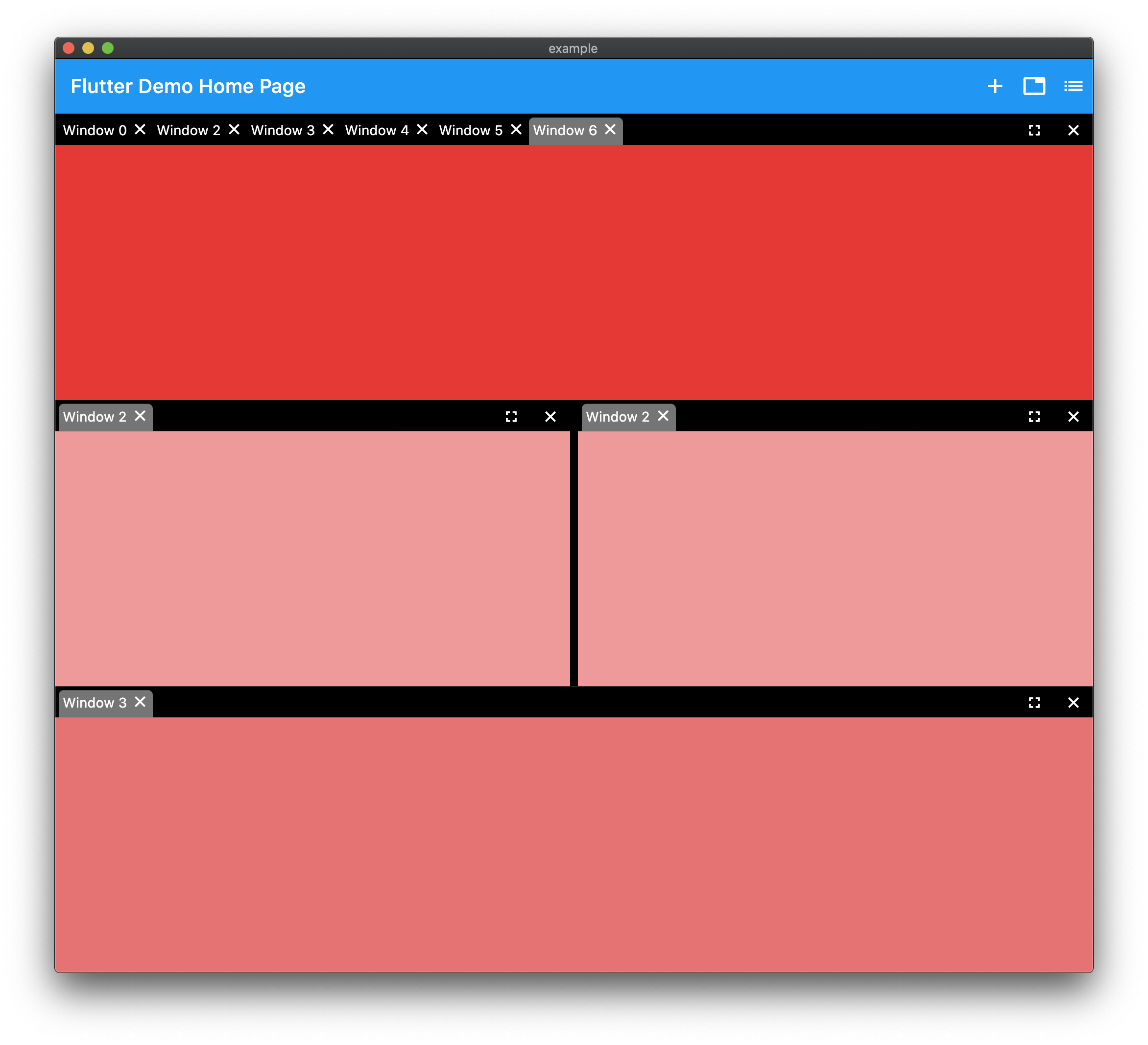
screenshot

Example

import 'package:flutter/material.dart';
import 'package:golden_layout/golden_layout.dart';

void main() {
  runApp(MyApp());
}

class MyApp extends StatelessWidget {
  @override
  Widget build(BuildContext context) {
    return MaterialApp(
      debugShowCheckedModeBanner: false,
      title: 'Flutter Demo',
      theme: ThemeData(
        primarySwatch: Colors.blue,
        visualDensity: VisualDensity.adaptivePlatformDensity,
      ),
      home: MyHomePage(title: 'Flutter Golden Layout'),
    );
  }
}

class MyHomePage extends StatefulWidget {
  MyHomePage({Key key, this.title}) : super(key: key);

  final String title;

  @override
  _MyHomePageState createState() => _MyHomePageState();
}

class _MyHomePageState extends State<MyHomePage> {
  final _controller = WindowController();
  int _count = 0;

  @override
  void initState() {
    final _group = WindowGroup();
    _group.addTab(_getTab(_count++));
    (_controller.base as WindowColumn).children.add(_group);
    super.initState();
  }

  @override
  Widget build(BuildContext context) {
    return Scaffold(
      appBar: AppBar(
        title: Text(widget.title),
        actions: [
          IconButton(
            tooltip: 'Add Window',
            icon: Icon(Icons.restore),
            onPressed: () {
              if (mounted)
                setState(() {
                  _controller.base =
                      WindowColumn([WindowGroup()..addTab(_getTab(_count++))]);
                });
            },
          ),
          IconButton(
            tooltip: 'Add Group',
            icon: Icon(Icons.list),
            onPressed: () {
              if (mounted)
                setState(() {
                  final _group = WindowGroup();
                  _group.addTab(_getTab(_count++));
                  (_controller.base as WindowColumn).children.add(_group);
                });
            },
          ),
          IconButton(
            tooltip: 'Add Row',
            icon: Icon(Icons.category),
            onPressed: () {
              if (mounted)
                setState(() {
                  final _group1 = WindowGroup()..addTab(_getTab(_count++));
                  final _group2 = WindowGroup()..addTab(_getTab(_count++));
                  (_controller.base as WindowColumn)
                      .children
                      .add(WindowRow([_group1, _group2]));
                });
            },
          ),
        ],
      ),
      body: GoldenLayout(
        controller: _controller,
      ),
    );
  }

  WindowTab _getTab(int count) {
    return WindowTab(
        title: 'Window $count',
        child: Container(color: Colors.red[100 * count]));
  }
}

Categories

Source repository

Projects using this package

No data available yet.