Search packages, repositories and app categories

google_nav_bar cover
Package detailsv5.0.7

google_nav_bar

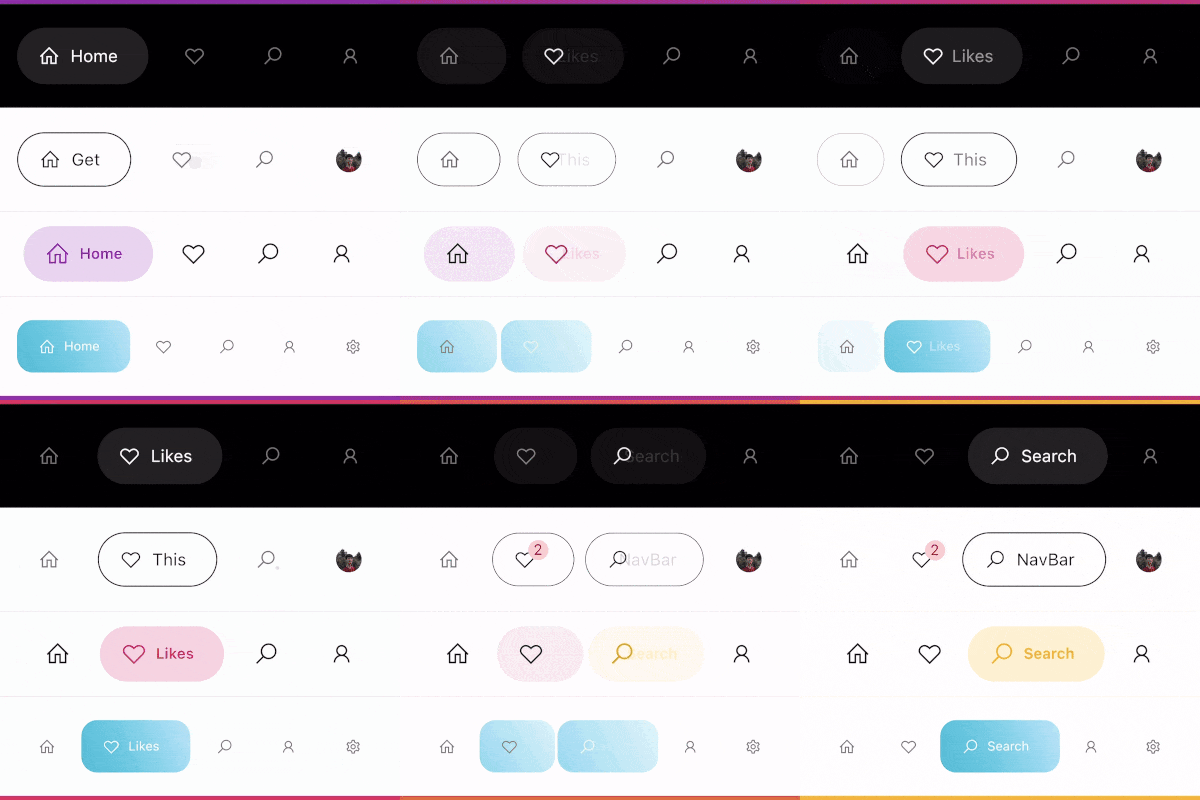
A modern google style nav bar which could be use as a bottom navigation bar or tabbar, the design strictly follows the cuberto UI/UX on dribbble.

AndroidiOSWebmacOSWindowsLinux
30-day downloads
33.9K
Likes
1.7K
Pub points
140

Install package

flutter pub add google_nav_bar

Package Overview

Package selection guidance compiled from public package information, community data, and project usage.

A modern, visually appealing navigation bar inspired by Google's design language and the Cuberto UI/UX concept on Dribbble. It functions as a bottom navigation bar or tab bar with smooth animations, customizable colors, and responsive layouts. Built for Flutter, it supports multiple platforms including Android, iOS, Web, macOS, Windows, and Linux. The package emphasizes clean aesthetics and intuitive user interaction, making it ideal for apps requiring a polished navigation experience.

Use cases

  • Mobile app bottom navigation
  • Web application tabbed interfaces
  • Cross-platform Flutter apps
  • Modern UI design implementation
  • Customizable navigation bars

Key features

  • Google-inspired design
  • Smooth animations
  • Multi-platform support
  • Customizable colors and icons
  • Responsive layout
  • Easy integration with Flutter

Suitable for

  • Developers seeking Material Design aesthetics
  • Apps needing elegant bottom navigation
  • Design-focused Flutter projects
  • UI/UX enthusiasts
  • Rapid prototyping

Considerations

  • Limited to navigation use cases
  • Requires manual icon management
  • May need additional styling for complex layouts
  • Not suitable for top-level navigation bars
  • Depends on external design consistency

Original README

Original README snapshot from the linked source repository. Visit the repository for the latest content.

google_nav_bar


A modern google style nav bar for flutter.

google_nav_bar

GoogleNavBar is a Flutter widget designed by Aurelien Salomon and developed by sooxt98.

Getting Started

Add this to your package's pubspec.yaml file:

...
dependencies:
  google_nav_bar: ^5.0.7
  

Now in your Dart code, you can use:

import 'package:google_nav_bar/google_nav_bar.dart';

Usage

Style your tab globally with GNav's attribute, if you wish to style tab separately, use GButton's attribute

GNav(
  rippleColor: Colors.grey[800], // tab button ripple color when pressed
  hoverColor: Colors.grey[700], // tab button hover color
  haptic: true, // haptic feedback
  tabBorderRadius: 15, 
  tabActiveBorder: Border.all(color: Colors.black, width: 1), // tab button border
  tabBorder: Border.all(color: Colors.grey, width: 1), // tab button border
  tabShadow: [BoxShadow(color: Colors.grey.withOpacity(0.5), blurRadius: 8)], // tab button shadow
  curve: Curves.easeOutExpo, // tab animation curves
  duration: Duration(milliseconds: 900), // tab animation duration
  gap: 8, // the tab button gap between icon and text 
  color: Colors.grey[800], // unselected icon color
  activeColor: Colors.purple, // selected icon and text color
  iconSize: 24, // tab button icon size
  tabBackgroundColor: Colors.purple.withOpacity(0.1), // selected tab background color
  padding: EdgeInsets.symmetric(horizontal: 20, vertical: 5), // navigation bar padding
  tabs: [
    GButton(
      icon: LineIcons.home,
      text: 'Home',
    ),
    GButton(
      icon: LineIcons.heart_o,
      text: 'Likes',
    ),
    GButton(
      icon: LineIcons.search,
      text: 'Search',
    ),
    GButton(
      icon: LineIcons.user,
      text: 'Profile',
    )
  ]
)

View the example folder

There are 4 different use case included in the /example directory, go try it out!

Categories

Source repository

Projects using this package