Search packages, repositories and app categories

hashtagable cover
Package detailsv2.3.0+1

hashtagable

Widgets and functions to implement hashtag decorated text. Decorates the words which start with `#` like a Twitter.

30-day downloads
151
Likes
136
Pub points
70

Install package

flutter pub add hashtagable

Package Overview

Package selection guidance compiled from public package information, community data, and project usage.

A Flutter package that enables the creation of hashtag-decorated text, similar to Twitter's styling. It provides widgets and utility functions to automatically detect and style words beginning with the '#' symbol, enhancing social media-inspired text displays. Ideal for apps requiring interactive or visually distinct hashtags in user-generated content. The package supports easy integration via a simple command and is open-source, hosted on GitHub. It currently has no platform-specific limitations but may require additional customization for advanced styling needs.

Use cases

  • Social media app feeds
  • User comment sections
  • Hashtag tracking interfaces
  • Interactive text input fields
  • Content tagging systems

Key features

  • Automatic hashtag detection
  • Twitter-style hashtag styling
  • Customizable decoration options
  • Simple integration via pub
  • Open-source codebase

Suitable for

  • Developers building social platforms
  • Apps with user-generated content
  • Text rendering with metadata highlighting
  • UIs requiring visual hashtag differentiation
  • Projects using lightweight text decoration

Considerations

  • Limited to basic hashtag styling
  • No built-in navigation on tap
  • May need custom handling for edge cases
  • Depends on external GitHub repository
  • No official documentation beyond source code

Original README

Original README snapshot from the linked source repository. Visit the repository for the latest content.

All Contributors

hashtagable

test pub package License: MIT

Widgets and functions to implement hashTag decorated text.

Detects the words start with # like a Twitter.

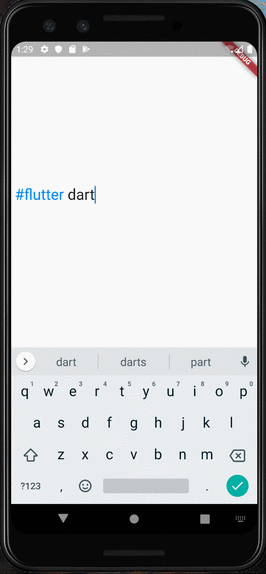
RPReplay_Final1599932903

Usage

  • As TextField

You can use HashTagTextField to decorate input text.

    HashTagTextField(
    decoratedStyle: TextStyle(fontSize: 14, color: Colors.blue),
    basicStyle: TextStyle(fontSize: 14, color: Colors.black),
    ),

decoratedStyle is the textStyle of tagged text. basicStyle is for untagged text.

Other arguments are basically same as those of material TextField

  • As ReadOnlyText

If you want to decorate the text only to display, HashTagText will help you.

    HashTagText(
        text: "#Welcome to #hashtagable \n This is #ReadOnlyText",
        decoratedStyle: TextStyle(fontSize: 22,color:Colors.red),
        basicStyle: TextStyle(fontSize: 22,color:Colors.black),
        onTap: (text) {
          print(text);
        },
    )

The argument onTap(String) is called when user tapped a hashTag.

You can add some actions in this callback with the tapped hashTag.

Customize with useful functions

  • Check if the text has hashTags
   print(hasHashtags("Hello #World")); 
   // true
   
   print(hasHashtags("Hello World"));
   // false
   
  • Extract hashTags from text
   final List<String> hashTags = extractHashTags("#Hello World #Flutter Dart #Thank you");
   // ["#Hello", "#Flutter", "#Thank"]

Tips

  • DetectableTextField is published as a refinement of this package. hashtagale forces you to use hashtag, but this one allows you to detect anything you want.

  • If you also want to decorate At sign, you can do that by adding the argument decorateAtSign: true.

    HashTagText(
        text: "#Hello World @flutter_developers",
        decoratedStyle: TextStyle(fontSize: 14,color:Colors.red),
        basicStyle: TextStyle(fontSize: 14,color:Colors.black),
        onTap: (text) {
          print(text);
        },
        decorateAtSign: true,
    )

Then HashTagText and HashtagTextField come to decorate the words start with # or @.

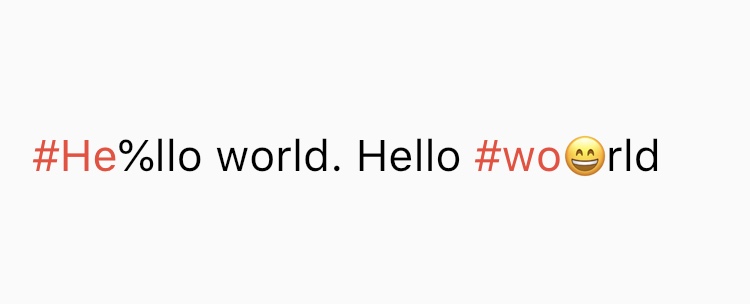
  • The decoration rules are almost same as twitter. It does not decorate the tags which contain emoji or symbol. It needs space before # (or @) to decorate.
  • Supported Languages are English, Japanese, Korean, Spanish, Arabic, Thai, Norwegian and German.

If you have any requests or questions, please feel free to ask on github.


Contributors: Santa Takahashi, Matheus Perez, Marcel Schneider, Ho Kim, Burak

Contributors ✨

Thanks goes to these wonderful people (emoji key):

JorisObert
JorisObert

💻

This project follows the all-contributors specification. Contributions of any kind welcome!

Categories

Source repository

Projects using this package

No data available yet.