Search packages, repositories and app categories

Package detailsv0.0.3

highlighter_coachmark

Coach Mark shows provided tips or inctructions in overlay by blurring background and highlighting target element.

30-day downloads
63
Likes
142
Pub points
40

Install package

flutter pub add highlighter_coachmark

Package Overview

Package selection guidance compiled from public package information, community data, and project usage.

Highlighter Coachmark is a Flutter package that guides users through app features by displaying tips or instructions as overlays. It blurs the background and highlights specific UI elements, making it ideal for onboarding or feature walkthroughs. The package enhances user experience by drawing attention to key components without disrupting the interface. It supports customizable styling and smooth animations for a polished look. Designed for simplicity and integration, it helps developers implement intuitive guidance flows with minimal effort.

Use cases

  • Onboarding new users
  • Highlighting new features
  • Guided tutorials
  • User education in apps
  • Improving UX for complex interfaces

Key features

  • Background blur effect
  • Target element highlighting
  • Customizable overlay design
  • Smooth transition animations
  • Easy integration with existing widgets

Suitable for

  • Mobile app onboarding
  • Feature discovery tools
  • User training modules
  • UX improvement initiatives
  • Developers seeking lightweight coach marks

Considerations

  • Limited platform-specific customization
  • No built-in localization support
  • Requires manual handling of tap events
  • May impact performance on low-end devices
  • Depends on correct widget positioning

Original README

Original README snapshot from the linked source repository. Visit the repository for the latest content.

Highlighter Coach Mark

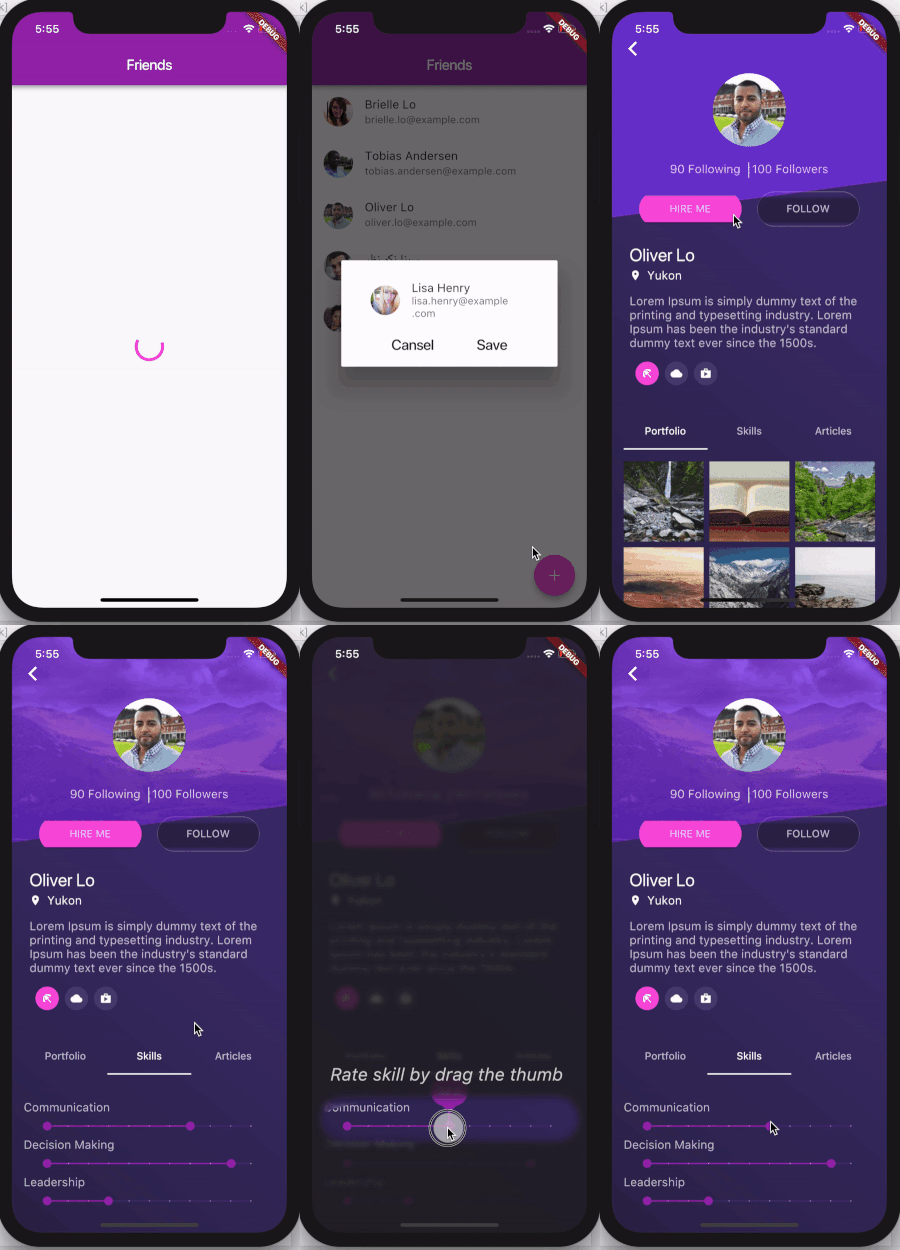
There are different ways for user on-boarding. It can be a show of screenshots or overlay with directions to features, feature discovery as in Material design or coach mark. This coach mark makes blurred background and highlights desired element.

This coach mark makes blurred background and highlights desired element.

A picture is worth a thousand words, so take a look at gif

And a few tips from UX

Presenting hints one-by-one, at the right moment, makes it a lot easier for users to understand and learn instructions.

To have their full effect, coach marks should focus on particularly innovative or unexpected elements.

Usage

Take a look at example folder. There are also 4 coach marks there. They are all presented in gif above

  CoachMark coachMark = CoachMark();
  RenderBox target = targetGlobalKey.currentContext.findRenderObject();
  Rect markRect = target.localToGlobal(Offset.zero) & target.size;
  markRect = Rect.fromCircle(center: markRect.center, radius: markRect.longestSide * 0.6);
  coachMark.show(
      targetContext: targetGlobalKey.currentContext,
      markRect: markRect,
      children: [
        Positioned(
            top: markRect.top + 5.0,
            right: 10.0,
            child: Text("Long tap on button to see options",
                style: const TextStyle(
                  fontSize: 24.0,
                  fontStyle: FontStyle.italic,
                  color: Colors.white,
                )))
      ],
      duration: null,
      onClose: () {
         appState.setCoachMarkIsShown(true);
      });
Similar packages
Thanks

Categories

Source repository

Projects using this package

No data available yet.