Search packages, repositories and app categories

input_history_text_field cover
Package detailsv0.4.0

input_history_text_field

A input_history_text_field widget is automatically saved and suggest as you type.

AndroidiOSWebmacOSWindowsLinux
30-day downloads
1.3K
Likes
80
Pub points
150

Install package

flutter pub add input_history_text_field

Package Overview

Package selection guidance compiled from public package information, community data, and project usage.

The input_history_text_field package provides a Flutter widget that automatically saves user input history and offers suggestions as users type. It enhances form usability by remembering previous entries, reducing repetitive typing. Ideal for search fields, login forms, or any input where past entries are valuable. The widget supports multiple platforms including Android, iOS, Web, macOS, Windows, and Linux, ensuring consistent behavior across devices. Built with simplicity and performance in mind, it integrates seamlessly into existing Flutter applications.

Use cases

  • Search bars with auto-suggestions
  • Form inputs with history retention
  • Login or registration fields
  • User preference settings
  • Quick access to frequently entered text
  • Enhanced user experience in data entry

Key features

  • Automatic input history saving
  • Real-time suggestion as you type
  • Cross-platform compatibility
  • Simple integration with existing forms
  • Lightweight and performant
  • Supports all major Flutter platforms

Suitable for

  • Developers building search interfaces
  • Apps requiring repeated user input
  • Forms aiming to improve UX
  • Projects targeting multiple platforms
  • Teams wanting minimal setup for history features

Considerations

  • Requires manual handling of storage persistence
  • May need customization for large datasets
  • Not suitable for sensitive data due to local storage
  • Limited built-in styling options
  • Depends on external state management for advanced use cases

Original README

Original README snapshot from the linked source repository. Visit the repository for the latest content.

input_history_text_field

A input_history_text_field widget is automatically saved and suggest as you type.

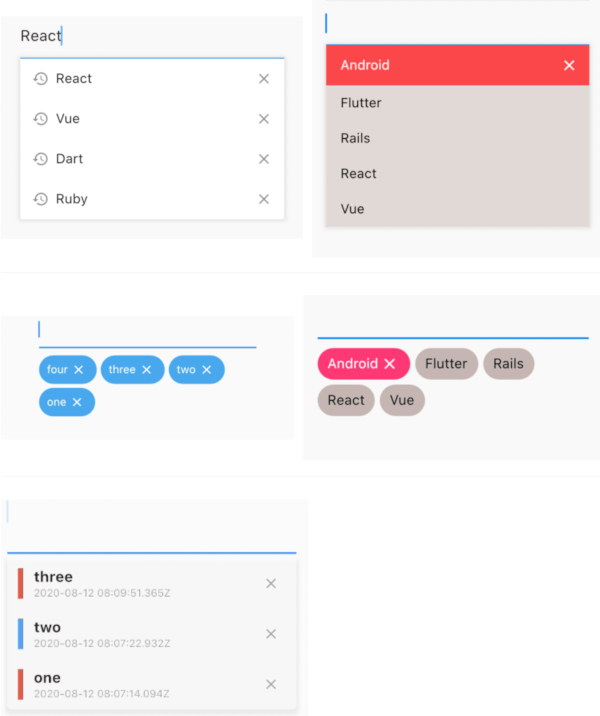
Overview

List

example1 example2
image image

Badge

example1 example2
image image

Customize

 
image

Getting Started

Usage

The only key in the your widget of application set to historyKey, supports like a text_field.

InputHistoryTextField(
    historyKey: "01",
),

a saved automatically as you type.( save up to limit, default to 5 )

input_history_text_field-1

a input history is suggested.

input_history_text_field-2

input history can be deleted.

input_history_text_field-3

Example

simple

All you need is a historyKey.

InputHistoryTextField(
    historyKey: "01",
),
badge style

Change style to badge is listStyle = ListStyle.Badge

InputHistoryTextField(
    historyKey: "01",
    listStyle: ListStyle.Badge,
),

 
image
Default items

If there is an item you want to display from the beginning or an item you want the user to selected.

InputHistoryTextField(
    historyKey: "01",
    lockItems: ['Flutter', 'Rails', 'React', 'Vue'],
),

List
image
change icon

Can hide or change the icon.

InputHistoryTextField(
    historyKey: "01",
    showHistoryIcon: true,
    showDeleteIcon: true,
    historyIcon: Icons.add,
    deleteIcon: Icons.delete,
),
 
image
gradually transmitted

enableOpacityGradient is input history list is gradually transmitted.

InputHistoryTextField(
    historyKey: "01",
    enableOpacityGradient: true,
),
 
image
lines decoration

listRowDecoration is input history lines as a decoration.

InputHistoryTextField(
    historyKey: "01",
    listRowDecoration: BoxDecoration(
        border: Border(
        left: BorderSide(color: Colors.blue, width: 8),
        ),
    ),
),

 
image
list decoration

listDecoration is input history list as a decoration.

InputHistoryTextField(
    historyKey: "01",
    listDecoration: BoxDecoration(
        color: Colors.cyan,
        borderRadius: BorderRadius.only(
            bottomLeft: Radius.circular(20),
            bottomRight: Radius.circular(20)),
        boxShadow: [
        BoxShadow(
            color: Colors.grey.withOpacity(0.2),
            spreadRadius: 8,
            blurRadius: 8,
            offset: Offset(0, 3)),
        ],
    ),
),

 
image
list layout builder

If you want to customize everything, to use historyListItemLayoutBuilder.

InputHistoryTextField(
    historyKey: "01",
    historyListItemLayoutBuilder: (controller, value, index) {
        return InkWell(
        onTap: () => controller.select(value.text),
        child: Row(
            children: [
            Expanded(
                flex: 1,
                child: Container(
                    margin: const EdgeInsets.only(left: 10.0),
                    padding: const EdgeInsets.only(left: 10.0),
                    decoration: BoxDecoration(
                    border: Border(
                        left: BorderSide(
                        width: 5.0,
                        color: index % 2 == 0
                            ? Colors.red
                            : Colors.blue,
                        ),
                    ),
                    ),
                    child: Column(
                    crossAxisAlignment: CrossAxisAlignment.start,
                    children: [
                        Text(
                        value.textToSingleLine,
                        overflow: TextOverflow.ellipsis,
                        style:
                            TextStyle(fontWeight: FontWeight.bold),
                        ),
                        Text(
                        DateTime.fromMillisecondsSinceEpoch(
                                value.createdTime)
                            .toUtc()
                            .toString(),
                        overflow: TextOverflow.ellipsis,
                        style: TextStyle(
                            fontSize: 10,
                            color: Theme.of(context).disabledColor),
                        ),
                    ],
                    )),
            ),
            IconButton(
                icon: Icon(
                Icons.close,
                size: 16,
                color: Theme.of(context).disabledColor,
                ),
                onPressed: () {
                controller.remove(value);
                },
            ),
            ],
        ),
    );}
)
 
image
API
name ex note
historyKey key-01 String a only key in the your application,saved with this key.
limit 5 int max limit of input history
hasFocusExpand true bool show input history of edit text focused
showHistoryIcon true bool icon of input history at left positioned
showDeleteIcon true bool icon of delete at right positioned
enableHistory true bool enabled/disabled of input history
enableSave true bool enabled/disabled saved history
enableOpacityGradient true bool make the input history list gradually transparent
enableFilterHistory true bool suggest filters when input text
showHistoryList true bool show/hide of input history list
historyIcon Icons.add IconData IconData for history icon.
historyIconTheme IconTheme IconTheme IconTheme for history icon.
deleteIcon Icons.delete IconData IconData for delete icon.
deleteIconTheme IconTheme IconTheme IconTheme for delete icon.
listOffset Offset(0, 5) Offset set a position for list.
listTextStyle TextStyle(fontSize: 30) TextStyle sets a text style for list.
listRowDecoration BoxDecoration Decoration a row of input history for decoration
listDecoration BoxDecoration Decoration a list of input history for decoration
listStyle ListStyle.List ListStyle change style List or Badge
textColor Colors.black Color a text color
backGroundColor Colors.grey Color a background color
historyIconColor Colors.white Color a history icon color
deleteIconColor Colors.white Color a delete icon color
lockItems ['Flutter', 'Rails', 'React', 'Vue'] List
fixed shown, cannot be delete items
lockTextColor Colors.black Color a lock items text color
lockBackgroundColor Colors.grey Color a lock items background color
historyListItemLayoutBuilder Widget Widget a customize full layout.
InputHistoryController InputHistoryController InputHistoryController Select or delete the input history list

Categories

Dependencies

Dependency list 1 items

Source repository

Projects using this package

No data available yet.