Package selection guidance compiled from public package information, community data, and project usage.
Interactive Maps Marker is a Flutter package that provides animated map markers with interactive detail cards. Designed for simplicity, it enables developers to easily integrate location-based features such as store locators or point-of-interest displays. The marker animates on tap, revealing a customizable card with additional information. Ideal for apps requiring intuitive geolocation visualization and user engagement. It supports smooth transitions and responsive design, enhancing the user experience without complex setup.
Use cases
Store locator applications
Point-of-interest highlighting
Event venue finders
Tourism and travel guides
Real-time location tracking interfaces
Key features
Animated marker transitions
Customizable detail cards
Simple integration with Google Maps
Tap-to-reveal interaction
Responsive UI components
Lightweight and easy to configure
Suitable for
Developers building location-based apps
Startups needing quick map feature implementation
Apps focused on user-friendly navigation
Projects requiring minimal code for map interactions
Flutter beginners exploring geolocation
Considerations
Requires Google Maps API key for full functionality
Limited to Android and iOS (no web support mentioned)
Custom styling may require additional Dart knowledge
Depends on external map rendering libraries
Not optimized for high-density marker clusters
Original README
Original README snapshot from the linked source repository. Visit the repository for the latest content.
interactive_maps_marker for Flutter
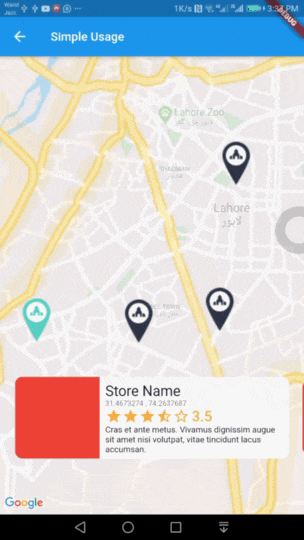
Easy to use Animated Maps Markers with detail card. Use it for store or any place locator.
Demo
Usage
Add this package to your pubspec.yaml in dependencies: section
dependencies:interactive_maps_marker:^0.0.2
This package depends upon google_maps_flutter so first setup this by following This Guide
Update dependencies
flutter pub get
You can now add a InteractiveMapsMarker widget to your widget tree.
Simple Usage
In your widget import the package and use InteractiveMapsMarker Widget
Use this widget inside a stateful widget and update the markers list state with new data. An example can be found in stateful_example.dart file in example project.
Customise with parameters
You can customise it by passing various parameter values. Details about all parameters is as follows.
Parameter
Type
Default Value
Description
items
List<MarkerItem>
none
List of Markers with type of MarkerItem. This parameter is required and cannot be null.
itemContent
IndexedWidgetBuilder
none
This is builder function which will receive context and index. You must return a Widget which will show on a pre designed container. This is exactly like you use ListView Builder. Not applicable when using itemBuilder
center
LatLng
LatLng(0.0, 0.0)
Center point for initial map display.
zoom
double
12.0
Default zoom value for initial map screen.
itemHeight
double
116.0
Height of your detail item. Not applicable when using itemBuilder
itemPadding
EdgeInsetsGeometry
EdgeInsets.only(bottom: 80.0)
Padding for item detail card. Mainly used for bottom padding.
itemPadding
Alignment
Alignment.bottomCenter
Alignment for content slider.
itemBuilder
IndexedWidgetBuilder
null
If you don't want default container and want to build the bottom widget yourself, you can use this builder instead of itemContent and have full control over UI. This is builder function which will receive context and index. You must return a Widget.
controller
InteractiveMapsController
null
A controller if you want to add the markers later and then call rebuild() or change the index of marker to animate with your action via setCurrentIndex(int index).