Search packages, repositories and app categories

Package detailsv5.0.1

l

Cross-platform html/io Logger library with simple API. Manipulate with native and web console. Support ascii colorize output.

AndroidiOSWebmacOSWindowsLinux
30-day downloads
3.2K
Likes
93
Pub points
160

Install package

flutter pub add l

Package Overview

Package selection guidance compiled from public package information, community data, and project usage.

The 'l' package is a cross-platform logging library for Flutter that provides a simple API for logging messages across Android, iOS, Web, macOS, Windows, and Linux. It supports output manipulation via native and web consoles, with built-in ASCII colorization to enhance log readability. Ideal for debugging and monitoring application behavior in real time, it integrates seamlessly into development workflows without adding complexity. The library is lightweight and designed for developers who need consistent, colorful, and platform-agnostic logging.

Use cases

  • Real-time debugging across platforms
  • Colorized console output for better log visibility
  • Simple integration in development and testing
  • Cross-platform logging consistency
  • Monitoring app behavior during development
  • Debugging web and mobile apps simultaneously

Key features

  • Simple and intuitive API
  • ASCII colorized output
  • Supports all major Flutter platforms
  • Native and web console compatibility
  • Lightweight and fast
  • Easy setup with flutter pub add

Suitable for

  • Flutter developers seeking easy logging
  • Teams building multi-platform apps
  • Developers focused on debugging efficiency
  • Projects requiring colorful console output
  • Those wanting minimal boilerplate logging
  • Frontend and backend debug logging

Considerations

  • Not intended for production logging
  • Color output may not render in all environments
  • Limited configuration options
  • Best suited for development use
  • May require additional filtering in large apps
  • Depends on console availability

Original README

Original README snapshot from the linked source repository. Visit the repository for the latest content.

[L]ogger

Pub Actions Status Coverage License: MIT Linter GitHub stars

About

Cross-platform html/io logger with simple API. No need to create a logger object. Just import and use. Simple and w/o boilerplate. Work with native console.

Core API

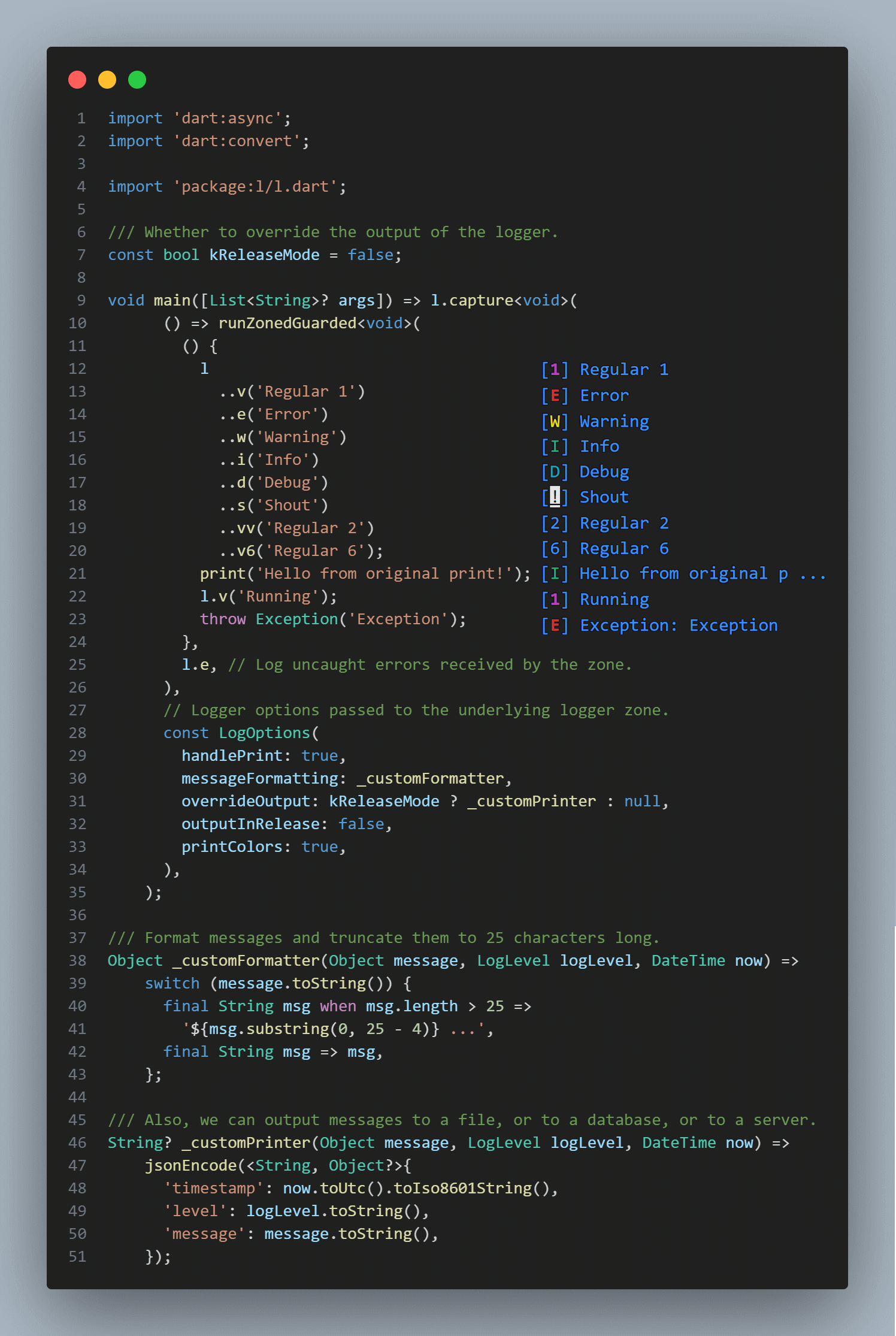
Example of usage

Example of using the library to display a message in the console.

Key features
Method Description
[s] A shout is always displayed
[v1], [v] Regular message with verbose level 1
[e] Error message with verbose level 1
[v2], [vv] Regular message with verbose level 2
[w] Warning message with verbose level 2
[v3], [vvv] Regular message with verbose level 3
[i], [<] Inform message with verbose level 3
[v4], [vvvv] Regular message with verbose level 4
[d], [<<] Debug message with verbose level 4
[v5], [vvvvv] Regular message with verbose level 5
[v6], [vvvvvv] Regular message with verbose level 6
l.s('shout me');
l.e('error msg');
l.w('warning msg');
l.i('info msg');
l < 'alt info msg';
l.d('debug msg');
l << 'alt debug msg';
l.v('verbose lvl #1');
l.vv('verbose lvl #2');
l.vvv('verbose lvl #3');
l.v4('verbose lvl #4');
l.v5('verbose lvl #5');
l.v6('verbose lvl #6');
Integration capabilities
Method Description
[listen] Broadcast stream receiving logs.
// Broadcast stream instantly receiving logs.
l.forEach((log) => print('* ${log.level} : ${log.message}'));
Print handling and customizing

Logger supports fine-tuning with the second argument LogOptions in a capture method. Also, you can handle print and output with l on some function or in a whole app with this simple syntax:

import 'package:l/l.dart';

void main() => l.capture(
      someFunction,
      const LogOptions(
        handlePrint: true,
        printColors: true,
        outputInRelease: false,
        messageFormatting: _messageFormatting,
      ),
    );

Future<void> someFunction() async {
  print('Hello');
  await Future<void>.delayed(const Duration(milliseconds: 150));
  l.d('world');
  await Future<void>.delayed(const Duration(milliseconds: 150));
  l.e('!!!');
}

Object _messageFormatting(Object message, LogLevel logLevel, DateTime now) =>
    '${now.hour}:${now.minute.toString().padLeft(2, '0')} $message';

Handling errors

Flutter
final sourceFlutterError = FlutterError.onError;
FlutterError.onError = (details) {
  l.w(details.exceptionAsString(), details.stack);
  sourceFlutterError?.call(details);
};
Crashlytics
l.where((msg) => msg.level.maybeWhen(
      error: () => true,
      warning: () => true,
      orElse: () => false,
    ))
  .map<String>((msg) => msg.message.toString())
  .listen(FirebaseCrashlytics.instance.log);
Zoned Errors
runZonedGuarded(someFunction, l.e);
Handling uncaught errors
Isolate.current
       ..setErrorsFatal(false)
       ..addErrorListener(
         RawReceivePort(
           (List<dynamic> pair) => // ignore: avoid_types_on_closure_parameters
               l.e(pair.first as Object),
         ).sendPort,
       );

Limitations

  • When there is no direct access to the terminal, it works through print.
  • !!! PLEASE, DO NOT LOG SENSITIVE INFORMATION !!!

Changelog

Refer to the Changelog to get all release notes.

Maintainers

Plague Fox

Funding

If you want to support the development of our library, there are several ways you can do it:

We appreciate any form of support, whether it's a financial donation or just a star on GitHub. It helps us to continue developing and improving our library. Thank you for your support!

License

MIT

Categories

Dependencies

Dependency list 1 items

Source repository

Projects using this package

No data available yet.