Search packages, repositories and app categories

live_text cover
Package detailsv0.0.7

live_text

A flutter package that provides easiest way to update text widget in UI.

AndroidiOSWebmacOSWindowsLinux
30-day downloads
19
Likes
26
Pub points
140

Install package

flutter pub add live_text

Package Overview

Package selection guidance compiled from public package information, community data, and project usage.

LiveText is a Flutter package designed to simplify dynamic text updates in the UI. It enables real-time, smooth text changes with minimal code, ideal for animations, counters, or any scenario requiring responsive text rendering. Built for ease of use, it integrates seamlessly across all major platforms including Android, iOS, Web, macOS, Windows, and Linux. The package focuses on performance and simplicity, making it perfect for developers seeking efficient text manipulation without complex setup. Its lightweight nature ensures fast rendering and low overhead.

Use cases

  • Real-time counters
  • Animated text transitions
  • Dynamic label updates
  • Interactive UI elements
  • Live data displays

Key features

  • Simple API
  • Cross-platform support
  • Smooth text updates
  • Low memory usage
  • Minimal boilerplate
  • Built-in animation handling

Suitable for

  • Beginner Flutter developers
  • Apps with dynamic text
  • Animations involving text
  • Performance-sensitive applications
  • Quick UI enhancements

Considerations

  • Limited to text-only updates
  • Not suitable for complex widgets
  • May require additional styling
  • Best for simple text scenarios
  • No built-in text formatting options

Original README

Original README snapshot from the linked source repository. Visit the repository for the latest content.

Buy Me A Coffee

pub package

:star: Updating Text widget made simple :star:

Have you stumble upon a situations where you simply need to update UI text without dealing with state management techniques? If so, this package is a perfect fit for you.

Features

  • [X] Updates text without any hassle.
  • [X] Provides call back with old and new value of your text widget.
  • [X] Reset to initial value whenever you want.

Getting started

Add live_text to your pubspec.yaml file and start making your text live.

Installation

Just add live_text as a dependency in your pubspec.yaml file.

dependencies:
  live_text: <Latest Version>

Usage

  import 'package:live_text/live_text.dart';

Simple counter example.

  • Create LiveTextController instance
    LiveTextController counterLiveTextController = LiveTextController(initialValue: "0");
    
  • Create LiveText widget and provide LiveTextController that we just created
     LiveText(
                style: Theme.of(context).textTheme.headlineMedium,
                liveTextController: counterLiveTextController,
              ),
    
  • Now provide following call backs on increase and decrease button
      void _incrementCounter() {
    counterLiveTextController.setValue =
        (int.parse(counterLiveTextController.getValue) + 1).toString();
    }
    
     void _decrementCounter() {
      counterLiveTextController.setValue =
          (int.parse(counterLiveTextController.getValue) - 1).toString();
    }
    

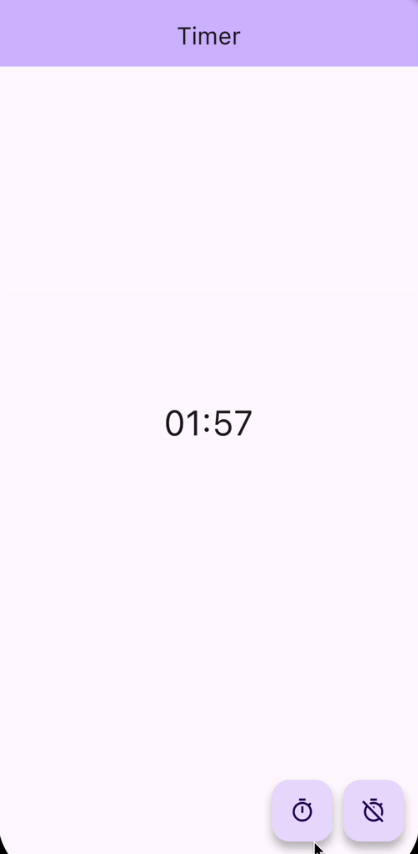
Timer example.

  • Following is the full example code for Timer app using live_text
import 'dart:async';

import 'package:flutter/material.dart';
import 'package:live_text/live_text.dart';

class TimerExample extends StatelessWidget {
  TimerExample({super.key});

  late LiveTextController timerLiveTextController = LiveTextController(
      initialValue: "00:00",
      onValueChanged: (String oldValue, String newValue) {
        print("Timer");

        print("Old Value $oldValue");
        print("New Value $newValue");
      });

  Timer? timer;

  void _toggleTimer() {
    if (timer == null) {
      DateTime futureTime = DateTime.now().add(const Duration(seconds: 120));

      timer ??= Timer.periodic(const Duration(milliseconds: 100), (_) {
        DateTime latestTime = DateTime.now();
        if (latestTime.isBefore(futureTime)) {
          timerLiveTextController.setValue =
              formatHHMMSS(futureTime.difference(latestTime).inSeconds);
        } else {
          _clearTimer();
        }
      });
    } else {
      _clearTimer();
    }
  }

  void _clearTimer() {
    timer?.cancel();
    timer = null;
    timerLiveTextController.resetValue();
  }

  String formatHHMMSS(int seconds) {
    final hours = (seconds / 3600).truncate();
    seconds = (seconds % 3600).truncate();
    final minutes = (seconds / 60).truncate();

    final hoursStr = (hours).toString().padLeft(2, '0');
    final minutesStr = (minutes).toString().padLeft(2, '0');
    final secondsStr = (seconds % 60).toString().padLeft(2, '0');

    if (hours == 0) {
      return '$minutesStr:$secondsStr';
    }

    return '$hoursStr:$minutesStr:$secondsStr';
  }

  @override
  Widget build(BuildContext context) {
    return Scaffold(
      appBar: AppBar(
        backgroundColor: Theme.of(context).colorScheme.inversePrimary,
        title: const Text("Timer"),
      ),
      body: SafeArea(
        child: Center(
          child: Column(
            children: <Widget>[
              const Spacer(),
              LiveText(
                style: Theme.of(context).textTheme.headlineLarge,
                liveTextController: timerLiveTextController,
              ),
              const Spacer(),
              Padding(
                padding: const EdgeInsets.symmetric(horizontal: 16.0),
                child: Row(
                  children: [
                    const Spacer(),
                    FloatingActionButton(
                      onPressed: _toggleTimer,
                      tooltip: 'Start Timer',
                      child: const Icon(Icons.timer_outlined),
                    ),
                    const SizedBox(width: 10),
                    FloatingActionButton(
                      onPressed: _clearTimer,
                      tooltip: 'Start Timer',
                      child: const Icon(Icons.timer_off_outlined),
                    ),
                  ],
                ),
              ),
            ],
          ),
        ),
      ),
    );
  }
}

Additional information

We will be more than happy for your contributions.
Please contribute to live_text this github repo.

Categories

Source repository

Projects using this package

No data available yet.