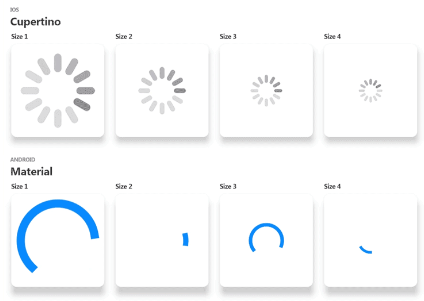
Loading indicator GIFs. Material and Cupertino (Android and iOS) loading indicators in assorted sizes. Use as placeholders for loading remote image assets.
Package selection guidance compiled from public package information, community data, and project usage.
A Flutter package providing loading indicator GIFs for both Material and Cupertino designs, optimized for Android and iOS. It offers various sizes to serve as placeholders while loading remote image assets. The package supports multiple platforms including Web, macOS, Windows, and Linux, ensuring consistent visual feedback across devices. Ideal for improving user experience during asynchronous operations like image fetching.
Use cases
Loading placeholder for remote images
Enhancing UI during data fetching
Cross-platform loading indicators
Improving perceived performance
Visual feedback in async operations
Key features
Material and Cupertino theme support
Multiple size options
Pre-built animated GIFs
Cross-platform compatibility
Easy integration with flutter pub
Lightweight and fast loading
Suitable for
Developers building cross-platform apps
UI/UX designers seeking consistent loading states
Apps requiring remote image loading indicators
Projects emphasizing smooth user experience
Teams using Flutter for mobile and web
Considerations
GIFs may increase app bundle size
Performance impact on low-end devices
Limited customization of animation
Requires internet for dynamic asset loading
Not suitable for high-frequency animations
Original README
Original README snapshot from the linked source repository. Visit the repository for the latest content.
Loading GIFs is a collection of high fidelity loading animations in GIF format. Included are Android "Material Design" and iOS "Cupertino" default loading indicators.
Usage
Import this library into your project:
loading_gifs:^latest_version
Use cupertinoActivityIndicator or circularProgressIndicator where ever a loading image is needed.
When loading images whose dimensions are unknown ahead of time, use cupertinoActivityIndicatorSmall instead of cupertinoActivityIndicator. cupertinoActivityIndicatorSmall is a min height variant of cupertinoActivityIndicator which allows Flutter to correctly expand the loaded image into the layout.
The small variant should be used when loading a list of images or compositing an image from multiple images.
FadeInImage requires a valid placeholder image to avoid "Asset not found" errors. Use placeholderEmpty, a 1x1 pixel transparent PNG, when an empty placeholder is needed.
Here at Codelessly, we're building a Flutter app UI and website builder, development tools, and UI templates to increase productivity. If that sounds interesting, you'll want to subscribe to updates below 😎
Loading GIFs is licensed under Zero-Clause BSD and released as Emailware. If you like this project or it helped you, please subscribe to updates. Although it is not required, you might miss the goodies we share!