Package selection guidance compiled from public package information, community data, and project usage.
The localization package simplifies internationalization in Flutter apps by providing a streamlined way to manage translations. It allows developers to organize language files efficiently and switch between locales dynamically, enhancing the user experience for multilingual audiences. With support across all major platforms—Android, iOS, Web, macOS, Windows, and Linux—it ensures consistent translation handling throughout the app lifecycle. The package is designed for ease of use, reducing boilerplate code and improving maintainability.
Use cases
Multilingual app development
Dynamic language switching
Centralized translation management
Cross-platform localization
User preference-based language selection
Easy integration with existing Flutter projects
Key features
Simple translation file structure
Automatic locale detection
Support for pluralization
Easy key-value translation system
Built-in fallback mechanisms
Platform-agnostic design
Suitable for
Developers building global apps
Teams managing multiple languages
Projects requiring frequent translation updates
Apps targeting diverse regional audiences
Flutter beginners learning i18n
Projects with tight localization timelines
Considerations
Requires manual setup of translation files
Limited built-in translation tools
No real-time sync with external translation services
Best suited for static translations
May need additional tooling for large-scale translation workflows
Does not handle runtime translation fetching
Original README
Original README snapshot from the linked source repository. Visit the repository for the latest content.
Localization
Package to simplify in-app translation.
Install
Use the Localization package together with flutter_localization.
Now, add the delegate in MaterialApp or CupertinoApp and define a path where the translation json files will be:
@overrideWidgetbuild(BuildContext context) {
// set json file directory// default value is ['lib/i18n']LocalJsonLocalization.delegate.directories = ['lib/i18n'];
//or set a map of translationsMapLocalization.delegate.translations = {
Locale('en', 'US'): {
'welcome-text': 'This text is in english',
},
Locale('es', 'ES'): {
'welcome-text': 'Este texto esta en español',
},
Locale('pt', 'BR'): {
'welcome-text': 'Este texto está em português',
},
};
returnMaterialApp(
localizationsDelegates: [
// delegate from flutter_localizationGlobalMaterialLocalizations.delegate,
GlobalWidgetsLocalizations.delegate,
GlobalCupertinoLocalizations.delegate,
// delegate from localization package.//json-fileLocalJsonLocalization.delegate,
//or mapMapLocalization.delegate,
],
home: HomePage(),
);
}
Json files
The json file pattern must have the name of the locale and its content must be a json of key and value ONLY.
Create the files in the directory configured (LocalJsonLocalization.delegate.directories):
For convenience, the i18n() method has been added to the String class via extension.
So just add the translation json file key as string and use i18n() method to bring up the translation.
String text = 'welcome-text'.i18n();
print(text) // prints 'This text is in english'
We can also work with arguments for translation. Use %s notion:
{"welcome-text":"Welcome, %s"}
String text = 'welcome-text'.i18n(['Peter']);
print(text); // Welcome, Peter
The %s notation can also be retrieved positionally. Just use %s0, %s1, %s2...
You could plularization your Strings. Use %b{true:false} notion, where left is a string value when condition is true and on the right is a value when condition is false:
{"person-text":"Welcome, %b{people:person}"}
final count = 2;
String text = 'person-text'.i18n(
        [], //args is a required positional parameter, if you don't gave a %s notation give a empty list []
        conditions: [count > 1]);
print(text); // Welcome, people
THAT`S IT!
Additional settings
After installation, the Localization package is fully integrated into Flutter and can reflect changes made natively by the SDK.
Here are some examples of configurations that we will be able to do directly in MaterialApp or CupertinoApp.
Add supported languages
This setting is important to tell Flutter which languages your app is prepared to work with. We can do this by simply adding the Locale in the supportedLocales property:
Often we will not have to make some decisions about what to do when the device language is not supported by our app or work with a different translation for different countries (eg pt_BR(Brazil) and pt_PT(Portugal).
For these and other decisions we can use the dsdsk property to create a resolution strategy:
returnMaterialApp(
localeResolutionCallback: (locale, supportedLocales) {
if (supportedLocales.contains(locale)) {
return locale;
}
// define pt_BR as default when de language code is 'pt'if (locale?.languageCode == 'pt') {
returnLocale('pt', 'BR');
}
// default languagereturnLocale('en', 'US');
},
...
);
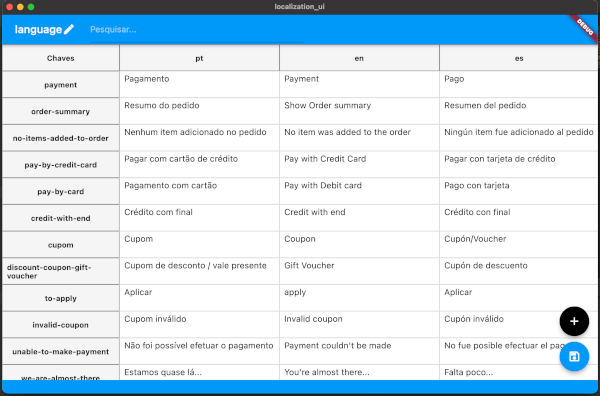
We have an application to help you configure your translation keys.
The project is also open-source, so be fine if you want to help it evolve!
Features and bugs
Localization package is constantly growing.
Let us know what you think of all this.
If you agree, give a Star in that repository representing that you are signing and consenting to the proposed standard.
Questions and Problems
The issues channel is open for questions, to report problems and suggestions, do not hesitate to use this communication channel.