Package selection guidance compiled from public package information, community data, and project usage.
LuaDardo is a Lua 5.3 virtual machine implemented in Dart, enabling seamless integration of Lua scripting within Dart applications. It allows developers to execute Lua code directly in Flutter and other Dart environments across multiple platforms. The package provides a lightweight, embeddable scripting solution ideal for extending application logic dynamically. With full support for Android, iOS, macOS, Windows, and Linux, LuaDardo offers cross-platform consistency and performance. Its design emphasizes compatibility with the Lua 5.3 standard, ensuring reliable behavior for scripts written in Lua.
Use cases
Embedding Lua scripts in Flutter apps
Dynamic game logic scripting
Extensible configuration systems
Runtime code evaluation
Plugin-based architecture
Key features
Lua 5.3 compatibility
Cross-platform support
Lightweight VM
Dart-native integration
Script execution from strings or files
Suitable for
Flutter developers needing scripting
Game development with dynamic behavior
Applications requiring plugin extensibility
Tools that need embedded scripting
Considerations
Requires understanding of Lua syntax
Limited to Lua 5.3 features
Performance depends on script complexity
No built-in debugging tools
Original README
Original README snapshot from the linked source repository. Visit the repository for the latest content.
LuaDardo
A Lua virtual machine written in Dart, which implements Lua5.3 version.
Example:
dependencies:lua_dardo:^0.0.3
import'package:lua_dardo/lua.dart';
voidmain(List<String> arguments) {
LuaState state = LuaState.newState();
state.openLibs();
state.loadString(r'''
a=10
while( a < 20 ) do
print("a value is", a)
a = a+1
end
''');
state.call(0, 0);
}
Usage
The LuaDardo library is compatible with most Lua C APIs. For the mutual call between Dart and Lua, please refer to the Lua C API guide.
Some simple examples:
LuaState state = LuaState.newState();
// Load the Lua standard library
state.openLibs();
state.loadString("print('hello')");
state.call(0, 0);
Dart calls Lua
Get Lua variables:
-- test.lua
a = 100
b = 120
Dart code:
LuaState ls = LuaState.newState();
ls.openLibs();
ls.doFile("test.lua");

// a push into the stack
ls.getGlobal("a");
if(ls.isNumber(-1)){
    var a = ls.toNumber(-1);
    print("a=$a");
}
// b push into the stack
ls.getGlobal("b");
if(ls.isNumber(-1)){
    var b = ls.toNumber(-1);
    print("b=$b");
}
ls.getGlobal("mytable");
ls.pushString("k1");
// Pop the key at the top of the stack, get the value of the key, and push the result onto the top of the stack
ls.getTable(-2);
if(ls.isInteger(-1)){
// Get the value of key k1var k1 = ls.toInteger(-1);
}
// Repeat
ls.pushString("k2");
ls.getTable(-2);
if(ls.isNumber(-1)){
var k2 = ls.toNumber(-1);
}
A simpler alternative: getField
    ls.getGlobal("mytable");
    ls.getField(-1, "k1");
    if(ls.isInteger(-1)){
      var k1 = ls.toInteger(-1);
    }
Call lua function:
-- test.lua

function myFunc()
    print("myFunc run")
end
The pCall method has three parameters. The first parameter indicates the number of parameters of the called Lua function, and the second parameter indicates the number of return values of the called Lua function.
Lua calls Dart
// Push value onto stack
ls.pushString("Alex");
// Set variable name
ls.setGlobal("name");
Lua:
-- Get global variable name
print(name) -- Alex
Define global table in Dart:
    // Create a table and push it onto the stack
    ls.newTable();
    // Push a key onto the stack
    ls.pushString("name");
    // Push the value onto the stack. Note that at this time the index of the table in the stack becomes -3
    ls.pushString("Alex");
    // Set the above key-value pair to the table, and pop up the key and value
    ls.setTable(-3);
    // Set the variable name to the table, and pop up the table
    ls.setGlobal("students");
Lua:
-- Equivalent to a table:students = {name="Alex"}
print(students.name)
Call Dart function:
import'package:lua_dardo/lua.dart';
import'dart:math';
// wrapper function must use this signature:int Function(LuaState ls)// the return is the number of returned valuesintrandomInt(LuaState ls) {
int max = ls.checkInteger(1);
ls.pop(1);
var random = Random();
var randVal = random.nextInt(max);
ls.pushInteger(randVal);
return1;
}
voidmain(List<String> arguments) {
LuaState state = LuaState.newState();
state.openLibs();
state.pushDartFunction(randomInt);
state.setGlobal('randomInt');
// execute the Lua script to test the randomInt function
state.loadString('''
rand_val = randomInt(10)
print('random value is '..rand_val)
''');
state.call(0, 0);
}
Some people are curious about how to access Lua tables in Dart. Here is a simple example:
  state.loadString('''
rand_val = randomInt(10,{ ["hello"] = "World", ["hello22"] = "World132414" })
print('random value is '..rand_val)
''');
intrandomInt(LuaState ls) {
int? max = ls.checkInteger(1);
ls.getField(2, "hello");
// This is a debugging method that looks at the stack
ls.printStack();
var hello = ls.toStr(-1);
print(hello);
ls.pop(1);
ls.getField(2, "hello22");
var hello22 = ls.toStr(-1);
print(hello22);
ls.pop(1);
var random = Random();
var randVal = random.nextInt(max!);
ls.pushInteger(randVal);
return1;
}
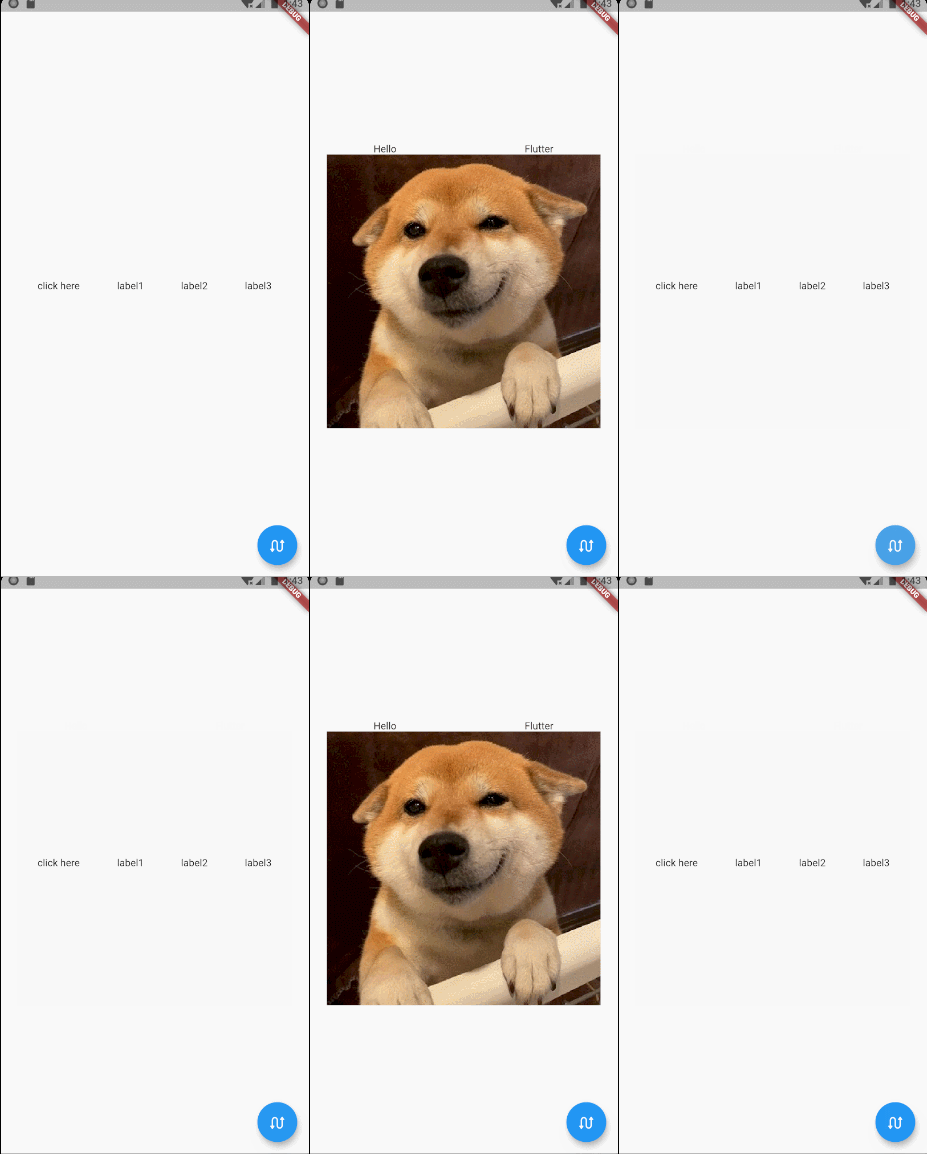
Try on Flutter
function getContent1()
    return Row:new({
        children={
            GestureDetector:new({
                onTap=function()
                    flutter.debugPrint("--------------onTap--------------")
                end,

                child=Text:new("click here")}),
            Text:new("label1"),
            Text:new("label2"),
            Text:new("label3"),
        },
        mainAxisAlign=MainAxisAlign.spaceEvenly,
    })
end

function getContent2()
    return Column:new({
        children={
            Row:new({
                children={Text:new("Hello"),Text:new("Flutter")},
                mainAxisAlign=MainAxisAlign.spaceAround
            }),
            Image:network('https://gitee.com/arcticfox1919/ImageHosting/raw/master/img/flutter_lua_test.png'
                ,{fit=BoxFit.cover})
        },
        mainAxisSize=MainAxisSize.min,
        crossAxisAlign=CrossAxisAlign.center
    })
end