Search packages, repositories and app categories

Package detailsv0.1.5

media_gallery

A Flutter plugin that lists native gallery items.

30-day downloads
36
Likes
31
Pub points
30

Install package

flutter pub add media_gallery

Package Overview

Package selection guidance compiled from public package information, community data, and project usage.

The media_gallery package is a Flutter plugin that enables access to native device gallery items, allowing users to browse and select images and videos from their device's local media storage. It provides a simple interface to retrieve media files with metadata such as file paths, timestamps, and dimensions. Designed for seamless integration with Flutter apps, it supports platform-specific implementations on Android and iOS. The plugin is ideal for applications requiring media selection features like photo sharing, profile picture upload, or content creation tools. It relies on native APIs for performance and compatibility.

Use cases

  • Image and video selection from device gallery
  • Profile picture upload workflows
  • Media-rich app content creation
  • Photo album browsing in Flutter apps
  • Integrating native media picker into Flutter UI

Key features

  • Access to native device media files
  • Supports both images and videos
  • Retrieves media metadata (path, timestamp, size)
  • Cross-platform compatibility (Android/iOS)
  • Simple API for listing and filtering media

Suitable for

  • Flutter apps needing media selection
  • Social media or photo-sharing platforms
  • Content creation tools
  • Apps with user-generated media uploads
  • Developers building custom media pickers

Considerations

  • Requires appropriate permissions (camera and storage)
  • Limited to native gallery; no cloud media support
  • Platform-specific behavior may vary
  • No built-in UI components; requires custom implementation
  • May require additional handling for large media libraries

Original README

Original README snapshot from the linked source repository. Visit the repository for the latest content.

Media Gallery plugin for Flutter

pub package

A Flutter plugin that lists native gallery items.

Installation

First, add media_gallery as a dependency in your pubspec.yaml file.

iOS

Add the following keys to your Info.plist file, located in <project root>/ios/Runner/Info.plist:

<key>NSPhotoLibraryUsageDescription</key>
<string>Example usage description</string>
Android

Add the following permissions to your AndroidManifest.xml, located in <project root>/android/app/src/main/AndroidManifest.xml:

<uses-permission android:name="android.permission.WRITE_EXTERNAL_STORAGE" />
<uses-permission android:name="android.permission.READ_EXTERNAL_STORAGE" />

You should also manage those permissions (for example thanks to the permission_handler plugin). You can see an example for more details.

Usage
Listing media collections
final List<MediaCollection> collections = await MediaGallery.listMediaCollections(
    mediaTypes: [MediaType.image, MediaType.video],
);
Listing medias in a collection
final MediaPage imagePage = await collection.getMedias(
    mediaType: MediaType.image,
    take: 500,
);
final MediaPage videoPage = await collection.getMedias(
    mediaType: MediaType.video,
    take: 500,
);
final List<Media> allMedias = [
    ...imageRange.items,
    ...videoRange.items,
]
..sort((x, y) => y.creationDate.compareTo(x.creationDate));
Loading more medias in a collection
if (!imagePage.isLast) {
    final nextImagePage = await imagePage.nextPage();
    // ...
}
Getting a file
final File file = await media.getFile();
Getting thumbnail data
final List<int> data = await media.getThumbnail();
Displaying thumbnails

MediaThumbnailProvider, MediaCollectionThumbnailProvider are available to display thumbnail images (here with the help of transparent_image) :

FadeInImage(
    fit: BoxFit.cover,
    placeholder: MemoryImage(kTransparentImage),
    image: MediaThumbnailProvider(
        media: media,
    ),
)
Displaying medias

You can use MediaImageProvider to display an image (here with the help of transparent_image):

FadeInImage(
    fit: BoxFit.cover,
    placeholder: MemoryImage(kTransparentImage),
    image: MediaImageProvider(
        media: media,
    ),
)

To display a video, you can use video_player.

Image/Video picker

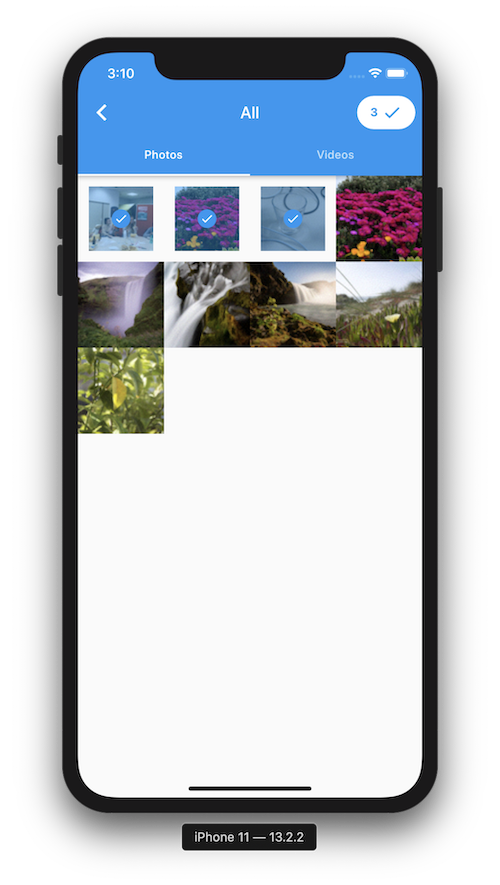
picker

You can build a gallery picker easily with this package.

See the example for more details.

Categories

Source repository

Projects using this package