Search packages, repositories and app categories

multi_image_layout cover
Package detailsv2.0.0

multi_image_layout

Flexible gallery package for displaying multiple network and asset images in adaptive layouts.

AndroidiOS
30-day downloads
122
Likes
61
Pub points
150

Install package

flutter pub add multi_image_layout

Package Overview

Package selection guidance compiled from public package information, community data, and project usage.

A flexible gallery package for displaying multiple network and asset images in adaptive layouts. It supports dynamic grid arrangements that adjust based on the number of images, ensuring optimal visual presentation across devices. Ideal for social media apps or image-sharing platforms, it efficiently handles both remote and local images with smooth rendering and responsive design. The package is lightweight and integrates seamlessly into Flutter projects.

Use cases

  • Social media feed displays
  • Image galleries in apps
  • User profile photo grids
  • Multi-image sharing features
  • Responsive image layout management

Key features

  • Adaptive grid layouts
  • Support for network and asset images
  • Smooth image loading
  • Responsive design
  • Customizable spacing and alignment

Suitable for

  • Developers building image-heavy apps
  • Social media applications
  • Photo sharing platforms
  • Apps requiring dynamic image grids
  • Flutter beginners exploring image display

Considerations

  • Requires proper error handling for broken image URLs
  • May need additional caching for performance with many images
  • Limited customization beyond layout structure
  • Not optimized for very large image sets without pagination

Original README

Original README snapshot from the linked source repository. Visit the repository for the latest content.

multi_image_layout

Flexible Flutter layouts for mixed media grids and fullscreen viewing.

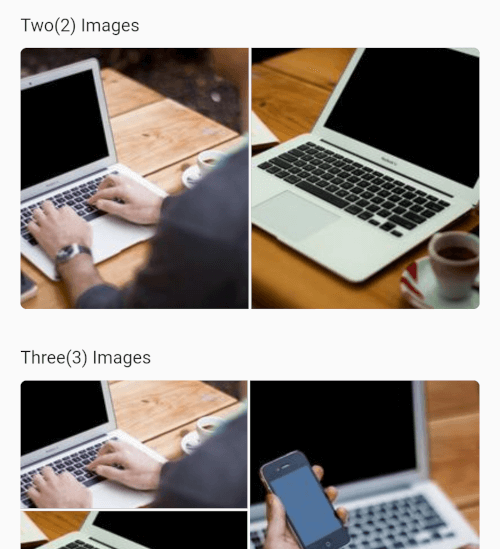
multi_image_layout lets you render single or multiple media items in adaptive layouts, then open them in a fullscreen viewer with captions, save support, and media-specific controls.

Screenshot 2026-03-22 at 23 42 57

Screenshot_20250430-162040

Features

  • Adaptive layouts for 1, 2, 3, 4, and 4+ items
  • Mixed image and video support in the same grid
  • Fullscreen media viewer with swipe navigation
  • Zoomable images
  • Zoomable fullscreen videos
  • Video autoplay with autoPlay: true by default
  • Video play/pause, mute, progress bar, elapsed time, and total duration
  • Shimmer loading placeholders for network images
  • Save support for images and videos
  • Video cache warm-up for faster repeat playback
  • Optional captions with expand/collapse support

Getting Started

Add the package to your project:

dependencies:
  multi_image_layout: ^1.0.0

Import it:

import 'package:multi_image_layout/multi_image_layout.dart';
iOS

If you use the save action, add these keys to ios/Runner/Info.plist:

<key>NSPhotoLibraryAddUsageDescription</key>
<string>This app saves images and videos to your photo library.</string>
<key>NSPhotoLibraryUsageDescription</key>
<string>This app accesses your photo library to save and manage media.</string>

Without these keys, iOS may terminate the app when save is triggered.

If you plan to load remote media, prefer https URLs. If you need http sources, configure App Transport Security for your app.

Android

If you load remote images or videos, make sure your app has internet access:

<uses-permission android:name="android.permission.INTERNET" />

If you use the save action, request the appropriate storage or media permissions for your target Android version. For older Android versions, that may include:

<uses-permission android:name="android.permission.WRITE_EXTERNAL_STORAGE" />

And, where needed:

<application android:requestLegacyExternalStorage="true" ...>

Permission handling is app-specific, so you should request it from your app layer before calling the save action. A package like permission_handler can be used for that flow.

Usage

Images only
MultiImageViewer(
  images: const [
    ImageModel(
      imageUrl:
          "https://4.img-dpreview.com/files/p/TS250x250~sample_galleries/3800753625/4684313123.jpg",
      caption: "Caption 1",
    ),
    ImageModel(
      imageUrl:
          "https://3.img-dpreview.com/files/p/TS250x250~sample_galleries/3800753625/8719688791.jpg",
      caption: "Caption 2",
    ),
  ],
);
Mixed Image and Video
MultiImageViewer(
  autoPlay: true,
  images: const [
    ImageModel(
      imageUrl:
          "https://4.img-dpreview.com/files/p/TS250x250~sample_galleries/3800753625/4684313123.jpg",
      caption: "Image caption",
    ),
    ImageModel.video(
      videoUrl:
          "https://flutter.github.io/assets-for-api-docs/assets/videos/butterfly.mp4",
      caption: "Video caption",
    ),
    ImageModel(
      imageUrl:
          "https://3.img-dpreview.com/files/p/TS250x250~sample_galleries/3800753625/8719688791.jpg",
      caption: "Another image caption",
    ),
  ],
  height: 220,
);
Disable Video Autoplay
MultiImageViewer(
  autoPlay: false,
  images: const [
    ImageModel.video(
      videoUrl:
          "https://flutter.github.io/assets-for-api-docs/assets/videos/butterfly.mp4",
      caption: "Tap to open and play",
    ),
  ],
);

API Notes

ImageModel

Use ImageModel(...) for images:

const ImageModel(
  imageUrl: 'https://example.com/image.jpg',
  caption: 'An image',
)

Use ImageModel.video(...) for videos:

const ImageModel.video(
  videoUrl: 'https://example.com/video.mp4',
  caption: 'A video',
)
MultiImageViewer

Common parameters:

  • images: media items to render
  • height: layout height
  • width: optional layout width
  • gap: spacing between tiles
  • radius: edge corner radius
  • enableSave: show or hide the save action in fullscreen
  • autoPlay: autoplay videos in the grid and fullscreen viewer
  • networkImageHeaders: headers used for remote image and video requests
  • textStyle: style for the +N overlay

Fullscreen Video Behavior

When a video is opened fullscreen, the viewer includes:

  • play/pause
  • mute/unmute
  • elapsed time
  • total duration
  • draggable seek bar
  • zoom support

Network videos are also warmed into cache to improve repeat playback speed.

Notes

  • The first playback of a remote video can still take time because the player must initialize and buffer the remote media.
  • Cached playback is most noticeable on repeat opens of the same video.
  • Save behavior depends on platform permissions being granted by the host app.

Contributing

Contributions, issues, and feature requests are welcome.

Feel free to check the issues page.

License

This project is MIT licensed.

Categories

Dependencies

Source repository

Projects using this package

No data available yet.