Search packages, repositories and app categories

multiple_search_selection cover
Package detailsv3.0.0

multiple_search_selection

A highly customizable multiple selection widget with fuzzy search functionality.

AndroidiOSWebmacOSWindowsLinux
30-day downloads
1.4K
Likes
73
Pub points
150

Install package

flutter pub add multiple_search_selection

Package Overview

Package selection guidance compiled from public package information, community data, and project usage.

A highly customizable multiple selection widget that includes fuzzy search functionality, enabling users to efficiently select multiple items from a large dataset. It supports real-time filtering with intelligent matching, making it ideal for forms, tags, or filters where users need to pick several options. The widget is designed for smooth performance across platforms and offers extensive customization for styling and behavior. Built with Flutter, it integrates seamlessly into apps targeting Android, iOS, Web, macOS, Windows, and Linux.

Use cases

  • Form inputs with multiple choices
  • Tag selection interfaces
  • Filtering systems with dynamic search
  • User preference selection
  • Dynamic dropdowns with search
  • Multi-select in admin panels

Key features

  • Fuzzy search for flexible matching
  • Customizable UI and styling
  • Support for large datasets
  • Cross-platform compatibility
  • Real-time search filtering
  • Multiple selection with clear feedback

Suitable for

  • Developers building complex form components
  • Apps requiring efficient multi-item selection
  • Projects needing intelligent search in dropdowns
  • Teams prioritizing cross-platform consistency
  • Users wanting a lightweight yet powerful selection widget

Considerations

  • May require tuning for very large data sets
  • Customization options can increase initial setup complexity
  • Performance depends on item rendering optimization
  • Limited built-in validation features
  • Not suitable for single-selection use cases

Original README

Original README snapshot from the linked source repository. Visit the repository for the latest content.

Version Version

Show some love by dropping a ⭐ at GitHub
HTML tutorial

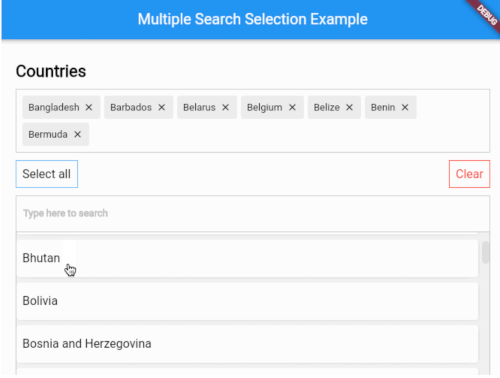
A highly customizable multiple selection widget with fuzzy search functionality
// Use this controller to adjust the behaviour of the widget
// 1. getAllItems
// 2. getPickedItems
// 3. searchItems
// 4. clearSearchField
// 5. clearAllPickedItems
// 6. selectAllItems
// 7. minCharsToShowItems
// 8. allowDuplicateSelection
// 9. isSelectable
MultipleSearchController controller = MultipleSearchController();
MultipleSearchSelection<Country>(
  // The TextField that is used to search items.
  //
  // You can use this to customize the search field.
  // The `onChanged` of the `searchField` is used internally to search items,
  // so you can use the `onSearchChanged` callback to get the search query.
  searchField: TextField(
    decoration: InputDecoration(
      hintText: 'Search countries',
      border: OutlineInputBorder(
        borderRadius: BorderRadius.circular(6),
        ),
      ),
    ),
  onSearchChanged: (text) {
    print('Text is $text');
  },
  items: countries, // List<Country>
  fieldToCheck: (c) {
    return c.name; // String
  },
  itemBuilder: (country,index,isPicked) {
    return Padding(
      padding: const EdgeInsets.all(6.0),
      child: Container(
        decoration: BoxDecoration(
          borderRadius: BorderRadius.circular(6),
          color: Colors.white,
        ),
        child: Padding(
          padding: const EdgeInsets.symmetric(
            vertical: 20.0,
            horizontal: 12,
          ),
          child: Text(country.name),
        ),
      ),
    );
  },
  pickedItemBuilder: (country) {
    return Container(
      decoration: BoxDecoration(
        color: Colors.white,
        border: Border.all(color: Colors.grey[400]!),
      ),
      child: Padding(
        padding: const EdgeInsets.all(8),
        child: Text(country.name),
      ),
    );
  },
  onTapShowedItem: () {},
  onPickedChange: (items) {},
  onItemAdded: (item) {},
  onItemRemoved: (item) {},
  sortShowedItems: true,
  sortPickedItems: true,
  fuzzySearch: FuzzySearch.jaro,
  itemsVisibility: ShowedItemsVisibility.alwaysOn,
  title: Text(
    'Countries',
    style: kStyleDefault.copyWith(
      fontSize: 22,
      fontWeight: FontWeight.bold,
    ),
  ),
  showSelectAllButton: true,
  maximumShowItemsHeight: 200,
)
MultipleSearchSelection<T>.creatable

MultipleSearchSelection<T>.creatable constructor can now create new item when search result does not return any results. It takes a new required parameter, createOptions e.g :

// [T] here is [Country]
createOptions: CreateOptions<Country>(
    // You need to create and return the item you want to add since [T] is not always [String].
    create: (text) {
        return Country(name: text, iso: text);
    },
    // A callback when the item is succesfully created.
    onCreated: (c) => print('Country ${c.name} created'),
    // Create item Widget that appears instead of no results.
    createBuilder: (text) => Align(
        alignment: Alignment.centerLeft,
            child: Padding(
                padding: const EdgeInsets.all(8.0),
                child: Text('Create "$text"'),
            ),
        ),
    // Whether you want to pick the newly created item or just add it to your list. Defaults to false.
    pickCreated: true,
),
Creatable
Showed items visibility

itemsVisibility behaviour for the default & creatable constructors

ShowedItemsVisibility.alwaysOn ShowedItemsVisibility.onType ShowedItemsVisibility.toggle
Always On On type Toggle

Issues / Features

Found a bug or want a new feature? Open an issue in the Github repository of the project.

Categories

Dependencies

Dependency list 1 items

Source repository

Projects using this package

No data available yet.